What Information Should Be Included on a Payslip?
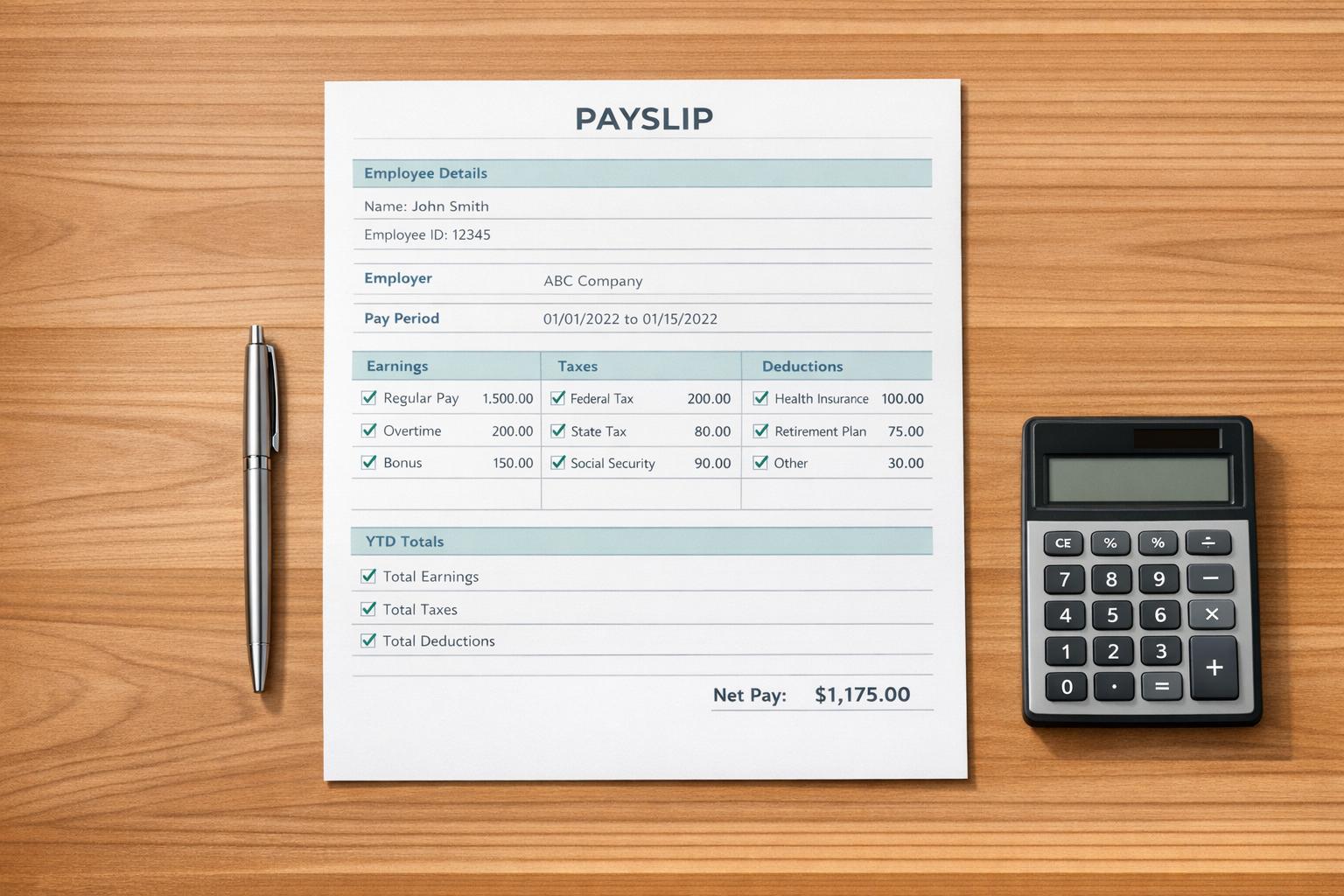
A payslip, also known as a pay stub, is a document that breaks down an employee's earnings, deductions, and net pay for a specific pay period. While federal law doesn’t mandate the distribution of payslips, most states require employers to provide them. Here’s what a payslip should include to ensure clarity, compliance, and transparency:
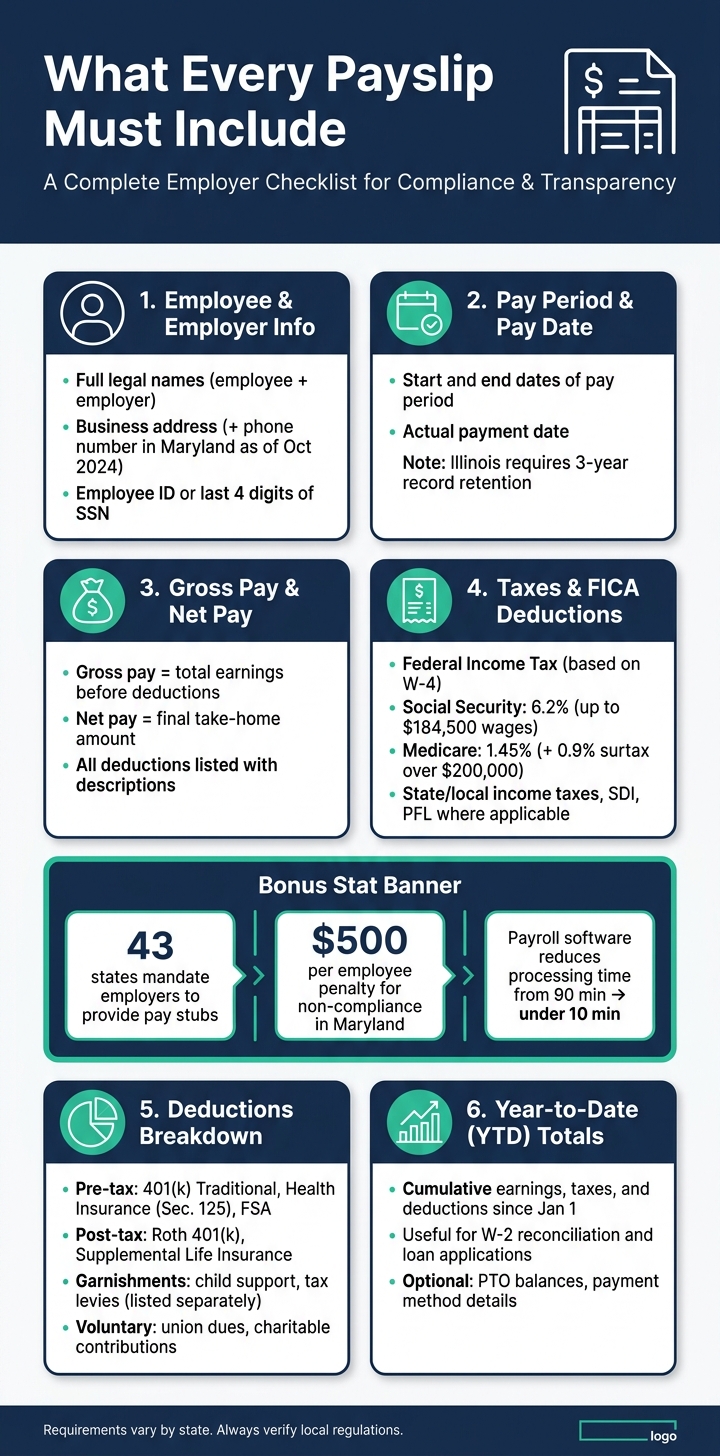
- Employee and Employer Information: Full legal names, business name, and address. Some states, like Maryland, require additional details (e.g., phone numbers starting in 2024).
- Pay Period and Pay Date: Clearly indicate the start and end dates of the pay period and the date of payment.
- Gross Pay and Net Pay: Show total earnings before deductions and the take-home amount after taxes and deductions.
- Deductions and Taxes: Itemize all deductions (e.g., federal and state taxes, benefits, garnishments) with descriptions. Include Social Security (6.2%) and Medicare (1.45%) taxes.
- Year-to-Date Totals: Summarize cumulative earnings, taxes, and deductions for the year.
- Additional Details: For hourly workers, list hours worked and rates. For salaried employees, show how pay is calculated. Include overtime, bonuses, and reimbursements as separate lines.
Providing detailed and accurate payslips not only builds trust but also helps businesses avoid penalties and legal risks. Tools like payroll software or learning how to generate a US pay stub simplify this process, ensuring compliance with state-specific requirements and reducing errors.
What Every Payslip Must Include: Complete Checklist for Employers
What a Payslip Must Include
Federal laws don’t dictate what must appear on a payslip, leaving it up to individual states to establish specific requirements. Using a pay stub generator for the United States to ensure payslips are accurate and complete helps avoid disputes and potential penalties for both employees and employers.
Employee and Employer Information
A payslip should clearly identify both the employee and the employer. For employees, include their full legal name and an identifier, such as an employee ID or the last four digits of their Social Security Number (SSN). For the employer, the payslip must list the legal business name and business address.
Some states have stricter rules. Starting October 1, 2024, Maryland requires employers to also include a telephone number alongside the company name and address. Failing to comply could result in penalties of up to $500 per employee.
"Remote employees follow the pay stub law of the state where they work, not where the employer is headquartered." - Lift HCM
This means that if your workforce is spread across multiple states, you’ll need to ensure each remote employee’s payslip aligns with the laws of their specific location.
Additionally, payslips must detail the pay period and pay date to maintain clarity.
Pay Period and Pay Date
A payslip should include both the pay period dates (e.g., May 1–May 15, 2026) and the pay date. These dates are not interchangeable, and both are essential for compliance.
States such as Maryland, Minnesota, and Illinois mandate that pay period start and end dates appear on payslips. Oregon takes it further: starting January 1, 2026, employers must provide new hires with a written explanation of the pay period structure during onboarding. Meanwhile, Illinois requires employers to keep copies of all pay stubs for three years, even after an employee leaves.
Including these dates ensures transparency when calculating gross and net pay amounts.
Gross Pay and Net Pay
Payslips must clearly show gross pay (total earnings before deductions) and net pay (the final amount employees take home). To avoid confusion, list each deduction along with its amount and description. For example, Maryland (starting October 2024) and Virginia require payslips to specify each deduction and its purpose so employees can verify how their pay was calculated.
Breaking down the path from gross pay to net pay is key. Here’s an example of how it could look:
| Item | Description | Impact on Pay |
|---|---|---|
| Gross Pay | Total earnings (base salary + bonuses) | Starting figure |
| Pre-Tax Deductions | 401(k), health insurance, HSA | Reduces taxable income |
| Taxes | Federal, state, local, FICA | Subtracted from taxable wages |
| After-Tax Deductions | Garnishments, Roth 401(k), union dues | Subtracted from remaining total |
| Net Pay | Final amount received | Take-home pay |
This level of detail ensures employees can easily verify their pay and catch any discrepancies early, reducing the chance of misunderstandings or errors down the line.
sbb-itb-b1c1928
How to Break Down Employee Earnings
After presenting gross pay and net pay, the next step is to show employees exactly how their gross pay is calculated. Breaking down each earnings component separately ensures transparency, provides clarity, and creates a clear audit trail. This approach also helps maintain compliance and reduces the risk of common payroll mistakes. Let’s look at how to present regular wages and additional earnings effectively.
Regular Wages or Salary
For hourly employees, include the total hours worked, the hourly rate, and the resulting amount. For instance, 80 hours × $22.50/hr = $1,800.00. This format allows employees to quickly verify their pay.
For salaried employees, the calculation is more straightforward: divide the annual salary by the number of pay periods. For example, an employee with an annual salary of $60,000 on a biweekly pay schedule would have $60,000 ÷ 26 = $2,307.69 as their gross pay for that period. Displaying this calculation eliminates confusion and ensures employees understand how their pay is determined. Once base pay is clear, additional earnings should be clearly itemized.
Overtime and Additional Earnings
Each variable pay component should appear on its own separate line rather than being grouped into a single gross pay figure. This includes overtime, bonuses, commissions, shift premiums, and reimbursements, as these items often have different tax treatments.
Here’s an example of how to display and calculate variable earnings:
| Earnings Category | Display Format | Calculation Method |
|---|---|---|
| Overtime | OT hours + premium rate (1.5x or 2x) | OT Hours × (Rate × 1.5 or 2.0) |
| Bonuses/Commissions | Separate line per type | Flat amount or percentage-based |
| Allowances | Itemized (e.g., Meal, Transport) | Fixed per-period amount |
| Reimbursements | Separate line, marked non-taxable | Actual expense cost |
Use clear and specific labels like "Performance Bonus" or "Sales Commission" instead of generic terms. For overtime, include the calculation so employees can verify the details. Non-taxable items, such as reimbursements, should be kept separate from taxable earnings to avoid errors in tax calculations.
It’s worth noting that 43 states currently mandate employers to provide some form of pay stub. This means itemizing earnings isn’t just a best practice - it’s often a legal requirement.
Deductions, Taxes, and Contributions
After outlining gross earnings, it's important to clearly list all deductions and their purposes. This transparency not only builds trust but also ensures compliance with federal, state, and local payroll laws.
Required Tax Deductions
Every payslip must include taxes withheld from an employee's gross pay. At the federal level, these include Federal Income Tax (FIT), Social Security, and Medicare - collectively referred to as FICA taxes. For 2026, the Social Security tax rate is 6.2% for both employees and employers, applied to the first $184,500 of annual wages. Medicare is withheld at 1.45%, with no wage cap, plus an additional 0.9% surtax on individual earnings exceeding $200,000.
Federal Income Tax amounts are based on each employee's Form W-4, which outlines their filing status and any adjustments. For bonuses and other supplemental wages, the flat federal withholding rate is 22%, or 37% for total supplemental wages exceeding $1 million in a year. Additionally, many states require income tax, as well as deductions for State Disability Insurance (SDI) or Paid Family Leave (PFL). Employees in states like Alaska, Pennsylvania, and New Jersey may also see State Unemployment Insurance (SUI) deductions.
To safeguard sensitive information, use an IRS Truncated Taxpayer Identification Number (TTIN) on payslips. This method displays only the last four digits of an employee's Social Security Number.
Benefit Deductions and Employer Contributions
Benefit deductions fall into two categories that affect taxable income: pre-tax and post-tax. Pre-tax deductions - like traditional 401(k) contributions, health insurance premiums under a Section 125 cafeteria plan, and Flexible Spending Account (FSA) contributions - reduce taxable income before taxes are applied. Post-tax deductions, such as Roth 401(k) contributions or supplemental life insurance, are taken out after taxes and do not reduce taxable income. Clearly distinguishing between these two types reinforces pay transparency and helps employees understand how their deductions impact their take-home pay.
| Deduction Type | Reduces Federal Taxable Wages | Affects FICA Calculation |
|---|---|---|
| 401(k) Traditional Contribution | Yes | No |
| Section 125 Health Premium | Yes | Yes |
| Roth 401(k) Contribution | No | No |
| Flexible Spending Account (FSA) | Yes | Yes |
| Supplemental Life Insurance (>$50k) | No | No |
While payslips typically show only the employee's share of deductions, including employer contributions - like a 401(k) match - can provide employees with a fuller picture of their total compensation. Each benefit deduction should appear as a separate line item, showing both the current-period amount and the year-to-date (YTD) total.
Other Deductions and Garnishments
Some employees may have additional deductions beyond taxes and benefits. For example, wage garnishments - such as child support, alimony, tax levies, or student loan repayments - are legally required and must be listed separately. These deductions are calculated based on the employee's disposable earnings, as defined by the Consumer Credit Protection Act (CCPA), which also sets limits on how much can be withheld.
Voluntary deductions, like union dues, charitable contributions, or uniform fees, are taken post-tax and should be clearly labeled to differentiate them from mandatory withholdings. The golden rule for all deductions is simple: list each deduction as its own line item. Grouping deductions together can obscure important details, making it harder for employees to verify their pay and increasing compliance risks.
"Payroll deductions are portions of an employee's pay that are subtracted from their total compensation to make required payments, such as taxes, and voluntary investments." - Paylocity Editorial Team
This structured approach lays the groundwork for how payroll software simplifies payslip management.
Optional Fields That Add Clarity
Adding extra details to a payslip can make it easier for employees to understand their complete compensation package.
Year-to-Date Totals
Year-to-date (YTD) totals show cumulative earnings, taxes, and deductions from January 1 through the current pay period. These figures serve multiple purposes. For instance, employees can use their YTD gross earnings as proof of income when applying for loans or mortgages. They also help employees track their progress toward annual limits like Social Security wage caps or retirement contribution thresholds. If the numbers don’t add up as expected, YTD totals can highlight discrepancies. Plus, they make it easier to reconcile the last payslip of the year with a W-2, minimizing confusion during tax season.
Paid Time Off (PTO) Balances
PTO balances - showing how much time off has been accrued, used, and remains - can cut down on routine questions to HR. Displaying this information directly on the payslip gives employees an immediate way to check their available time off.
"For employees, [payslips] offer clarity regarding earnings and deductions, aiding in financial planning and tax filing." - Sureka, Zoho
Including PTO balances also helps employees plan their time off better, ensuring they avoid unpaid leave.
Payment Method Details
Specifying how pay was issued - whether by direct deposit, check, or cash - removes ambiguity, especially for businesses that use multiple payment methods. Adding details like a bank transfer reference number or check number links the payslip to the payment transaction, creating a clear record for both employees and employers.
How Payroll Software Makes Payslip Management Easier
Automation and Error Reduction
Creating payslips manually using tools like Excel or Word can be a tedious process prone to mistakes. A single miscalculation or missing detail can lead to compliance headaches and damage employee trust. Payroll software steps in to handle these calculations automatically, significantly reducing errors.
The time savings alone are hard to ignore. Processing payroll manually for a team of 10 employees can take anywhere from 45 to 90 minutes per cycle. With payroll software, that same task can be completed in under 10 minutes. And as your team grows, the efficiency scales effortlessly.
Another major advantage is automatic tax updates. Payroll software ensures that tax rates are always current, so your payslips reflect the latest figures. This automation not only boosts accuracy but also keeps your business compliant with ever-changing regulations.
Customization and Compliance with CleverSlip

Payroll compliance requirements vary widely across states. For example, California mandates itemized payslips with nine specific data points, while Texas has no state-level requirements for payslips. CleverSlip simplifies this complexity by automatically including the correct fields for all 50 states, ensuring compliance no matter where your employees are based.
CleverSlip also takes care of federal deductions with pre-configured FICA fields, such as Social Security (6.2%) and Medicare (1.45%). For companies with international teams, it offers templates for over 20 countries, each tailored with local deductions and required fields. Pricing starts at $0/month for small teams (up to 10 employees, 50 payslips/month), with paid plans beginning at $9/month for larger organizations. These features make it easier to manage compliance while offering flexibility for businesses of all sizes.
Employee Self-Service Access
Distributing payslips manually creates extra work for HR teams. CleverSlip’s employee self-service portal, available on Starter, Pro, and Business plans, solves this by giving employees direct access to their payslip history. This means employees can retrieve their own records - whether they need past payslips or year-to-date figures - without having to go through HR.
For employers, this feature provides a searchable, organized record of every payslip issued. It eliminates the hassle of maintaining manual records and reduces time spent on administrative tasks, freeing up HR to focus on other priorities.
Conclusion: Key Takeaways for Employers
Payslips aren't just paperwork - they're legal records, trust-builders, and essential documents for things like loan applications and tax filings. Getting them right isn't optional; it's a must.
Here’s what every payslip should include: employer and employee details, pay period dates, gross and net pay, FICA deductions (Social Security at 6.2% and Medicare at 1.45%), federal and state income taxes, pre-tax and post-tax deductions, and year-to-date totals. Even in states like Texas, where the rules are minimal, issuing detailed payslips is a smart move. It not only protects your business in case of disputes but also sets the stage for adopting automated solutions to reduce errors.
Speaking of errors, small mistakes can snowball into major compliance headaches if you’re not conducting regular audits.
For businesses managing payroll across multiple states or countries, simplifying the process is key. Tools like CleverSlip can take the hassle out of the equation. With features like pre-configured fields for all 50 states, automatic FICA calculations, and templates for over 20 countries, it keeps you compliant without the manual tracking. Plus, with plans starting at $0/month for small teams, it’s an option that fits businesses of all sizes.
FAQs
Which state’s payslip rules apply for remote employees?
Employers need to follow the pay stub requirements of the state where their remote employees actually work - not the state where the company is based. This means businesses must carefully adhere to the specific rules of the employee's location to stay within legal boundaries.
What’s the difference between pre-tax and post-tax deductions on a payslip?
Pre-tax deductions are amounts taken from your gross pay before taxes are calculated. This reduces your taxable income, which can lower the amount of income tax you owe. Common examples include contributions to a 401(k) retirement plan and payments for health insurance premiums.
On the other hand, post-tax deductions are taken after taxes have already been applied to your paycheck. These don’t impact your taxable income. Examples of post-tax deductions include Roth 401(k) contributions, wage garnishments, and union dues. While pre-tax deductions help lower your tax burden, post-tax deductions come directly out of your net pay.
How can I spot a payroll error using year-to-date (YTD) totals?
To catch payroll mistakes, compare the Year-to-Date (YTD) figures on your payslip with your personal records. Make sure the totals for gross pay, deductions, and net pay match what you’ve earned and what you expect to be withheld.
Pay close attention to discrepancies, such as taxes exceeding annual thresholds - for instance, Social Security taxes should not surpass $176,100. By reviewing your YTD totals regularly, you can identify problems like incorrect tax withholdings or duplicate deductions before they become bigger issues.
Payroll, simplified
Create structured payslip PDFs in minutes.
Build country-specific payslip documents, deliver them instantly, and keep a searchable history for audits and employee requests.
Start free