
Best Payroll Features for Small to Medium Businesses
If payroll taxes are late, penalties can start at 2% and go up to 15%. So if I’m picking payroll software for an SMB, I’d focus on one thing first: which tool cuts my biggest payroll risk.
Here’s the short version: full-service payroll tools like Gusto, QuickBooks Payroll, ADP RUN, Paychex Flex, and Rippling handle payroll runs, tax filing, direct deposit, and employee self-service. CleverSlip does not. It’s mainly for pay stub creation and delivery, so I’d only use it if payroll and tax filing already happen somewhere else.
If I were comparing these tools fast, I’d look at:
- Payroll automation for weekly, biweekly, or semimonthly runs
- Federal, state, and local tax filing
- Forms like 941, 940, W-2, and 1099
- Direct deposit and employee self-service
- Time tracking and benefits deduction sync
- Multi-state support for remote teams
- Reporting and audit trails
More than 50% of small businesses now use payroll software instead of manual payroll. That makes sense. Once mistakes start, they often keep piling up.
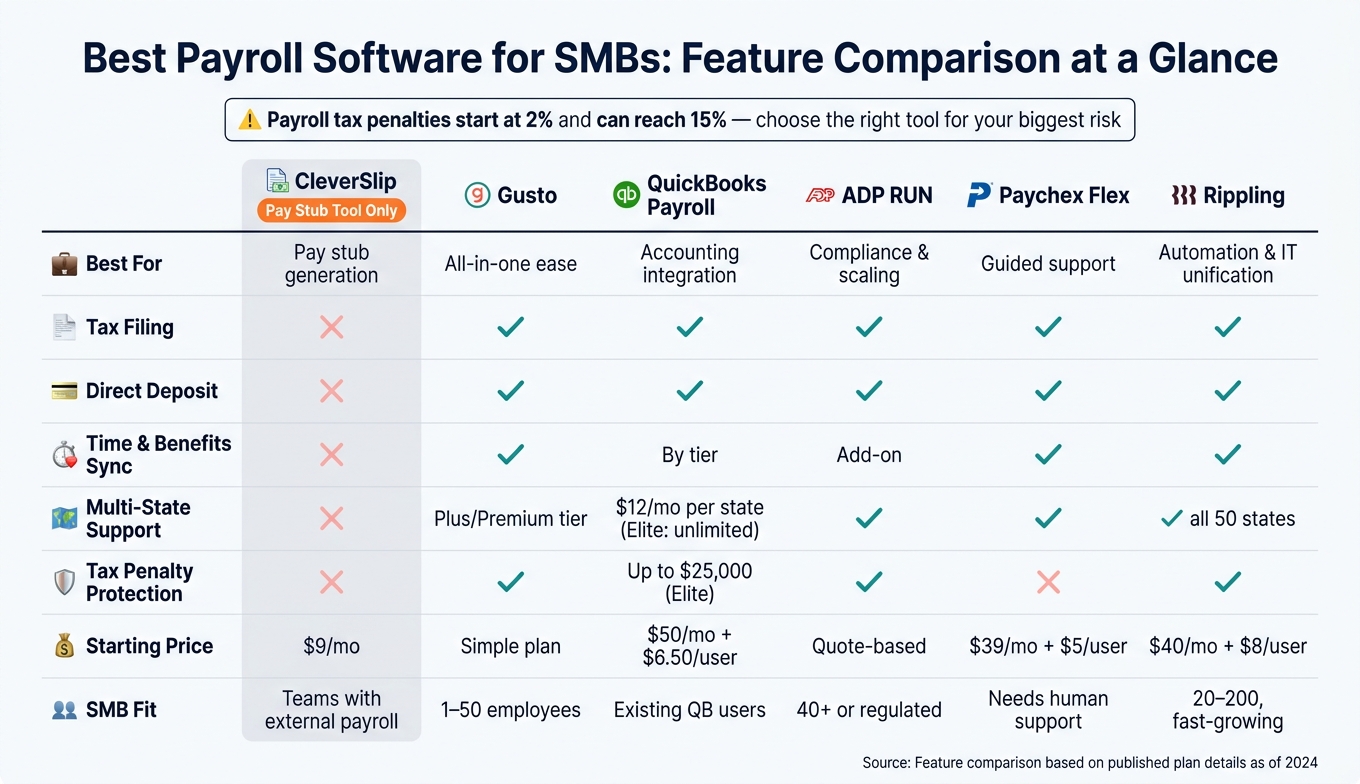
Best Payroll Software for SMBs: Feature Comparison at a Glance
CPA Shares: The Best Payroll Software's in 2026
sbb-itb-b1c1928
Quick Comparison
| Tool | Best use | Tax filing | Direct deposit | Time/benefits sync | Best fit |
|---|---|---|---|---|---|
| CleverSlip | Pay stub generation | No | No | No | Teams using another payroll system |
| Gusto | Simple all-in-one payroll | Yes | Yes | Yes | Small teams, single-state or light multi-state use |
| QuickBooks Payroll | Payroll with QuickBooks Online | Yes | Yes | Yes, by tier | Businesses already on QuickBooks |
| ADP RUN | Compliance-heavy payroll | Yes | Yes | Yes, with add-ons | Multi-state or rules-heavy teams |
| Paychex Flex | Payroll with guided support | Yes | Yes | Yes | SMBs wanting more hands-on help |
| Rippling | Payroll tied to HR and IT | Yes | Yes | Yes | Fast-growing, multi-state teams |
So my takeaway is simple: don’t choose by brand name first. Choose by the feature you can’t afford to miss - tax filing, multi-state support, deductions, reporting, or pay stub access.
1. CleverSlip
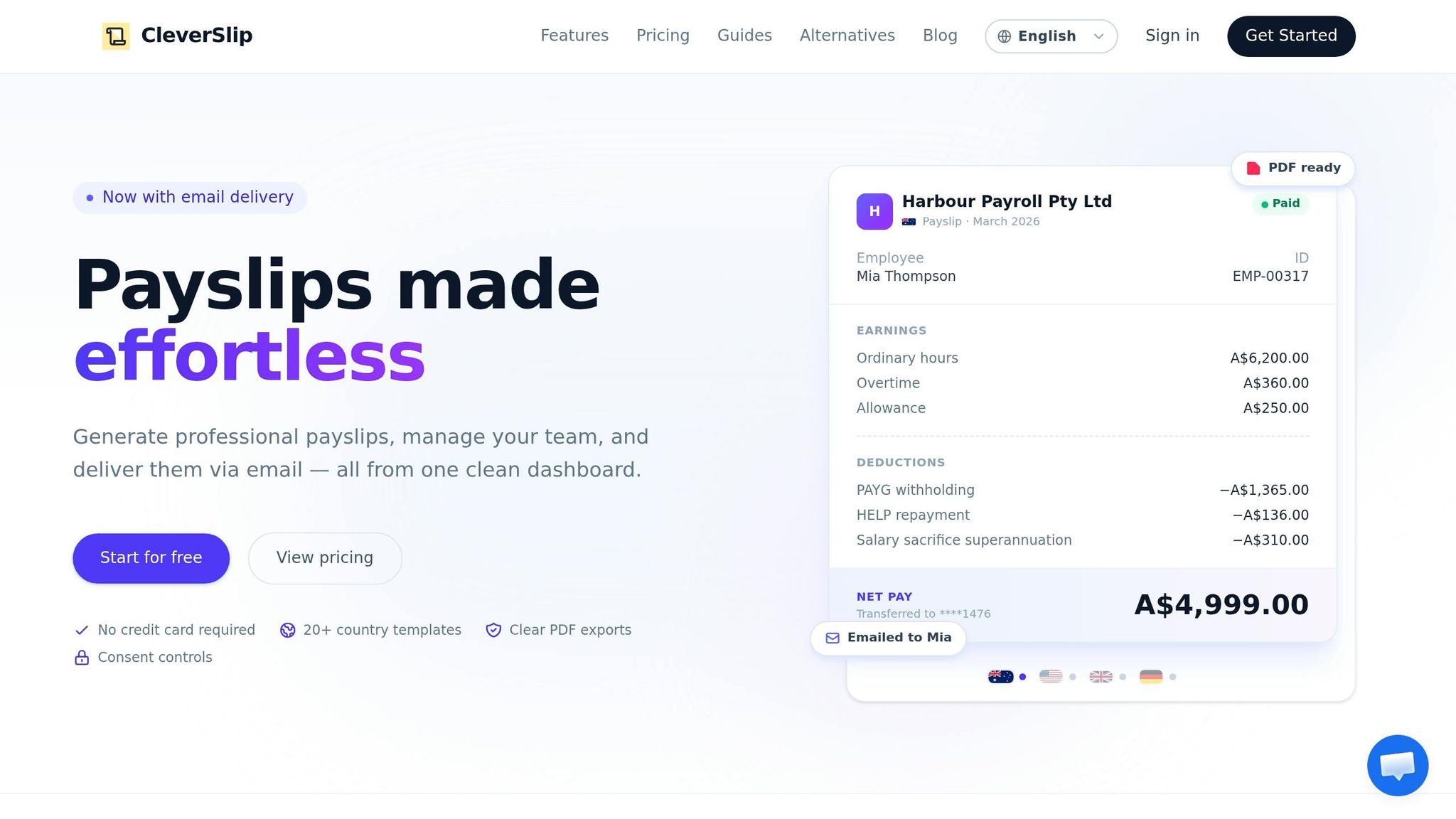
CleverSlip is mainly a pay stub generator, not full-service payroll software. That difference matters, especially for a growing SMB. It does a solid job with pay documents, but it isn't built to run payroll from start to finish.
Automation & Tax Filing
CleverSlip handles basic pay-stub creation, and that's where its automation mostly ends. It can calculate gross pay, net pay, year-to-date totals, and basic withholding based on the hours and rates you enter.
It also calculates FICA withholding, including Social Security at 6.2% and Medicare at 1.45%. But federal income tax still has to be entered manually from the employee's W-4. On top of that, CleverSlip does not file Forms 941, W-2, or 940, and it does not send payroll taxes to the IRS or state agencies.
Employee Pay Access
CleverSlip sends pay stubs by PDF email. The Starter plan ($9/month) includes an employee portal, while the Pro plan ($29/month) adds year-to-date totals, bulk generation, and branding.
There is no direct deposit. So if you need a way for employees to view and receive pay records, it can help. If you need full payroll admin, it won't get you there.
Time/Benefits Integrations
CleverSlip does not include built-in time tracking, PTO, or benefits syncing.
Compliance & Reporting
CleverSlip stores generated pay stubs in a searchable archive. That helps with audits, employee record requests, and state pay-stub rules. It also includes country-specific pay-stub templates for the US, UK, Australia, India, and Germany.
What it does not do is just as important: no new hire reporting and no automated state tax filing. In plain English, CleverSlip works best for businesses that only need pay-stub generation and plan to handle tax filings and deposits on their own.
2. Gusto
The next step up is a platform that handles payroll, files taxes, and supports onboarding in one place. Gusto is a full-service payroll system with automation, tax filing, onboarding, and compliance tools built in.
Automation & Tax Filing
AutoPilot runs scheduled payroll for salaried employees and fixed-hour hourly workers. Gusto also calculates, files, and pays federal, state, and local payroll taxes in all 50 states. W-2 and 1099-NEC forms are included, and tax filing comes with a penalty guarantee.
There’s one catch that matters when you compare plans: the entry-level Simple plan only supports single-state payroll. If your team is spread across more than one state, you’ll need the Plus or Premium plan.
Employee Pay Access
Once payroll is done, the employee side matters just as much. Gusto offers 2–4-day direct deposit on the Simple plan and next-day direct deposit on higher tiers. Employees can view pay stubs and manage direct deposit in the app, and they keep access to pay stubs and W-2s even after they leave the company.
New hires can finish W-4, I-9, and direct deposit setup before day one. Gusto also files new hire reports automatically.
Time/Benefits Integrations
After payroll is set up, one of the biggest time-savers is syncing hours and deductions without manual entry. Native time tracking is available on Plus and Premium, or as a paid add-on for Simple, with hours syncing straight into payroll.
Gusto also syncs several payroll-related items, including:
- Time tracking
- Benefits
- 401(k)
- Workers' compensation
- Garnishments
These sync directly into payroll. Gusto also processes garnishments and other complex deductions.
Compliance & Reporting
Gusto’s taxes and compliance dashboard shows upcoming filing dates and brings required tax forms to the surface, which helps SMBs avoid missed deadlines. State tax registration resources are available in all 50 states, and there’s a paid registration service for businesses that want extra help.
One limit to note: advanced reporting is only available on Premium.
3. QuickBooks Payroll
QuickBooks Payroll makes the most sense for SMBs that already run on QuickBooks Online. The big reason is simple: payroll data flows straight into QuickBooks Online, which cuts duplicate entry and a lot of back-and-forth. For most teams, the main choice comes down to which features save the most time: tax filing, employee self-service, or cleaner time data.
Automation & Tax Filing
Auto Payroll handles recurring pay runs for salaried employees and hourly workers set to default hours. That can take a lot of routine work off your plate.
All plans calculate, file, and pay federal and state taxes automatically. But there's a catch: local tax automation is only included with Premium and Elite. If you're on Core, local filings stay manual.
Elite adds tax penalty protection of up to $25,000 per year if a filing error happens, no matter who caused the mistake. That's a big deal if you want more room to breathe during tax season.
Employee Pay Access
Direct deposit timing changes by plan. Core comes with next-day direct deposit, while Premium and Elite include same-day direct deposit.
Employees can also handle a lot on their own through the QuickBooks Workforce app on iPhone and Android. They can view pay stubs, W-2s, and PTO balances without asking payroll to send over basic info each time.
Once self-service is in place, the next place teams usually save time is timekeeping and deductions.
Time/Benefits Integrations
Premium and Elite include native time tracking through QuickBooks Time, along with GPS clock-ins that help cut rekeying mistakes. Core doesn't include this feature.
Benefits such as 401(k) and health insurance work through third-party partners. That includes Vestwell/Guideline for retirement plans and Allstate/SimplyInsured for health coverage. After setup, deductions can run automatically.
In plain English: if hours and deductions flow into payroll on their own, you're less likely to run payroll with bad numbers.
Compliance & Reporting
For growing SMBs, the last thing to check is whether payroll can deal with multi-state filing and reporting without piling on admin work. QuickBooks Payroll supports up to 150 employees, which keeps it aimed squarely at the SMB market. Elite also includes penalty protection for up to $25,000 in filing errors.
Reporting is available across all plans, with customizable reports for payroll costs, tax liabilities, and retirement contributions.
| Feature | Core | Premium | Elite |
|---|---|---|---|
| Base Monthly Fee | $50 | $88 | $134 |
| Per Employee Fee | $6.50 | $10 | $12 |
| Direct Deposit | Next-day | Same-day | Same-day |
| Local Tax Filing | Manual | Automated | Automated |
| Time Tracking | Not included | Included | Included |
| Multi-State Filing | $12/mo per state | $12/mo per state | Unlimited |
| Tax Penalty Protection | None | None | Up to $25,000 |
4. ADP RUN
If payroll accuracy is the top concern, especially when compliance pressure is high, ADP RUN is built for that kind of workload. It tends to fit SMBs that deal with multi-state payroll, frequent tax filings, or tighter audit demands.
Automation & Tax Filing
ADP RUN stands out for SMBs that want payroll automation without giving up control over compliance. RUN & DONE automates recurring payroll for salaried and hourly employees, and ADP's Payroll Inspector checks for errors before payroll is submitted. If ADP causes a filing error, it covers the fines or penalties charged by taxing authorities.
Employee Pay Access
Employees can get paid by direct deposit, ADPCheck™, or Wisely® Direct. Direct deposit is available by 9:00 AM on payday. Through the ADP Employee Access portal and mobile app, employees can view pay history, pull up to three years of W-2s and 1099s, and update personal details. New hires can also complete W-4 forms and direct deposit setup before their first day.
Time, Benefits & Integrations
Time tracking is available as an add-on and syncs with payroll. ADP also exports journal entries to QuickBooks®, Xero, Wave, and Creative Solutions.
Benefits sync into payroll deductions too, including:
- 401(k)
- Health insurance
- Pay-as-you-go workers' compensation
Compliance & Reporting
This is where ADP RUN has a clear edge. When payroll rules shift and filing deadlines pile up, ADP handles a lot of the heavy lifting. It provides automatic compliance updates across all 50 states, reports new hires to state agencies, and manages state unemployment insurance while reviewing incorrect charges.
Pricing is quote-based.
5. Paychex Flex
Paychex Flex works well for SMBs that need more than a basic payroll setup. If your business runs multiple pay schedules, has employees in more than one state, or wants self-service tools that cut back on back-and-forth, it checks those boxes. The big draw is simple: payroll, taxes, and compliance live in the same workflow.
Automation & Tax Filing
Paychex Flex includes Taxpay®, which automatically calculates, withholds, and remits federal, state, and local payroll taxes. It also handles quarterly and annual tax filings. In practice, that means managers can run payroll in just a few steps instead of piecing things together by hand. Less manual work also means fewer chances to miss a tax task.
Employee Pay Access
Employees can get paid by direct deposit, paper check, or pay card. They can also view pay stubs, W-2s, 1099s, and other tax documents in the app or portal.
One feature that stands out is Pre-Check. It lets employees review withholding, deductions, and net pay before payroll closes. That extra look can catch mistakes early, before payroll is locked in.
Time, Benefits & Integrations
Payroll gets a lot smoother when hours and deductions flow in on their own. Paychex Flex supports direct time-tracking sync through add-on modules, so hours move into payroll without extra data entry. Benefit deductions also sync each pay run, including:
- 401(k)
- Health insurance
- Dental insurance
- HSA
- FSA
The platform also links payroll with HR and benefits workflows, which helps keep hours, deductions, and enrollments lined up.
Compliance & Reporting
For SMBs dealing with more than one tax rule set, Paychex Flex goes past basic payroll processing. It supports multi-state and local payroll taxes and includes new-hire reporting, labor law poster updates, and SUI management.
Its reporting tools give managers payroll journals, labor cost reports, and change reports. Those change reports are especially useful because they make it easier to audit edits and spot issues before the next payroll run. For businesses with tougher filing demands, that kind of control often matters more than raw payroll speed.
Essentials starts at $39/month + $5 per employee. Select and Pro use custom pricing.
6. Rippling
Rippling combines payroll with HR, IT, and finance. For SMBs, that means fewer handoffs as the business grows across state lines or supports remote teams.
Automation & Tax Filing
Rippling can run payroll in as little as 90 seconds. It also calculates and files federal, state, and local taxes across all 50 states, generates W-2s and 1099s, and includes a tax penalty guarantee for filing errors.
Employee Pay Access
After payroll is set to run on its own, day-to-day access starts to matter just as much.
Employees can use the app or web portal to view pay stubs, W-2s, and tax forms. They can also update bank account and withholding details on their own. Even after leaving the company, they can still access past records.
Time, Benefits & Integrations
Approved hours from Time & Attendance flow straight into payroll, including overtime based on local rules. Benefits updates sync in real time, and Rippling reconciles deductions with carrier invoices.
It also connects with third-party tools such as QuickBooks, Xero, and NetSuite. That makes it easier to keep payroll, accounting, and back-office data in sync without extra manual work.
Compliance & Reporting
Compliance 360 tracks minimum wage, overtime, and training rules by jurisdiction. Rippling also records every payroll action in an immutable audit trail and supports custom reports across payroll, HR, IT, and finance.
In practice, that shifts reporting from simple record-keeping into something more useful: a way to monitor payroll activity and spot issues before they turn into bigger problems.
Pricing starts at $40/month plus $8 per user per month. Payroll is sold as an add-on, and total costs go up as more modules are added.
From here, it helps to look at which payroll features matter most for your business - automation, compliance, self-service, or reporting.
Pros and Cons by Payroll Feature Priority
No single platform wins in every area. The best pick comes down to one thing: which payroll gap you need to fix first.
Use the summary below to line up your top need with the platform that does that job best.
| Product | Best For | Pros | Cons | SMB Fit |
|---|---|---|---|---|
| CleverSlip | Pay stub access and transparency | PDF generation and bulk delivery, dashboard analytics, employee self-service portal, company branding on PDFs, API and webhook support | Not a full-service tax filing or payroll calculation engine | High for businesses with external payroll engines |
| Gusto | All-in-one ease of use | AutoPilot runs, intuitive UI, benefits marketplace | Multi-state filing requires the Plus tier; reporting is less flexible than legacy providers | High - ideal for 1–50 employees |
| QuickBooks Payroll | Accounting integration | Native sync with QuickBooks Online, tax penalty protection up to $25,000 on the Elite tier | Local tax filing is gated by tier; limited HR tools | High - best for existing QuickBooks users |
| ADP RUN | Compliance and scaling | Deep compliance expertise, certified payroll reporting, 24/7 support | Opaque pricing, per-pay-run billing, less modern interface | Medium - better suited for 40+ employees or regulated industries |
| Paychex Flex | Guided support | Dedicated payroll specialists, employee pre-run review via "Pre-check" | Many features are paid add-ons; pricing lacks transparency | Medium - best for businesses wanting guided human support |
| Rippling | Automation and IT unification | 90-second payroll runs, 650+ integrations, global payroll capability | Complex setup, opaque pricing, 1-year contract required | High - best for fast-growing or multi-state teams (20–200 employees) |
The table makes the trade-offs pretty clear. If you want a simple all-in-one setup, Gusto stands out. If your books live in QuickBooks already, QuickBooks Payroll is the easier fit. If compliance is the big headache, ADP RUN and Paychex Flex lean more in that direction. And if your team is growing fast across states, Rippling has more range.
CleverSlip plays a tighter role. It’s built for branded pay stub delivery at scale, archive access, and API/webhook support for teams that already handle payroll processing somewhere else.
That means these feature priorities don’t just point to a product. They point to the right fit based on your business size, payroll setup, and how much complexity your team deals with day to day.
Conclusion
The comparisons above lead to one clear rule: pick payroll software based on your costliest payroll risk.
No payroll system works for every SMB. The right pick depends on the payroll problem that hurts you most, whether that's tax compliance, multi-state complexity, or benefits administration.
Here's the framework: if your team deals with deductions like 401(k) contributions, garnishments, or benefits, you need a system that can handle pre-tax and post-tax calculations on its own. If it can't, manual mistakes can stack up fast.
With that in mind, the final call should come down to the one feature your team can't afford to miss.
Choose features over brand names. A big name doesn't mean it's the right match for your headcount, your state footprint, or your worker mix.
For teams that care most about pay stub delivery and employee document access, CleverSlip is the strongest fit.
FAQs
Which payroll feature should I prioritize first?
Prioritize automated payroll processing first. It’s the core of any payroll system, handling wage calculations, deductions, and payments on a set schedule.
Starting here cuts down on manual data entry and math mistakes, saves admin time, and helps make sure employees are paid the right amount and paid on time before you layer in more advanced features.
Do I need multi-state payroll support?
Yes. You need multi-state payroll support as soon as an employee works or lives in a state other than the one where your business is registered.
Even a single remote employee can trigger rules for tax withholding, unemployment insurance, and local labor law compliance. And that’s where things can get messy fast. Each state has its own rates, deadlines, and filing rules, so payroll software helps by automating withholdings and handling state-by-state requirements.
Can pay stub tools replace full payroll software?
No. Pay stub tools only create documents. Full payroll software handles the entire payroll process.
That usually means it can calculate wages, deal with federal, state, and local tax withholding and filing, manage benefits and deductions, and help with compliance over time. Many platforms also include employee self-service for tax forms and direct deposit, which cuts down on manual work for employers.
Payroll, simplified
Create structured payslip PDFs in minutes.
Build country-specific payslip documents, deliver them instantly, and keep a searchable history for audits and employee requests.
Start free