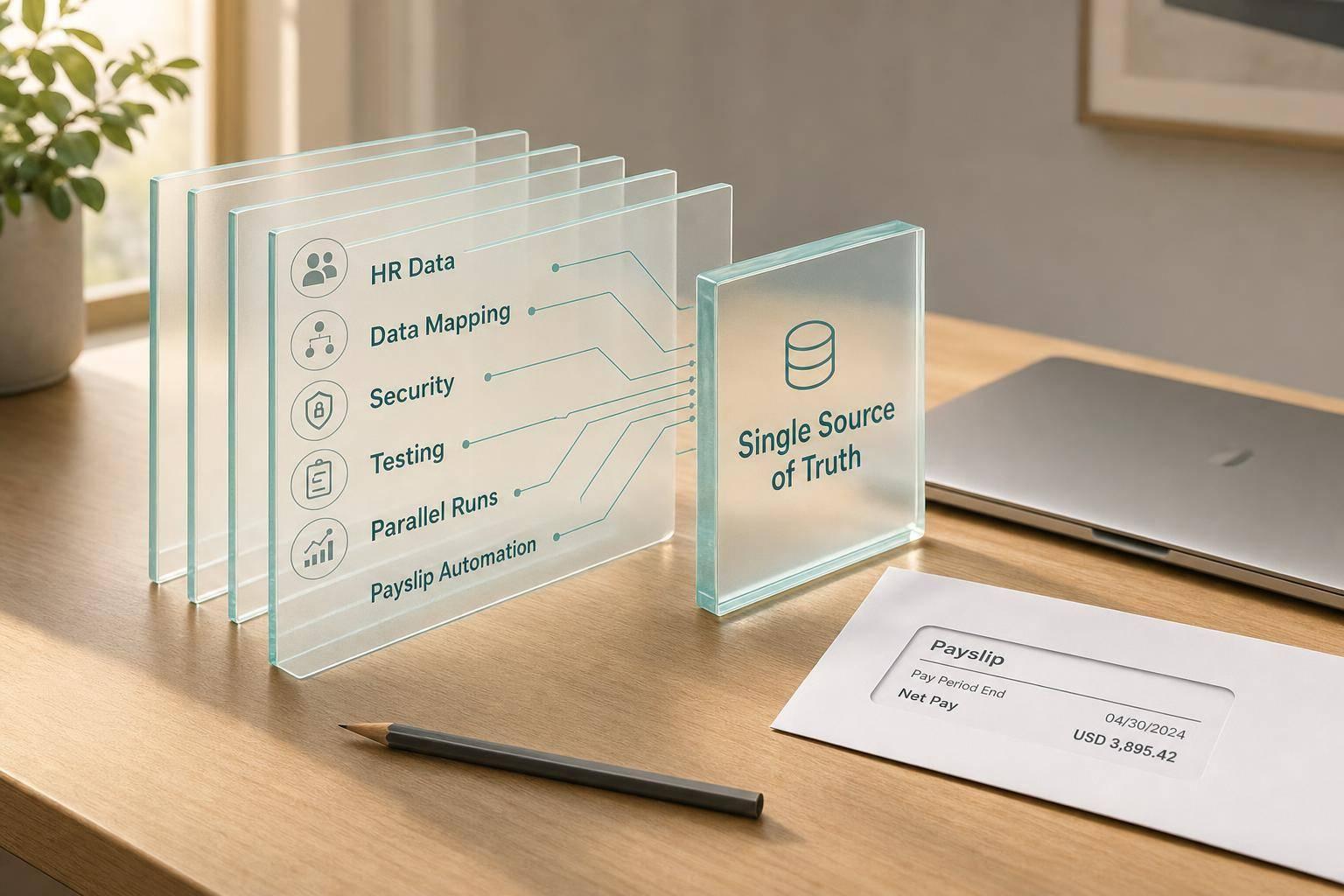
Ultimate Guide to Payroll and HR System Integration
If your HR and payroll systems don’t share data, payroll errors spread fast. In the U.S., one bad field - like a tax location, overtime code, or termination date - can lead to wrong pay, tax mistakes, and rework before the next payroll cutoff.
I’d sum it up like this: payroll and HR integration means one employee record, clear system ownership, tested data mapping, and tight controls before go-live. The article shows how to connect HRIS, payroll, time, benefits, and payslip delivery so approved changes move automatically instead of being typed twice.
Here’s the short version:
- Set one source of truth for employee data, hours, taxes, deductions, and benefits
- Choose the right sync method: API, batch file, middleware, or a mix
- Map payroll fields with care, especially employee ID, tax location, FLSA status, overtime, deductions, and garnishments
- Protect sensitive payroll data with least-privilege access, encryption, and audit logs
- Test U.S. payroll cases like new hires, retro pay, bonuses, garnishments, transfers, overtime, and terminations
- Run parallel payroll for 2 to 4 cycles and review any net pay gap over $1.00
- Watch live payroll closely after launch with alerts, rollback rules, and post-run reviews
- Connect day-to-day workflows for time approval, onboarding, offboarding, payslips, W-2 access, and employee self-service
A few numbers stand out. The article points to targets like 99.5% payroll accuracy, under 15 minutes for high-priority syncs, and a 50% drop in manual corrections. It also notes that payroll records often need to be kept for at least four years for IRS employment tax purposes.
What I like about this piece is that it stays practical. It doesn’t treat integration as just an IT project. It frames it as a payroll control system: who owns the data, when it moves, how it is checked, and what happens when something fails.
This guide is for U.S. employers that want fewer payroll handoffs, cleaner audits, and less last-minute fixing before payday.
Best Practices For Payroll System Integration In HR Tech? - Legal And HR SaaS Stack
sbb-itb-b1c1928
Benefits and Risks of Payroll-HR Integration
The main day-to-day win is simple: fewer manual handoffs between HR and payroll. That shows up first in onboarding, timekeeping, compliance, and employee self-service.
Gains in day-to-day operations and employee experience
The clearest gains tend to show up in onboarding, time approvals, deductions, and pay-stub access. When approved time sheets move straight into payroll, employees can trust that what their manager approved is what gets paid. The biggest payoff comes when those updates land before the payroll cutoff.
Employee self-service is another big plus. CleverSlip supports this with PDF payslips, payslip history, and employee self-service portals. That access matters most when people need tax forms or year-to-date pay data. No back-and-forth with HR. No digging through old emails. Just direct access when they need it.
Compliance and audit improvements in a U.S. payroll context
It’s not just about accuracy. Integration also helps with compliance by keeping payroll inputs consistent and traceable. When synced hours, work location, deduction amounts, and termination dates come from a single source of truth, the data behind payroll decisions is easier to track across systems instead of being scattered around. That can cut filing mistakes for quarterly Form 941 filings and year-end IRS reporting.
A small mismatch can turn into a big headache. For example, if a location field is wrong, it can trigger incorrect withholding under state income tax withholding in most jurisdictions for an entire pay period.
Common failure points to plan for
Most integration failures start in familiar places: unclear data ownership and timing drift. That often means mismatched employee IDs, bad pay code mapping, delayed API events, and approval bottlenecks that push hours past the payroll cutoff.
The fix isn't complicated, but it does need to be in place from day one:
- Role-based access
- Scoped API credentials
- Exception alerts
- Reconciliation checks built in from the start
Integration can improve speed and accuracy. But if the mappings and controls are messy, errors can move through the system just as fast.
Integration Architecture, Data Mapping, and Security
Once sync timing is set, the next thing to sort out is how data actually moves between systems. That decision affects payroll accuracy, sync speed, and how easily your team can recover when something breaks.
API, file-based, and middleware integration models
| Model | Best For | Key Tradeoff |
|---|---|---|
| Direct API | Hires, terminations, pay changes, time approvals, benefit changes | More setup, stronger control |
| Scheduled file exchange (CSV/XML/SFTP) | Legacy payroll systems, nightly batch loads | Slower and vulnerable to format errors |
| Middleware / iPaaS | Organizations with multiple connected systems | Centralized, adds cost |
| Prebuilt connector | Standard HRIS-to-payroll scenarios on common platforms | Fast, less flexible |
For many small to mid-sized U.S. employers with simple payroll needs, prebuilt connectors or a basic file-based integration can do the job. If the setup is more complex - multiple entities, more frequent payroll runs, or several connected systems - APIs paired with middleware usually make more sense. That mix helps teams deal with edge cases and keep records aligned across systems.
A lot of employers take a blended approach. They use APIs for event-driven employee updates and batch feeds for payroll checks. That way, downstream workflows keep moving without people stepping in to push data manually.
Data fields that must map correctly for payroll accuracy
The architecture can look great on paper, but payroll still falls apart if the field mapping is off. Bad mappings are one of the most common reasons teams run into payroll errors after launch. These fields are the ones you can't afford to get wrong:
- Employee ID - keeps time records and deductions tied to the right person
- Work location / tax jurisdiction - a bad match can trigger the wrong state withholding
- FLSA status - if this doesn't line up, overtime may not calculate correctly, which can create Fair Labor Standards Act exposure
- Overtime category - this needs an exact match between time and payroll systems
- Deduction and garnishment codes - bad alignment can lead to missed benefit premiums or wrong garnishment orders
A smart move is to build one standard payroll data structure and map every system to it. In practice, that means using a canonical data model that standardizes hours, leave, premiums, pay types, deductions, benefits, and garnishments before those values flow into each platform. It makes audits easier to follow and reduces disruption if you switch vendors later.
Security, access control, and monitoring
A payroll integration handles SSNs, bank details, and pay records, so the controls need to be tight from day one. Payroll data should be treated as highly sensitive, and the setup should protect that data without losing visibility into what changed and when.
Use least-privilege access for HR, payroll, IT, and vendor roles. In middleware platforms, configuration access should be separate from monitoring access. That split helps reduce mistakes and limits who can change live settings.
For data in transit, APIs should use TLS 1.2 or higher with token-based authentication like OAuth2 or signed JWTs. File transfers should go through SFTP or HTTPS, and many teams add AES-256 file-level encryption on top. At rest, payroll databases, HRIS storage, and middleware logs should all be encrypted - especially fields with SSNs, bank account numbers, and home addresses. Platforms that handle payslip generation and delivery, like CleverSlip, need those same controls on PDF payslips, email delivery pipelines, and archived records, because those files hold both pay and personal data.
Audit logs should show who changed what, when, and from which system. That includes mapping updates, manual overrides, and every successful or failed data transfer. Logs should be kept for at least four years to match IRS employment tax recordkeeping rules, and longer if the records relate to retirement plans or litigation holds. Monitoring dashboards should make sync latency, failed job counts, and unusual data volume easy to spot. Alerts that fire before payroll cutoff give teams a chance to fix issues before they turn into missed or wrong pay.
Step-by-Step Implementation Plan
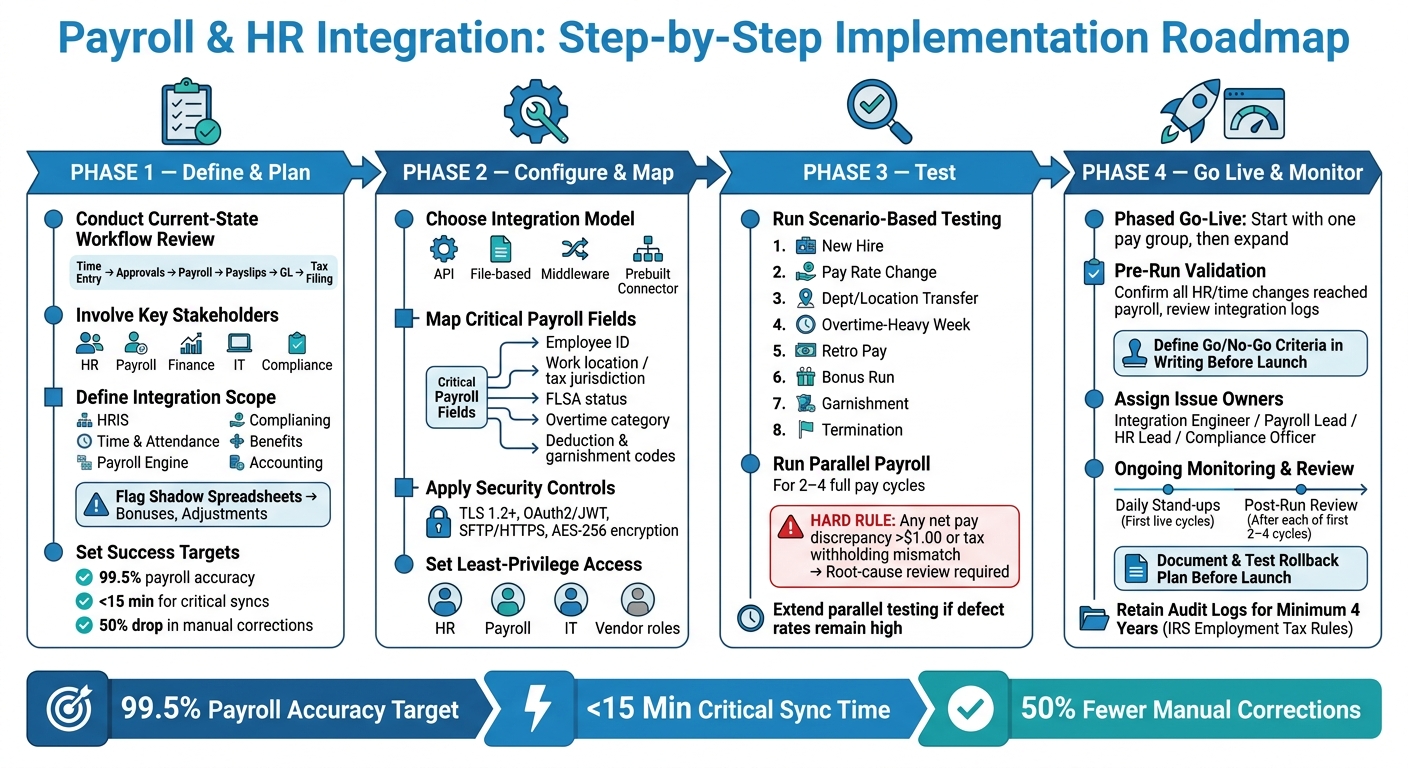
Payroll & HR Integration: Step-by-Step Implementation Roadmap
Once the integration model is set, it’s time to move from planning to rollout. A phased approach helps HR, payroll, finance, IT, and compliance stay in sync and cuts down on mismatched HR, time, and payroll data. The goal is simple: turn the design into tested payroll workflows, not pile on one more process layer.
Define scope, requirements, and success metrics
Begin with a current-state workflow review before you change any configuration. Walk through every payroll-related process from start to finish: time entry, approvals, payroll calculation, payslip generation, GL posting, tax filing, and reporting. Note which system handles each step and where manual handoffs still happen. This works best when HR, payroll, finance, IT, and compliance are all in the room.
Next, define the integration scope. Spell out which systems will connect - HRIS, time and attendance, payroll engine, benefits, and accounting. Then define which data domains are in play, such as employees, jobs, pay components, taxes, deductions, and time. You’ll also want to pin down which process stages the integration will cover, like onboarding, pay changes, and terminations.
For U.S. payroll, this part needs extra care. Call out federal, state, and local tax codes, FLSA overtime rules, garnishment handling, and multi-state employee cases. Also, look for shadow spreadsheets. Those off-the-books Excel files used for bonuses, adjustments, or local pay changes can cause payroll problems fast, so surface them early and pull them into the plan.
Set clear success targets before the project moves ahead. For example, teams may agree on 99.5% payroll accuracy, under 15 minutes for critical syncs, and a 50% drop in manual corrections.
Configure integrations and test U.S. payroll scenarios
Configuration should cover the payroll rules that drive each run: pay periods, pay frequencies, overtime and holiday pay logic, tax setup, benefits, garnishments, and approval workflows. Check that every earnings, deduction, and tax code maps the same way across systems. If one code means one thing in HR and something else in payroll, trouble usually follows.
Then test the rules most likely to break U.S. payroll calculations. Use scenario-based testing tied to a written test plan. Each scenario should include the data setup, expected result, and pass/fail criteria. HR, payroll, finance, and IT should all sign off before go-live.
| Scenario | What to Validate |
|---|---|
| New hire | Tax elections, pay rate, FLSA status, location, first pay |
| Pay rate change | Pro-rating, retro earnings, YTD updates |
| Department or location transfer | Cost center, tax jurisdiction, GL alignment |
| Overtime-heavy week | 40-hour threshold, OT rate, hours aggregation |
| Retro pay | Backdated rate, catch-up earnings, YTD corrections |
| Bonus run | Supplemental tax treatment, regular rate inclusion, payslip accuracy |
| Garnishment | Disposable earnings, priority rules, CCPA caps |
| Termination | Final pay timing, PTO payout, final payslip |
After that, move into parallel payroll runs on the same pay period in both systems and reconcile the outputs line by line. Plan for at least 2–4 full pay cycles, including at least one cycle with edge cases like a holiday week or a bonus run.
Set a hard rule here: any net pay discrepancy above $1.00, or any tax withholding mismatch, should trigger a root-cause review before the next cycle. If defect rates are still high after two cycles, extend parallel testing instead of forcing a go-live date. Once these scenarios pass, validate the live employee data flows that feed payroll each cycle.
Go live with monitoring and rollback plans
A phased go-live lowers risk. Start with one pay group or business unit, then expand from there. Before the first live payroll run, do pre-run validation checks. Make sure all HR and time changes reached payroll, review integration logs for failures, and pull audit reports that flag missing tax setups, missing bank accounts, or pay rate changes that don’t look right.
Put go/no-go criteria in writing before launch day. That should include the maximum allowed variance, the number of unresolved defects, and the level of test coverage required. Give each issue type a clear owner:
- Integration engineer for technical failures
- Payroll lead for calculation issues
- HR lead for data quality problems
- Compliance officer for regulatory questions
During the first live cycles, daily stand-ups can help the team catch and fix issues before they repeat.
If payslip delivery is in scope, verify API or webhook delivery, PDF accuracy, and employee access to pay history. CleverSlip supports this layer with branded PDF payslips, payslip history, and employee self-service portal access.
Before launch, document the rollback plan and test it. Be clear about what triggers a rollback, such as broad pay inaccuracies or system-wide integration failures. Define how fast the team can switch back to the legacy process and how employees will be informed. It also helps to separate a partial rollback - where one integration is turned off while others stay live - from a full revert.
After each of the first 2–4 live cycles, run a post-run review to check performance, log issues, and apply fixes before the next cycle. That live control sets up the time, onboarding, and payslip workflows that follow.
Integrated Workflows for Time, Onboarding, Payslips, and Self-Service
After go-live, the integration needs to make day-to-day payroll handoffs automatic. Mapping and security set the stage. The part that matters most, though, is simple: do daily payroll tasks move cleanly from HR to payroll, without extra chasing or manual fixes?
Time tracking, approvals, and payroll cutoffs
The target is straightforward: approved, accurate hours must be in payroll before cutoff. Employees enter time through a clock, mobile app, or web timesheet. That data then moves into the HRIS and payroll, where pay rules and leave codes are applied. Managers review time each day and approve it by a set deadline, such as Tuesday at 12:00 p.m. PT for a Friday pay date.
Once time is approved, it locks. Any edit made after approval turns into an exception and must be approved again before payroll can use it. That single freeze point matters a lot. It stops late fixes from quietly changing a pay run that looked finished.
Payroll should also split overtime into regular, overtime, and double-time codes automatically. At the same time, exception dashboards should flag the issues that tend to blow up at the last minute:
- Unapproved time
- Missed punches
- Hours that run past scheduled shifts
That gives managers a chance to fix problems before the cutoff hits.
Onboarding, offboarding, and final pay workflows
The same single-source rule that cuts payroll errors should guide hiring too. HRIS owns the hire record, and payroll takes in that data. When a candidate becomes an employee, core details like legal name, SSN, address, pay rate, exemption status, W-4, and direct deposit should be entered once in the HRIS and then flow into payroll, benefits, and timekeeping. Benefit eligibility should then start deductions on the first eligible paycheck.
The same handoff pattern should apply when someone leaves. The HRIS termination date should move to payroll and benefits in the right sequence. Payroll uses that date to calculate final wages under the right state deadline. Some states require immediate pay for involuntary termination, while others allow payment on the next regular payday. Payroll also needs to apply PTO payout rules based on state law and company policy.
One detail can’t slip through the cracks: payroll must use the same PTO balance stored in the timekeeping system. If those numbers don’t match, the final check will be wrong.
| Onboarding/Offboarding Step | System of Record | Downstream Impact |
|---|---|---|
| W-4 / state withholding | HRIS / employee self-service | Federal and state tax withholding accuracy |
| Benefits enrollment | Benefits admin → Payroll | Pre/post-tax deductions from first paycheck |
| Direct deposit authorization | Employee → Payroll | Successful payment delivery |
| Termination date + last hours worked | HRIS → Payroll | Final pay timing and PTO payout calculation |
| PTO balance at exit | Timekeeping system → Payroll | Correct payout per state law and policy |
Payslip delivery and employee self-service
Once payroll closes, the workflow shifts from calculation to employee access. Payslips should go out without manual exports or spreadsheet work. Each pay stub needs gross pay, net pay, taxes withheld, deductions, pay period dates, and year-to-date totals. Those records should sit in a secure employee portal, ready whenever an employee needs them.
CleverSlip handles this layer directly. It creates PDF payslips from payroll outputs, sends them through secure email, and keeps the full payslip history in an employee self-service portal. Employees can sign in, download past pay stubs, and check YTD totals without opening an HR ticket. For payroll teams, the CSV export and audit trail make it easier to answer internal audits or employee disputes fast.
When payslip generation is tied into the payroll run instead of handled as a separate manual step, missed statements and formatting errors stop showing up over and over.
A self-service portal should also let employees:
- Update direct deposit details
- Check live leave balances
- Submit time-off requests
- Access W-2s
Approved leave should feed back into timekeeping and payroll automatically so accruals and pay amounts stay in sync. Tracking self-service adoption, ticket volume, and accuracy after launch is a simple way to see whether this part of the setup is doing its job.
FAQs
How do I choose the right integration method?
Choose the integration method that fits your team’s technical skill and the way you already work. Start by looking at your current tools and day-to-day tasks. If you keep running into manual data entry or the same info gets requested over and over, that’s usually a clear sign an integration could help.
For simpler setups, a cron job or manual CSV imports may do the job. If you need data to move with less delay, webhooks are often a better fit. In more complex setups, middleware can connect systems and map data from one tool to another. CleverSlip supports a range of options, from CSV imports to API integrations.
What payroll fields are most likely to cause errors?
Payroll errors often start with manual data entry. And the risk climbs fast when the same task gets repeated over and over.
The fields most likely to cause trouble include:
- Timekeeping records, such as missed punches or unauthorized overtime
- Variable earnings, including bonuses, commissions, and retroactive pay adjustments
- Tax withholding when work locations or state forms are wrong
- Deductions like 401(k), health premiums, garnishments, and payments made after termination
It’s easy to see how this happens. One missed punch here, one wrong state form there, and payroll can go off track in a hurry.
How long should parallel payroll testing last?
Parallel payroll testing should run for at least one full pay cycle before you switch over to the new system.
During that period, compare results from the old system with the new platform. This helps confirm that calculations and withholdings are correct, checks that your data carried over properly, and lowers the risk of payroll mistakes on payday.
Payroll, simplified
Create structured payslip PDFs in minutes.
Build country-specific payslip documents, deliver them instantly, and keep a searchable history for audits and employee requests.
Start free