Common Payroll Migration Testing Errors
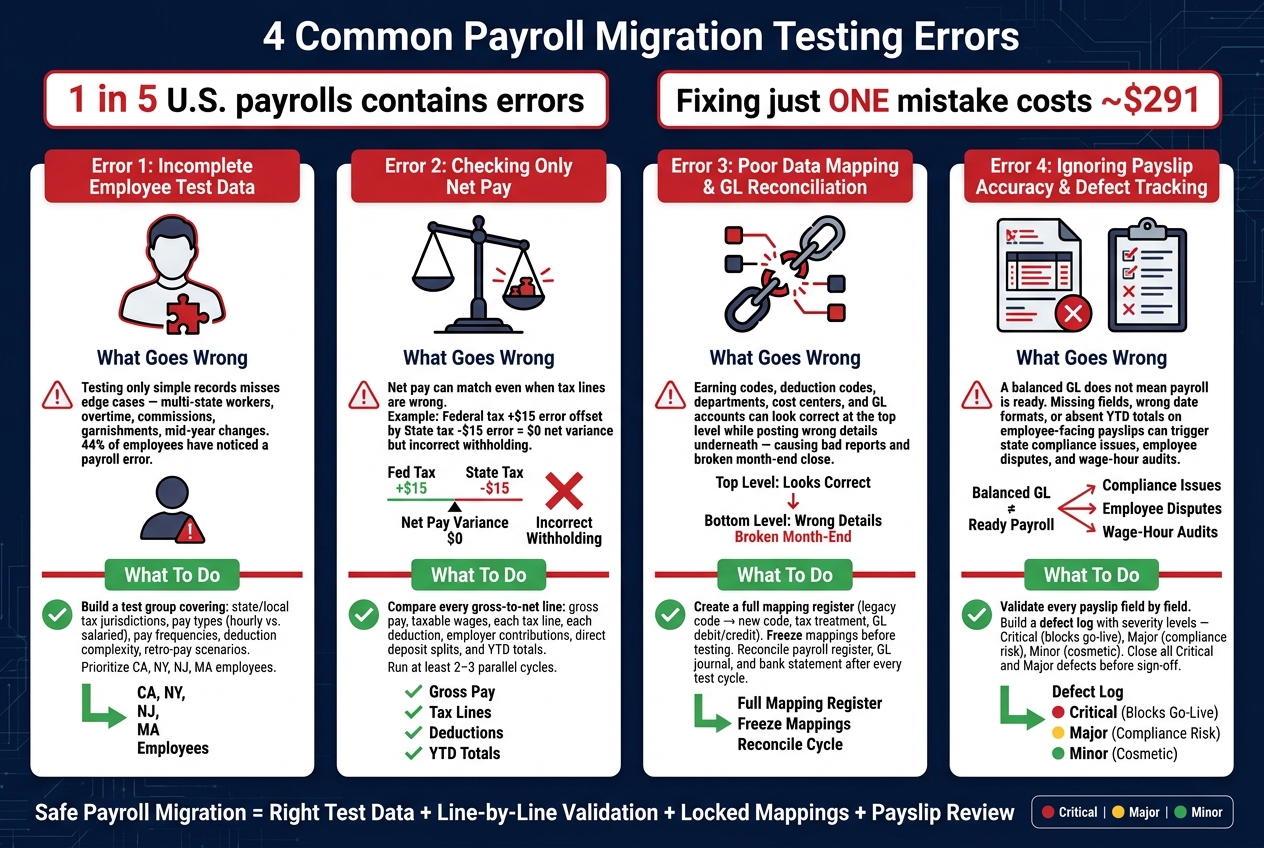
Payroll migration mistakes can cost you money fast. In the U.S., 1 in 5 payrolls has errors, and fixing just one mistake can cost about $291. If tax, overtime, deduction, or GL issues slip through testing, the fallout can include penalties, back pay, cleanup work, and upset employees.
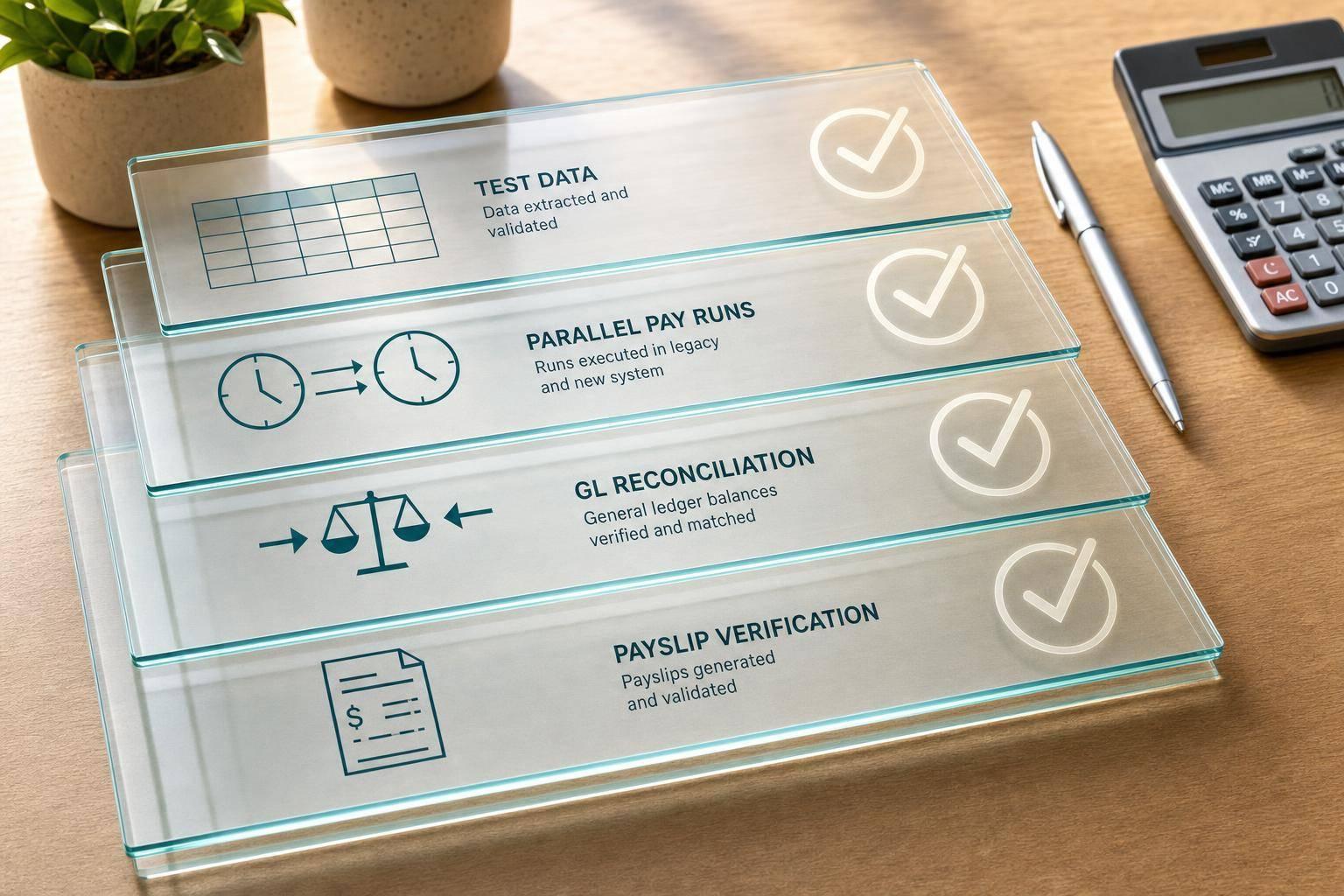
If I had to sum up the article in plain English, it comes down to this: test with the right employees, compare every pay detail, check code mapping, and review the payslip before go-live. A payroll run is not “good” just because net pay matches or the file processes.
Here are the 4 main testing errors the article covers:
-
Testing with incomplete employee data
If I only test simple employee records, I miss the cases that usually break payroll: multi-state work, overtime, commissions, retro pay, garnishments, and mid-year changes. -
Checking only net pay during parallel runs
Net pay can match even when tax lines are wrong. I need to compare gross pay, taxable wages, each tax, each deduction, employer-paid amounts, direct deposits, and YTD totals. -
Missing mapping and reconciliation problems
Earning codes, deduction codes, departments, cost centers, and GL accounts can look fine at the top level while posting the wrong details underneath. That can break reports and month-end close. -
Ignoring payslip review, defect tracking, and cutover controls
Even if payroll math is right, the employee-facing payslip can still be wrong or incomplete. Missing fields, bad date formats, or state pay stub issues can stop go-live.
A short way to think about it:
| Error | What goes wrong | What I should do |
|---|---|---|
| Incomplete test data | Edge cases get missed | Use a test group that reflects actual payroll complexity |
| Weak parallel validation | Wrong taxes or deductions hide behind matching net pay | Compare line by line across at least 2 cycles |
| Poor mapping and reconciliation | Items post to wrong codes or GL accounts | lock mappings and trace variances back to setup |
| Weak payslip and defect control | Employee-visible or state-rule issues slip through | Review payslips field by field and log every defect |
Bottom line: if I want a safer payroll migration, I need to treat testing like a full payroll proof check - not just a system check. The article walks through the main failure points and shows how to catch them before the first live run.
4 Common Payroll Migration Testing Errors: What Goes Wrong & How to Fix It
How Can You Effectively Validate Migrated Data For Accuracy? - Legal And HR SaaS Stack
sbb-itb-b1c1928
Error 1: Testing With Incomplete Employee Data
Incomplete test data can make a payroll system look fine during testing and then fall apart in production. If the test group is too small or too similar, defects stay hidden until real employees with messy, everyday pay situations get their first checks.
A 2025 U.S. employee survey found that 44% of employees have noticed a payroll error at some point, with the most common issues being missing or incorrect overtime pay (42%), wrong hours or days worked (28%), and unpaid or miscalculated bonuses or commissions (24%). Those numbers are a warning sign. If a team tests only salaried, single-state employees with standard benefits, it skips the cases most likely to break.
Take a few common examples. A field technician working in both California and Nevada during the same pay period checks cross-border taxation, state overtime rules, and work-location logic. A salesperson paid base plus commission checks whether the system applies supplemental wage tax calculations and earning code mappings the right way. An hourly worker with a shift differential who often goes past 40 hours in a week checks whether the new system calculates the FLSA regular rate of pay correctly, including bonuses or differentials that belong in the calculation. None of that shows up in a plain salaried test set. That's why the test group needs to mirror real payroll complexity.
Then there's deduction logic. Employees with garnishments, 401(k) contributions, HSA elections, and deduction order add another layer of risk. The order in which deductions run changes taxable wages. Get that sequence wrong, and the entire gross-to-net result for those employees is wrong.
How To Build a Representative U.S. Test Group
Build the test group on purpose, not by convenience. Start by splitting employees across the areas that tend to drive payroll errors:
- State and local tax jurisdiction
- Pay type, such as hourly vs. salaried
- Pay frequency, including weekly, biweekly, semimonthly, and monthly
- Deduction complexity
- Retro-pay and mid-year rate-change scenarios
It also helps to test across higher-risk groups, especially employees in states such as California, New York, New Jersey, and Massachusetts. Include cases with mid-year rate changes, back-dated promotions, and retro-pay adjustments. Those cases show whether the new system recalculates prior-period taxes and YTD balances correctly without double-counting.
Using Historical Payslip Data To Improve Test Coverage
Historical payslips can make testing much stronger. Instead of building every case from scratch, teams can review prior pay periods and find the cycles that were actually tough to process, like months with large bonus runs, open enrollment changes, or off-cycle correction checks. Those are the periods worth pulling into the test set.
CleverSlip's payslip history helps teams review prior pay periods and pull real complex cases into the test set.
A broad test group is only the first step; after that, teams need to check whether gross-to-net results match across multiple payroll runs.
Error 2: Weak Gross-To-Net and Parallel Run Validation
After you build a representative employee mix, put it through parallel payroll cycles.
What Teams Miss When They Only Check Net Pay
A matching net pay does not prove payroll is right. You need to compare every gross-to-net line item, not just the final check amount.
Here’s how this can happen. Federal income tax is off by $15.00 in one direction, and state income tax is off by $15.00 in the other. Those errors cancel out, so net pay looks perfect even though the withholding details are wrong.
| Gross-to-Net Component | Legacy Result (USD) | New System Result (USD) | Variance (USD) |
|---|---|---|---|
| Gross Pay (incl. OT/Bonuses) | $5,400.00 | $5,400.00 | $0.00 |
| Pre-Tax: 401(k) (6%) | $324.00 | $324.00 | $0.00 |
| Pre-Tax: Health Insurance | $200.00 | $200.00 | $0.00 |
| Taxable Income | $4,876.00 | $4,876.00 | $0.00 |
| Federal Income Tax | $640.00 | $655.00 | +$15.00 |
| Social Security (6.2%) | $334.80 | $334.80 | $0.00 |
| Medicare (1.45%) | $78.30 | $78.30 | $0.00 |
| State Income Tax | $243.80 | $228.80 | -$15.00 |
| Net Pay | $3,579.10 | $3,579.10 | $0.00 |
On its own, a small per-employee variance may not look like much. Spread that across hundreds or thousands of employees, though, and it turns into a payroll and compliance problem fast. That’s why each part of the gross-to-net chain needs its own check: taxable wages, each tax line, each deduction, employer contributions, and direct deposit splits.
How To Run Multi-Cycle Parallel Payroll Tests
Run at least two parallel cycles. For more complex migrations, use three. Start with a normal cycle. Then run an exception-heavy cycle that includes bonuses, terminations, corrections, garnishments, and benefit changes.
Use the same complex employee scenarios from the representative test group, not a new sample. That way, both cycles hit the same edge cases and make the comparison meaningful.
Reconcile results at two levels:
- A payroll-group summary for gross pay, total taxes, total deductions, and net pay
- A line-by-line comparison for each employee
Any unexplained variance should be treated as a defect.
Checking Payslip Line Items and YTD Totals
One clean cycle isn’t enough. YTD totals are where slow drift shows up.
After each cycle, compare YTD taxable wages, taxes, deductions, and retirement contributions for each employee. A small per-pay-period error in taxable wages or pre-tax deductions can compound over many pay runs and create material gaps by year-end.
Also review payslip line items against system output. CleverSlip's PDF payslips and payslip history support that workflow by helping teams inspect earnings, deductions, taxes, and YTD totals alongside system calculation results.
If the numbers still don’t tie out, the next place to look is mapping and GL reconciliation.
Error 3: Poor Data Mapping and Incomplete Payroll Reconciliation
When parallel-run totals still don’t line up, mapping is usually the problem.
And here’s the tricky part: even when top-line totals look clean, mapping errors can still be sitting underneath. If earning codes, deductions, departments, cost centers, and GL accounts don’t line up the right way, payroll can misclassify items, break reports, and send journal entries to the wrong accounts. Most teams don’t spot that right away. It tends to show up later at month-end close or during audit review.
Where Mapping Errors Most Often Occur
In U.S. payroll migrations, these are the areas where mapping problems tend to show up most often:
- Overtime codes - multiple OT rates (1.5x, 2.0x, holiday) rolled together the wrong way
- Employer tax accounts - SUI and local payroll taxes mapped to broad liability accounts
- Benefit deductions - employee 401(k) mapped, but employer match missed or tagged the wrong way
- Garnishments - child support, tax levies, and creditor garnishments merged into one code
- Department and cost center codes - labor costs posted to the wrong business units
When an item has no mapping at all, it often lands in a suspense account like GL 999999.
How To Document and Lock Mapping Rules
Start with a mapping spec. It should list every legacy earning code, deduction code, department, cost center, and GL account next to its new-system match, tax treatment, and related debit and credit accounts. That step helps stop one-sided postings that can throw the payroll journal out of balance.
The table below shows what a working mapping register looks like:
| Legacy Code / GL Account | Description | New Code / GL Account | Tax Treatment | Reconciliation Status |
|---|---|---|---|---|
| E015 | Nonexempt Overtime 1.5 | OT_NONEX_1_5 | Taxable wages | Reconciled |
| D401K_PRE | 401(k) Employee Pre-tax Deduction | 401K_EMP_PRE | Pre-tax deduction | Reconciled |
| D401K_ER | 401(k) Employer Match | 401K_ER_MATCH | Benefit expense | In progress |
| GL 5000-100 | Regular Wages Expense | GL 6000-100 | Wage expense | In progress |
| GL 2100-300 | Federal Tax Withholding Liability | GL 2200-310 | Tax liability | Not started |
| GARN_CHILD | Child Support Garnishment | GARN_CHILD_SUPP | Post-tax deduction | Reconciled |
Once those mappings are set, freeze them. If someone wants to change overtime, garnishment, or tax rules during testing, that change should go through payroll, HR, and finance approval. If changes happen in the middle of testing without that step, legacy-to-new comparisons stop being reliable because the setup is no longer stable.
Reconciling Payroll Results to the General Ledger
After each test cycle, compare the payroll register, GL journal, and bank statement. Review each piece on its own: gross wages, employer taxes, employee taxes, deductions, benefit contributions, and garnishments. High-level totals can look fine while single line items are still posting to the wrong accounts.
Also check debit and credit direction for tax and benefit entries. Wage expense should debit. Tax and benefit liabilities should credit. If those entries are reversed or lumped together, the financial statements will be wrong from day one.
Fix each variance, then trace it back to the mapping issue that caused it before go-live.
CleverSlip's CSV exports and audit logs can support reconciliation and preserve an audit trail during migration.
Once the GL ties out, the next control is payslip accuracy before cutover.
Error 4: Ignoring Payslip Accuracy, Defect Tracking, and Go-Live Controls
Once the GL ties out, there’s still one more test that matters: the payslip the employee actually sees.
A balanced GL does not prove payroll is ready for go-live. A payroll run can be mathematically correct and still fail if the employee-facing payslip leaves out required fields, shows dates in the wrong format, or skips YTD totals. That’s where trouble starts. These gaps can trigger state compliance issues, employee disputes, and wage-hour audits.
How To Validate U.S. Payslips Before Cutover
Validate each payslip against a field-level checklist. Review every test payslip for:
- Employee and employer details
- Pay period and pay date in mm/dd/yyyy
- Hours by type
- Pay rates
- Gross pay
- Itemized taxes and deductions
- Employer-paid benefits
- Net pay
- YTD totals
Then build a state-by-state matrix for every employee location. If a required field is missing, mark it as a critical defect. It’s also smart to compare test-run PDF payslips side by side with legacy payslips. That kind of direct comparison makes formatting gaps and missing details much easier to spot.
How To Build a Defect Log With Clear Severity Levels
Every issue should go into a defect tracker with an ID, owner, status, due date, fix path, and evidence.
Classify each defect by type: Data, Configuration, Integration, UI/Payslip layout, or Compliance. Then assign a severity level that everyone agrees on before testing starts:
- Critical: wrong or noncompliant pay; blocks go-live
- Major: correct pay but compliance or operational risk; resolve or formally accept before sign-off
- Minor: cosmetic and nonblocking
| Defect Type | Example | Resolution Path | Required Evidence |
|---|---|---|---|
| Data | Employee YTD 401(k) contributions missing on payslip | Correct data load script; reload history; re-run test cycle | Before/after payslips; data load log; test run ID |
| Configuration | Overtime calculated at 1.25x instead of 1.5x | Update overtime earning code formula; re-run parallel test | Config change record; comparison of old/new pay amounts |
| Integration | Health premium deduction not passed from benefits system | Fix integration mapping; reprocess inbound file | Interface logs; mapping document; payslip sample |
| UI/Payslip layout | Pay period end date truncated or in wrong format | Update payslip template; adjust date formatting to mm/dd/yyyy | Template version; screenshot of corrected payslip |
| Compliance | California pay stub missing overtime hours and rate detail | Add state-specific section; re-run CA employee sample | State rule reference; sample CA payslip |
Conclusion: Controls That Prevent Payroll Migration Failures
Use representative test data, run parallel cycles, reconcile to the GL, validate payslips field by field, and close every defect before sign-off.
Disciplined testing protects more than the numbers. It protects wage-and-hour compliance, accounting integrity, and the trust employees place in every paycheck they receive.
FAQs
How many payroll cycles should I test before go-live?
For U.S. payroll migrations, test at least 2–3 payroll cycles. In many cases, 3–4 cycles is the safer call. The usual approach is to run parallel payroll for the same pay period in both systems, then reconcile the results before cutover.
Don’t go live until you have three consecutive runs within agreed thresholds. After that, treat the first 1–3 live cycles as a stabilization window and monitor them closely.
Which employees should be included in payroll migration testing?
At a minimum, include all active employees with complete, current pay profiles, W-4 elections, deduction setups, and direct deposit details. You should also decide if terminated employees belong in the test group for year-to-date reporting, audits, and W-2 reprints.
Put the trickier records at the top of the list. That includes multi-state employees, garnishments, and multiple pay rates, since those records are more likely to expose mapping problems.
Freeze the test population before parallel runs so your comparisons stay consistent.
What should I compare besides net pay?
Compare the full employee-level breakdown, not just net pay.
Look at:
- gross pay
- each earning and deduction line
- employer taxes
- year-to-date totals
- general ledger summaries
That’s how you catch issues like missing taxes, wrong benefit deductions, or account mapping mistakes. Before go-live, document every variance by category, dollar amount, and root cause.
Payroll, simplified
Create structured payslip PDFs in minutes.
Build country-specific payslip documents, deliver them instantly, and keep a searchable history for audits and employee requests.
Start free