
Ultimate Guide to Payroll Migration Planning
Payroll migration can fail fast if data, tax setup, or cutover timing is off. In most U.S. companies, the safest plan is simple: review current payroll rules, clean employee and tax data, test the new system for 2–3 payroll cycles, lock down year-to-date balances, and watch the first 1–3 live runs closely.
If I were planning a payroll move, I’d focus on these points first:
- Define scope early: employees, pay groups, legal entities, records, and integrations
- Clean data before loading: SSNs, addresses, W-4 details, pay rates, deductions, and bank info
- Map every pay and deduction code to the new setup
- Run staged loads and employee-level checks, not just company totals
- Test taxes, ACH files, time feeds, benefits, and GL exports
- Use parallel payroll runs when payroll has multi-state workers, garnishments, or many pay groups
- Reconcile YTD wages, taxes, and deductions to the cent
- Set freeze dates and sign-offs before go-live
- Tell employees what changed: payday timing, payslip access, and support contacts
- Treat the first live cycles as a watch period, with daily issue review
A few numbers from the article stand out:
- U.S. payroll migrations often take 3–4 months
- Prenote or test deposits can take 2–4 business days
- Parallel test variance should stay around $0.01 to $0.05 for rounding only
- Critical setup errors should be at 0
- 53% of U.S. workers say payroll mistakes make them more likely to look for a new job
In other words: payroll migration is less about switching software and more about getting pay, taxes, and records right on every run.
The article breaks that work into five parts: assess current payroll, prepare data, configure and test, execute cutover, and fix issues after go-live.
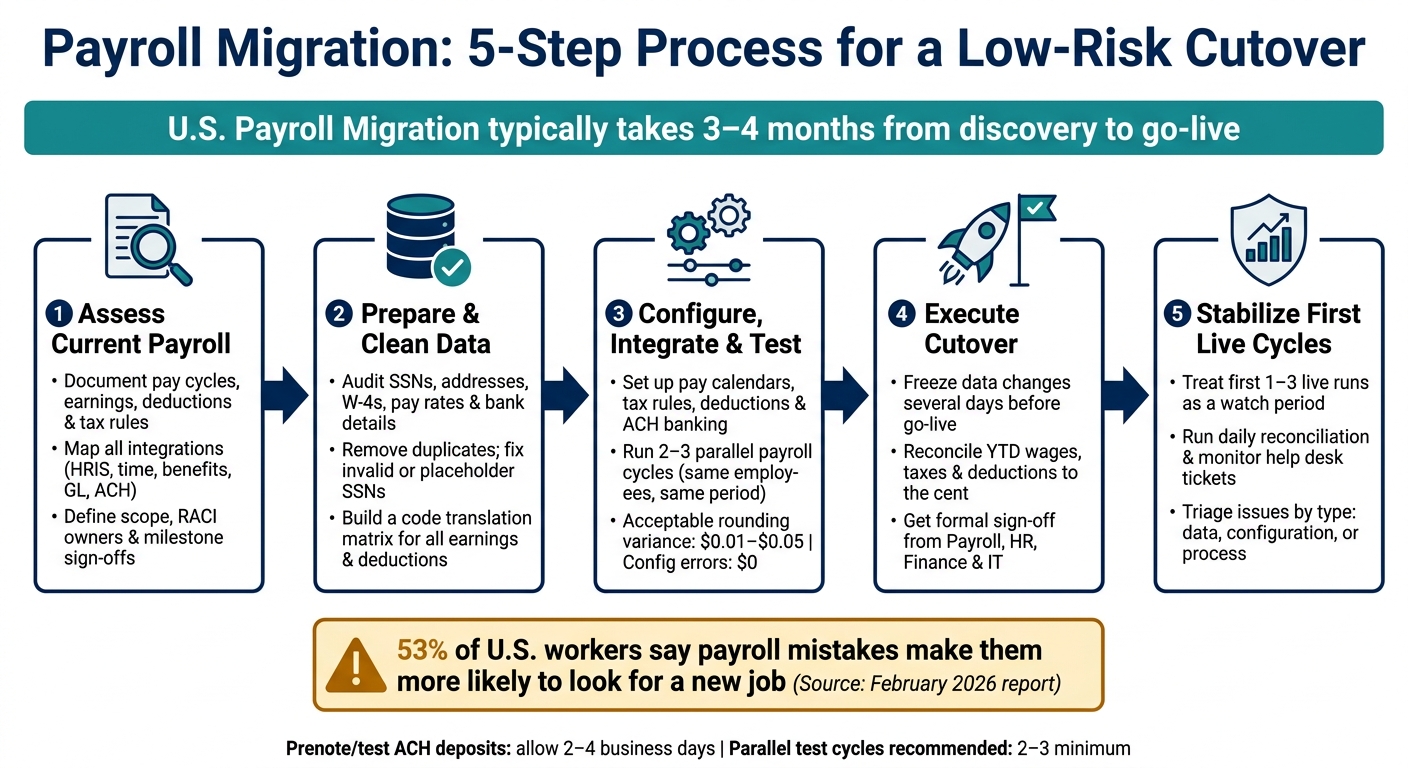
Payroll Migration: 5-Step Process for a Low-Risk Cutover
1. Assess current payroll processes and define migration requirements
Start with what you do today. That’s the base layer of the whole migration, and most payroll risks come straight from the current setup. Payroll mistakes are common and expensive, so a detailed review helps stop those same issues from showing up again in the new system.
Document pay cycles, earnings, deductions, taxes, and approval workflows
Write down every payroll input and rule. That includes pay frequency, pay-period dates, payday rules, earnings types, deduction rules, tax withholdings, and approval steps.
For earnings, include regular wages, overtime rules, shift differentials, bonuses, commissions, retro pay, and reimbursements. Just as important, note how each item is calculated. If a bonus is flat-rate, say that. If overtime changes by state or union agreement, spell that out.
Deductions need the same level of detail. List every pre-tax item, such as 401(k), health, dental, and HSA, plus every post-tax item, such as garnishments, union dues, and after-tax benefits. Include:
- Priority order
- Annual limits
- How each deduction changes taxable wages
Taxes need a full map too. Document federal obligations, including FICA Social Security at 6.2%, Medicare at 1.45%, federal income tax, and FUTA, along with every state and local withholding rule that applies.
Approval workflows matter more than people think. Note who prepares, reviews, and approves each payroll run, what the cutoff times are, and how exceptions are handled. Also mark where segregation of duties is in place to lower fraud risk.
Then go back through the last 12 months of adjustment journals and off-cycle runs. Look for repeat issues. Talk to your payroll analysts. Ask where they still lean on Excel, which steps take the most time, which ones break most often, and which reports they need but can’t get today. Log every manual workaround with its description, frequency, owner, and risk level.
Set scope, timeline, and sign-off points
Once you know how payroll works now, decide what’s actually moving.
At a minimum, include all active employees with their full current pay profiles, W-4 elections, deduction setups, and direct deposit details. Then decide whether terminated employees are also in scope for W-2 reprints, year-to-date reporting, and audits.
Year-to-date balances need special care. Freeze them on a set date and carry them forward exactly. Those numbers feed directly into Form W-2 and Form 941 reporting.
For timing, a single-country U.S. payroll migration usually takes 3 to 4 months from discovery to go-live. Build the project around named milestones, exact dates, and a clear owner for each sign-off point.
A RACI model helps keep decisions from getting muddy:
- Payroll owns calculation accuracy
- HR owns employee data
- Finance owns GL mapping
- IT owns integrations
- A senior leader owns go-live approval
Assign a named owner to every milestone. If no one owns a decision, it tends to sit there until it turns into a delay.
Once scope is clear, confirm what the new system must calculate, file, and exchange.
List US compliance rules and required system integrations
On the compliance side, document every federal, state, and local tax obligation your company has. That includes FICA, FUTA, SUTA, federal and state income tax withholding, and any city or county taxes tied to multi-jurisdiction employees.
Map each earning and deduction code to the right tax and reporting fields. If you have multi-state employees, flag them now. That’s one of the easiest places for wage-allocation errors to slip in.
On the integration side, list every system that sends data to payroll or gets data back from it. That usually includes time and attendance, HRIS, benefits administration, the general ledger, expense management, and ACH banking files.
For each connection, note:
- Data format
- Transfer method
- Frequency
This list becomes the backbone of your integration test plan.
With that inventory in place, you’re ready to map data fields and build test cases. You can also follow our step-by-step payslip workflow guides to streamline your document operations during the transition.
sbb-itb-b1c1928
2. Prepare payroll data and plan the migration approach
With the requirements set, the next step is getting payroll data ready for mapping and testing. This is where small data issues can turn into big payroll problems, so it pays to be careful early.
Inventory employee, tax, pay, deduction, and history data
Start by splitting payroll data into six core groups before touching anything else: employee master records, pay rates and job data, federal and state/local tax details, benefit deductions and contributions, garnishments and court-ordered deductions, and accrual balances and historical payroll results.
Employee master records should include legal name, Social Security number, date of birth, home address, hire date, employment status, job title, department, and FLSA exemption status. Pay data should cover hourly rates or salaries, shift differentials, overtime rules, bonus eligibility, and pay group assignments. Tax details need to include federal withholding elections, state and local withholding setups, SUI/SDI configurations, and any special statuses such as nonresident arrangements.
Move current-year YTD data and any required prior-year records into the new system. Then keep older records in a searchable archive for audit support.
It also helps to build a plain-English inventory for each data domain that shows the required fields, system of record, and owner. If something is missing, like SSNs, addresses, or tax codes, track it as an open issue instead of letting it drift.
Once that inventory is done, map each field to the new payroll structure.
Clean and map data to the new payroll structure
The most common issues in U.S. payroll migrations are duplicate employee records, missing or invalid SSNs, outdated addresses, and inconsistent earnings and deduction codes.
Duplicate records often come from rehires or simple manual entry mistakes. A good way to spot them is to cross-check SSN, name, and date of birth, then merge them into one active record while keeping the historical IDs in place. Invalid SSNs, including placeholder values like 000-00-0000, create compliance risk and need to be fixed before any data load happens. Old addresses can lead to the wrong state or local tax withholding and returned W-2s, so this is the right time to run address validation and ask employees to confirm their details.
After the data is cleaned up, build a code translation matrix that maps every legacy earnings and deduction code to its match in the new system. Group earnings by type, such as regular, overtime, holiday, bonus, commission, and retro pay. Then sort deductions into pre-tax and post-tax buckets so W-2 box mapping stays correct. For example:
- Pre-tax deductions can include traditional 401(k) and Section 125 health plans
- Post-tax deductions can include Roth 401(k) and after-tax premiums
Log every change with the timestamp, user ID, old value, new value, and reason. That audit trail can save a lot of trouble later.
After mapping is done, validate the load in staging before cutover.
Plan test loads, reconciliation, and payslip history access
Load data into a staging environment first, then check it before cutover.
Run 2–3 staged loads, starting with 10%–20% of employees. Compare gross pay, taxes, deductions, net pay, and YTD totals at the employee level. Acceptable tolerance for rounding differences is usually $0.01 or less. Any structural variance, like a missing tax or an absent deduction, needs a root-cause fix before moving forward.
Reconcile at the employee level, not just against company-wide totals. Company totals can look fine while individual records are wrong and simply cancel each other out. Put your toughest cases at the front of the line, especially multi-state workers, employees with garnishments, and people with multiple pay rates. Those records tend to expose mapping issues fast.
If employees need historical access after go-live, keep that access in place through archive search or self-service. Payslip history should stay available through an archive or employee self-service portal. A platform like CleverSlip supports this directly - it stores payslip history, generates professional PDF payslips with YTD totals, and gives employees self-service access to their records.
Load final history only after pay codes, tax rules, and integrations are stable.
These load checks prepare the ground for payroll setup and parallel testing in the next step.
3. Configure payroll, validate integrations, and run parallel tests
With the data loaded and mapped, the next step is to set up payroll rules, check each integration, and test everything before a single live payment goes out. When those controls are steady, you can move into cutover and first-cycle stabilization.
Configure pay calendars, tax rules, deductions, and banking details
Start with pay calendars. Set up each one in MM/DD/YYYY format and tie it to the right employee groups, such as hourly vs. salaried and union vs. non-union. Then work backward from each check date to set the key deadlines: time entry cutoff, manager approval, and the ACH file submission window.
Next, set up earning codes tied to GL accounts and pre-tax and post-tax deductions with limits and priority order. Tax setup comes next. Apply federal, state, local, and FICA/Medicare rules based on each employee's location. If you have remote or multi-state workers, map both work and residence states and include reciprocity rules.
For banking and ACH, collect each employee's routing number, account number, account type, and pay distribution rules. This part matters a lot. A bank file error can hold up payroll fast. Confirm ACH settings before the first live run, and coordinate with your bank on the NACHA file format, originator ID, and cutoff times. Run one test ACH file and check the file structure, totals, and cutoff timing before go-live. Prenote testing or small test deposits can take 2–4 business days, so make room for that in the project timeline.
After setup is done, use the mapped employee data from the prior step and verify each payroll calculation line by line.
Run parallel payroll tests and investigate variances
Once configuration is stable, run payroll in both the old system and the new one for the same pay period, using the same employees, hours, rates, and deductions. Freeze the test population before the first run so the comparison stays clean. Most implementation guides call for at least two or three parallel cycles. Start with a standard run first. Then test a cycle with known complexity, like overtime, bonuses, retro pay, or benefit changes, and generate payslips in bulk to verify the output for the entire group.
Compare results at the employee level. That’s where mistakes show up before they turn into a bad paycheck. Pull gross pay, each earning and deduction line, employer taxes, net pay, and GL summaries from both systems. Then log every variance with the employee ID, amount, category, likely cause, owner, and retest status.
A simple approach helps here:
- Group variances by cause
- Fix issues that hit multiple employees first
- Retest after each correction
- Track sign-off as issues are cleared
For pure rounding, acceptable tolerance is usually $0.01–$0.05 per check. Any variance tied to configuration should be zero before cutover. Also check GL postings, finance uploads, accrual reversals, and bank file confirmation. Don’t move ahead until you have at least three consecutive runs within the agreed thresholds and all material variances have a documented root cause plus sign-off from payroll, HR, finance, and compliance.
Those variance results should guide the next move: direct cutover, or one more parallel cycle.
Parallel run vs. direct cutover: how to choose
The best path depends on how complex your payroll is, how much capacity your team has, and how much compliance risk you’re carrying.
| Strategy | Advantages | Risks | Best fit |
|---|---|---|---|
| Parallel run | Higher confidence, line-by-line comparison, stronger variance analysis | More time, duplicate effort, heavier staffing load | Complex payrolls, multi-state teams, higher compliance risk |
| Direct cutover | Faster timeline, less duplicate processing | Higher go-live risk, less live validation | Simpler payrolls with low complexity and strong test results |
In plain terms, use a parallel run when payroll has moving parts - multi-state employees, garnishments, or several pay groups. Use direct cutover only when payroll is simple and test results are clean.
4. Execute cutover and stabilize the first payroll cycles
Once parallel testing is done and the sign-offs are in place, the job gets very simple in one sense: run the first live payroll accurately and on time.
Finalize the cutover checklist, freeze dates, and go-live approvals
Before go-live, lock in a formal cutover checklist. At a minimum, it should confirm migrated employee data, configuration sign-off for pay calendars, earning codes, deduction rules, overtime rules, and tax tables, YTD balance reconciliation, and ACH file validation.
You also need to reconcile year-to-date gross pay, taxable wages, taxes, and deductions to the cent against the legacy system. This is not the place for rough matches or “close enough.”
Set a hard freeze several business days before go-live. During that window, block changes to pay, tax, bank, or benefit data unless there is documented approval.
Be equally clear about the cutover boundary. Document the final legacy pay period and the first new-system pay period so there is no overlap and no gap. Tie that boundary to the final tested pay period, so the handoff picks up right where the parallel-run phase ended. For hourly employees, make sure timecards are assigned to one system only.
Go-live approval should include formal sign-off from payroll, HR, finance, and IT. That sign-off should confirm that all test cycles passed, ACH files were validated with the bank, and contingency plans were documented.
Once the checklist is approved, the focus shifts from internal controls to employee communication.
Communicate changes to employees, managers, and internal teams
Most employees do not care about the migration mechanics. They care about three things: when they’ll be paid, how to get their payslips, and who to contact if something looks off.
Send an initial notice 3–4 weeks before cutover, a detailed FAQ 1–2 weeks before, and a reminder a few days before the first payday in the new system. Tie every message to the approved payroll calendar and the cutover date.
For managers and time approvers, keep the message practical. Spell out new approval deadlines and escalation paths. For example:
All hours must be approved by 5:00 PM PT two business days before payday.
Finance and accounting need a different view. They should know how GL postings and payroll registers will appear in the new system and when to expect them.
Employees should also know where to find current payslips, how to get historical records, and who handles pay issues. Explain how YTD totals move across the cutover too. A plain-English note helps here, such as telling employees that YTD figures on the new payslip include earnings and taxes from both systems as of the cutover date.
Once employees, managers, and internal teams are aligned, the next step is tight monitoring during the first live cycles.
Monitor first pay runs and fix post-go-live issues
Treat the first 1–3 payroll cycles as a stabilization window after parallel testing and cutover. In other words, don’t run payroll as if it’s business as usual yet.
During this period:
- Run full reconciliation of net pay and key tax and deduction totals.
- Monitor help desk tickets daily.
- Limit configuration changes to urgent items only, with documented approvals.
When issues come up, triage them using the same categories used earlier in the project: data, configuration, and process.
- Classify the issue - data, configuration, or process problem.
- Review source records - compare the employee master, timecard, and pay setup to the source documents.
- Review outputs - check the payroll register, payslip, and ACH file.
- Test the fix in a sandbox - confirm the correction before changing production.
- Document the resolution - record the root cause, the fix, and any new control added.
Here’s what that looks like in practice. If multiple employees in one state show $0.00 in state income tax withheld, that usually points to a configuration problem with that state’s tax rules, not a string of unrelated data mistakes. The right fix is to correct the setup and add a pre-pay validation report that checks state tax withholding totals by work state each cycle. That’s how you stop the same issue from popping up again.
Assign a go-live lead to own prioritization during go-live, and give the payroll lead responsibility for variance review and sign-off each cycle. Define ahead of time who can approve off-cycle payments or configuration changes, and set a clear escalation threshold, such as more than 1% of employees reporting pay discrepancies.
5. Common payroll migration problems and how to address them
Common challenges and how to handle them
Even with a solid plan, payroll migrations tend to break down in the same areas: data, setup, integrations, governance, and communication.
A simple way to get ahead of problems is to sort them by where they start. That makes it easier to spot patterns, assign owners, and fix the right thing instead of chasing symptoms.
| Challenge | Likely cause | Mitigation |
|---|---|---|
| Inaccurate employee or tax data | Weak source data and incomplete audits | Run pre-migration audits, cleanse records, and validate high-risk fields (SSN, W-4, pay rates, bank details) |
| Payroll calculation errors | Misconfigured earnings, deductions, or tax rules | Reconcile gross, tax, deduction, and net-pay variances against the legacy run; fix the source setup before go-live |
| Integration failures | Poor interface mapping or missing ownership | Test end-to-end feeds early and assign interface owners |
| Stakeholder misalignment | No governance or approval model | Use a RACI, milestone reviews, and formal sign-offs |
| Employee confusion after go-live | Limited communication and training | Share clear timelines, access instructions, and support contacts |
Data quality is still the biggest migration risk. And it’s easy to see why. If Social Security numbers, state tax assignments, pay rates, bank details, or W-4 elections are missing or wrong, those errors can roll straight into bad pay, withholding mistakes, and compliance trouble. The safest move is to quarantine unverified records outside the live load.
There’s also a people impact here, not just a process issue. A February 2026 report found that 53% of U.S. workers say payroll mistakes make them more likely to look for a new job. That turns payroll accuracy into more than an admin task. It becomes a retention issue.
Some of the mess after go-live shows up on the employee side, even when payroll totals are technically right. People may not know where to find payslips, what changed, or who to contact. For employee-facing issues, CleverSlip's employee self-service portal and email delivery of PDF payslips can help employees access current and historical payslips after cutover. That can reduce help tickets and keep access to pay history in place.
Conclusion: Key steps for a low-risk payroll migration
Once these risks are under control, the focus shifts to the first live payroll cycles.
Low-risk payroll migration comes down to clean data, tested configuration, controlled cutover, and fast issue resolution in the first live cycles. Disciplined planning, accurate reconciliation, and clear communication are what keep employees paid correctly and on time.
FAQs
How do I know if parallel payroll is necessary?
Parallel payroll is a must when you're moving to a new automated payroll system. It checks the new setup by running the old and new systems side by side, then comparing the results line by line.
That side-by-side check helps you spot setup problems or calculation mistakes before they hit employees' paychecks. If you skip it, your first payroll run can go wrong. That can mean pay errors, compliance trouble, and a loss of employee trust. Run at least one parallel payroll cycle to confirm the numbers match.
What payroll data should be validated first?
Start with the records that matter most for accuracy and compliance:
- Timekeeping for non-exempt employees
- Employee records, including hires, terminations, pay changes, and W-4 updates
- Federal, state, and local tax details by work location
- Earnings and deductions, such as bonuses, commissions, 401(k) contributions, health premiums, and garnishments
This helps you catch errors before moving to the new system.
What should happen during the first live payroll runs?
Run a parallel cycle before you switch over. That means generating payslips in both your old system or spreadsheet and your new platform at the same time.
Then compare the results line by line. Check that pay amounts, calculations, and withholdings match before you finalize anything. It’s a simple step, but it can save you from a messy payroll error later.
If you’re moving to digital delivery, send both paper and digital payslips for one pay period. This gives you a clean way to test that email addresses are correct, spam filters aren’t getting in the way, and employee portal access works as expected.
Once both versions match and delivery checks out, retire the old process.
Payroll, simplified
Create structured payslip PDFs in minutes.
Build country-specific payslip documents, deliver them instantly, and keep a searchable history for audits and employee requests.
Start free