
4 Techniques for Payroll Data Analysis
_Payroll errors are expensive: one mistake can cost about _$291_ to fix, and many teams spend 12+ hours per month dealing with payroll issues._*
If I want payroll data analysis to work, I focus on four checks: variance analysis, trend review, employee-level audits, and rule-based exception checks. Together, they help me catch pay errors, tax issues, overtime problems, duplicate payments, and post-termination pay before they turn into IRS notices, wage claims, or employee complaints.
Here’s the article in plain English:
- First, clean the data: line up pay periods, check for duplicates, and fill missing fields.
- Then compare groups: look at payroll by department, location, pay type, or worker class.
- Next, review patterns over time: spot overtime drift, tax swings, and deduction gaps.
- After that, audit employee records: confirm pay rates, classification, and pay gap risks.
- Last, run rule checks: flag duplicate profiles, negative net pay, high hour totals, and payments after termination.
If I had to sum it up in one line: good payroll analysis is about checking the right data, at the right time, in the right order.
Quick Comparison
| Technique | What I use it for | What it can catch | Best time to run it |
|---|---|---|---|
| Segmentation and variance analysis | Compare payroll groups | Cost spikes, missing employees, mapping issues | Before payroll, monthly close |
| Trend analysis | Track changes across periods | Overtime growth, tax drift, deduction stops | Monthly or quarterly |
| Pay rate, equity, and classification audits | Check employee-level records | Rate mismatches, misclassification, pay gap issues | Quarterly or yearly |
| Exception and outlier checks | Flag odd transactions | Duplicate pay, negative net pay, post-termination pay | Every payroll cycle |
Bottom line: if you want fewer payroll mistakes, start with clean data and use all four methods on a set schedule.
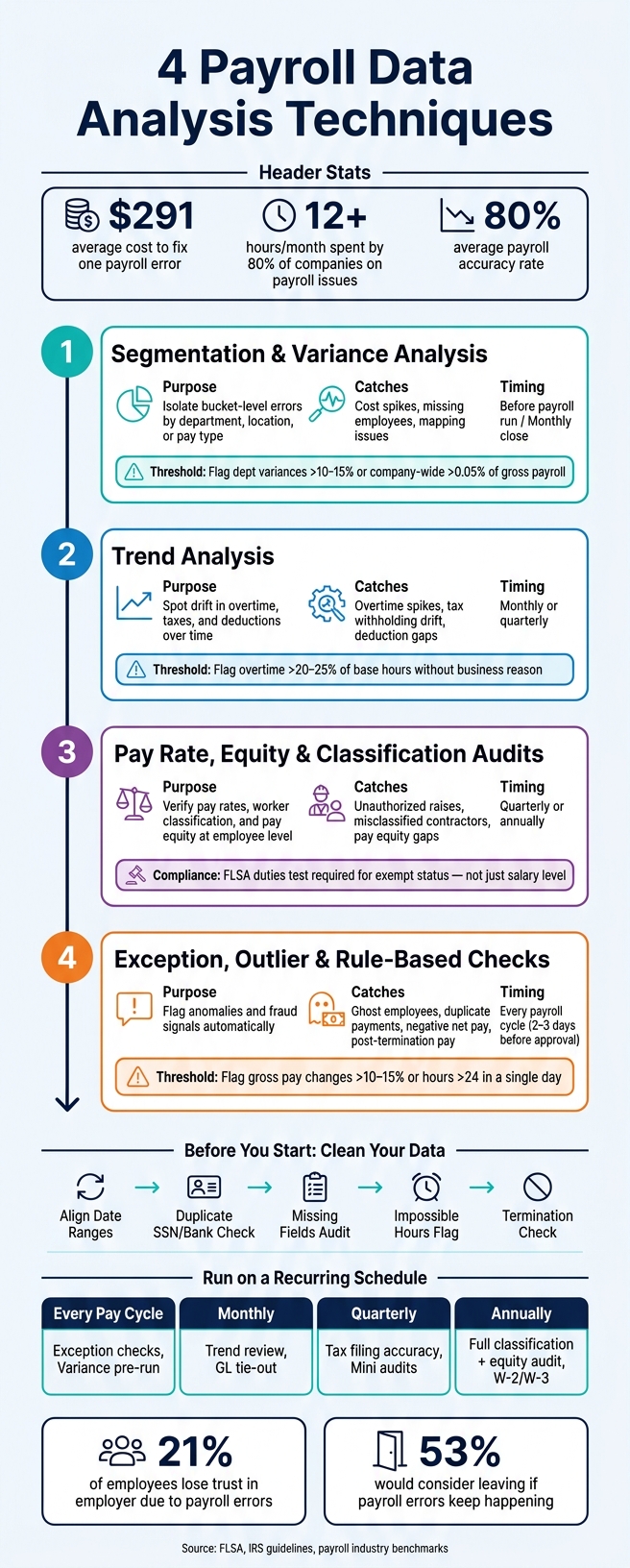
4 Payroll Data Analysis Techniques: A Complete Control Map
How to Analyse Payroll in Excel and Create Awesome Dashboard [Download the Template] | Udemy Sale
sbb-itb-b1c1928
Payroll Data to Review Before Analysis
Before you use the four techniques below, make sure your data is complete, lined up, and consistent. If you pull the wrong employee group or use date ranges that don't match, the rest of your analysis can point you in the wrong direction.
Start by pulling:
- Employee master data
- Time records
- Pay details
- Tax data
- Deductions
- Employer taxes
- Year-to-date totals
Once those datasets are in place, run three basic cleaning checks before you go deeper.
First, align your date ranges so your payroll register, attendance system, and general ledger all point to the same pay period and cut-off date. If one system is off by even a few days, variances can show up that aren't problems at all.
Second, run a duplicate-record check by flagging employees who share the same Social Security number, bank account number, or address. That's one of the simplest ways to spot duplicate payments or ghost employees before money goes out the door.
Third, audit for missing required fields such as bank details, job codes, or tax ID numbers. Also flag zero-hour entries, since they can point to a missed import or a broken handoff between systems.
Use a pre-payroll control sheet to compare expected hours and base pay against system output.
| Cleaning Step | What to Check | Why It Matters |
|---|---|---|
| Duplicate Check | Shared SSNs, bank accounts, addresses | Catches ghost employees and duplicate payments |
| Missing Field Audit | Tax IDs, bank details, job codes | Prevents processing errors and compliance gaps |
| Date Range Alignment | Cut-off dates across HR, attendance, and GL | Eliminates false variances from timing mismatches |
| Impossible Hours | More than 24 hours in a day | Identifies timecard errors or system import issues |
| Termination Check | Payments issued after an employee's end date | Stops unauthorized disbursements after separation |
With clean inputs in place, start with segment-level variance analysis.
1. Segmentation and Variance Analysis
Once your inputs are clean, segmentation lets you split payroll data into smaller groups - by department, location, pay type, employee class, or pay period - so comparisons are much more precise.
From there, compare the current period with the prior period, the budget, or both. Then narrow any variance to a short list of likely causes: timing, population changes, pay-mix changes, or mapping errors. One small mismatch can throw off the whole review, so before you dig in, make sure you're using the same pay period, the same timing rule, and the same employee population. If the same variance keeps showing up from one period to the next, shift to trend analysis to check whether the problem is growing or just coming back again.
When to Run It
Run this review before payroll is released. At month-end, a lighter check usually does the job. At year-end, do the full review.
Use these thresholds to decide when a variance needs attention:
- Department-level salary variances above 10% to 15%
- Company-wide variances above 0.05% of gross payroll
U.S. Compliance Focus
For U.S. employers, segment by pay type, employee class, and work location. That makes it easier to catch overtime issues, state tax mistakes, and local withholding errors. If the pattern sticks around, trend analysis can help you tell whether it's a one-off problem or something built into the process.
2. Trend Analysis for Overtime, Taxes, and Deductions
Segmentation helps you find where a variance shows up. Trend analysis tells you whether that issue keeps showing up over time.
That matters because a one-pay-period check can miss slow-building problems. Overtime might creep up bit by bit. A deduction might stop coming out without anyone noticing. Looking across multiple pay periods makes those patterns easier to spot.
If the same variance appears again and again, shift from a segment review to a trend review to see whether the issue is systemic.
Discrepancy Types This Catches
Trend analysis tends to expose three common problem areas: overtime spikes, tax withholding inconsistencies, and deduction mismatches.
For overtime, review overtime hours across pay periods and compare overtime pay to regular pay. A good rule of thumb is to flag any employee whose overtime goes above 20% to 25% of base hours without a clear business reason.
Tax withholding trends can be trickier. For example, a gradual drop in Social Security tax later in the year may be normal after an employee hits the annual wage base. But a sudden shift in federal or state withholding that doesn't line up with a W-4 change, a jurisdiction update, or a rate-table change deserves a closer look.
Then check deductions across pay periods against employee elections and remittance timing. Make sure withheld amounts match elections and garnishments, and confirm that those amounts are remitted on time.
When to Review
| Review Frequency | Focus Area | Key Documents |
|---|---|---|
| Per Pay Period | Accuracy & fraud detection | Payroll Register, GL, Bank Statements |
| Quarterly | Federal/state tax filing accuracy | Form 941, Tax Deposit Records |
| Annually | Year-end reporting | W-2, W-3, Cumulative 941s |
U.S. Compliance Focus
Under the FLSA, overtime must be paid at 1.5x the regular rate of pay. That rate includes non-discretionary bonuses and commissions, not just the base hourly wage.
On the tax side, one common source of quarterly differences comes down to timing. A pay period may end in one quarter, while the check date lands in the next. The IRS says reporting must follow the check date, while internal payroll registers often follow the pay period end date. That small difference can make Form 941 totals look wrong even when the payroll math is fine. Trend review helps you catch that before the filing deadline instead of cleaning it up after.
3. Pay Rate, Equity, and Classification Audits
When segment or trend analysis points to a payroll issue, the next step is an employee-level audit. This review checks each record to confirm pay rate, worker classification, and pay equity.
Discrepancy Types This Catches
Three problems tend to show up most often.
Pay rate mismatches happen when payroll rates don't match the latest approved offer or merit increase. In many cases, the root cause is old data or stale pay-code mapping.
Worker misclassification can get expensive if it sits too long. That's especially true when exempt employees are coded as nonexempt, or when W-2 workers are treated as contractors.
Pay equity gaps are harder to spot without a structured review. A pay equity audit compares similar employee groups and flags gaps that can't be explained, especially when those gaps may be tied to protected traits.
Required Data
Use these sources together, not one at a time:
- Payroll Register
- Employee Pay Rate Report including FLSA exempt/nonexempt status
- Employee Roster showing active vs. terminated status
- Time & Attendance Report
- Signed offer letters
- Demographic data such as gender and race for equity analysis
This audit makes sense when a discrepancy needs a source-of-truth check across payroll, HR, and time records.
When to Review
Run a full audit once a year. Then run mini-audits each quarter after system changes, fast headcount growth, or expansion of remote teams.
| Audit Focus | Key Compliance Check | Core Data Source |
|---|---|---|
| Worker Classification | FLSA exempt vs. nonexempt; W-2 vs. 1099 | Employee Roster, Job Descriptions, IRS SS-8 criteria |
| Pay Rate Accuracy | Match to offer letters and approved merit increases | Employee Pay Rate Report, Payroll Register |
| Pay Equity | EEOC wage/benefit discrimination check | Compensation by role, tenure, and geography |
U.S. Compliance Focus
Under the FLSA, exempt status isn't based on salary alone. Employees also have to pass a duties test tied to what they actually do on the job.
That's where teams often slip up. Someone may be marked exempt because of a job title or pay level, even though their day-to-day work doesn't meet the test.
Once pay rates and classifications are confirmed, move to exception-based testing for missed or unusual entries.
4. Exception, Outlier, and Rule-Based Checks
After rate and classification audits, the last step is automated exception testing. This is where rule-based checks help you spot duplicate payments, negative net pay, missing deductions, and signs of fraud before payroll is approved.
Set a normal range first. Then flag anything outside it. For example, review any employee who logs more than 24 hours in a single day, any gross pay change above 10% to 15% from the prior cycle, or any payment sent after termination.
Discrepancy Types This Catches
The most common exceptions to flag usually fall into a few plain categories:
| Exception Type | Detection Method | Data needed |
|---|---|---|
| Duplicate Payroll Profiles | Automated cross-system matching on SSN, bank account, or address | Employee Master File |
| Duplicate Payments | Reconcile bank withdrawals vs. approved payroll | Bank Statements, Payroll Register |
| Negative Net Pay | Flag deductions exceeding gross pay | Payroll Transaction File |
| Unusually High OT | Flag any day over 24 hours or any overtime above approved limits | Time & Attendance Records |
| Active-Status Mismatch | Flag pay records where employee status conflicts across HR and payroll systems | HR System, Payroll Register |
| Missing Deductions | Flag deductions that stop unexpectedly or exceed the current gross pay | Previous Payroll Reports |
Required Data
Run exception checks from one central source that connects employee master data, time records, payroll registers, payment details, and W-4s. If that data lives in different systems and never meets in one place, things slip through the cracks.
When to Review
Run core exception checks 2 to 3 days before final payroll approval. Then reconcile again on a quarterly and annual basis.
U.S. Compliance Focus
For U.S. payroll teams, these checks should focus first on FLSA overtime rules. Nonexempt employees must receive 1.5x their regular rate for hours worked over 40 in a workweek, and bonuses must be included in the regular rate when required.
State rules add more to watch. In California, for example, daily overtime applies when an employee works more than 8 hours in a single day.
Tax withholding also needs close review. Check that FICA, FUTA, and SUTA contributions are capped the right way and match each employee’s current W-4. Use these rules before final payroll approval, then match the depth of review to the issue at hand.
Quick Reference: When to Use Each Technique
After rule-based checks, use this recap to pair the right analysis method with the right payroll risk.
Think of this table as a control map. Each technique catches a different kind of error at a different stage of the payroll cycle. That makes it much easier to build one repeatable payroll control process instead of relying on ad hoc reviews.
| Technique | Primary Purpose | Common Discrepancies Detected | Core Payroll Inputs | Best Timing |
|---|---|---|---|---|
| Segmentation & Variance Analysis | Isolate bucket-level errors | Budget overruns, unexpected salary spikes, missing employees | Payroll register, GL reports, departmental budgets | Pre-run or monthly close |
| Trend Analysis (OT, Taxes, Deductions) | Spot drift over time | Overtime spikes, tax withholding drift, benefit deduction creep | Historical payroll data, time-tracking logs, tax and benefit data | Monthly or quarterly |
| Pay Rate, Equity & Classification Audits | Check pay, classification, and equity | Unauthorized raises, misclassified contractors, pay equity gaps | Employee master file, contracts, job classification tables | Quarterly or annual |
| Exception, Outlier & Rule-Based Checks | Flag anomalies and fraud signals | Ghost employees, duplicate bank accounts, active-status mismatches | Master file data, termination logs, time entry data, bank details | Pre-run, every cycle |
Use pre-run checks every payroll cycle. Then layer in monthly, quarterly, and annual reviews for trend tracking, reconciliation, and compliance coverage.
For ownership, keep the split clear:
- Assign payroll to input validation and calculation
- Assign finance to general ledger tie-out and manual journal entries
Conclusion
Used together, these four techniques create a full control map for payroll review. No single check will catch every payroll mistake. Variance analysis, trend monitoring, classification audits, and exception checks each cover a different weak spot.
That system only works if you run it on a steady schedule. Use the four checks on a recurring cadence - per pay cycle, monthly, quarterly, and annually - so small variances don’t turn into normal practice.
The numbers make the case. Average payroll accuracy sits at about 80%, payroll errors cost about $291 each to fix, and 80% of companies spend 12 or more hours per month dealing with common payroll mistakes.
Payroll mistakes also damage trust. 21% of employees say they’ve lost trust in their employer because of payroll problems, and 53% would think about leaving if errors keep happening. That’s why a steady review process built around variance checks, trend monitoring, classification audits, and exception reporting matters so much.
If you use CleverSlip, payslip history and employee self-service can make pay-period reviews faster.
FAQs
Which payroll analysis technique should I start with?
Start by standardizing and consolidating your payroll data. Keep employee records, time and attendance, compensation, and tax data in one central source, and make sure the formatting is consistent across the board.
Once the data is clean, it's much easier to spot trends, run variance analysis, track KPIs like payroll accuracy rate, and build reports that mean something. CleverSlip supports this step by keeping payroll records organized and easy to access.
How often should I review payroll data?
Review payroll data at every pay cycle to make sure it’s right before you process payroll. Then, for internal audits, shift from once a year to quarterly check-ins.
That change matters more than it may seem. Quarterly audits help you catch issues early, not months later when fixing them turns into a mess. They’re especially useful after company growth, payroll provider changes, or when you start hiring remote employees.
Modern analytics tools can also scan 100% of payroll data each cycle. That makes it easier to spot fraud, errors, and compliance risks before they snowball.
What payroll errors are easiest to miss?
The payroll mistakes that slip through most often usually start with manual data handoffs between HR, finance, and time-tracking systems. That’s where things tend to fall through the cracks. A record gets missed, the same entry gets added twice, or an update shows up too late to make the current payroll run.
Other easy-to-miss problems include outdated pay rates, wrong job codes sitting in legacy systems, and approved salary changes or new hire details that don’t make it into payroll on time.
Payroll, simplified
Create structured payslip PDFs in minutes.
Build country-specific payslip documents, deliver them instantly, and keep a searchable history for audits and employee requests.
Start free