
Payroll Management Checklist for HR Professionals
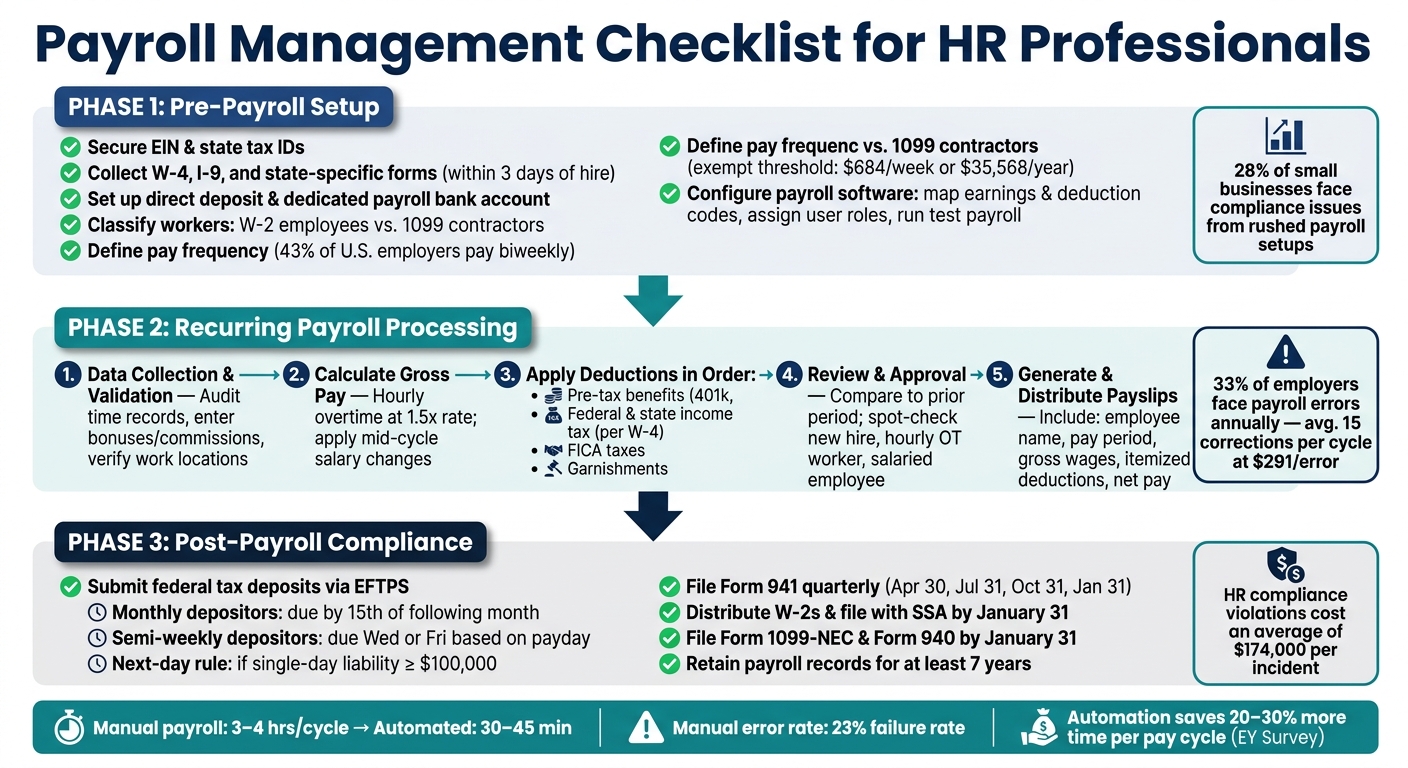
- Payroll Errors Are Costly: Mistakes affect 33% of businesses and cost an average of $291 per error per employee.
- Compliance Is Key: Payroll involves tax filings, worker classifications, and adhering to federal and state laws like FLSA and FMLA.
- Automation Reduces Errors: Manual methods fail in 23% of cases, while tools like CleverSlip save time and improve accuracy.
- Pre-Payroll Setup: Verify employee data, secure tax IDs, and define policies like pay frequency and overtime rules.
- Recurring Payroll Tasks: Validate time records, calculate gross pay and deductions, and review for errors before finalizing.
- Post-Payroll Obligations: Handle tax deposits, year-end filings (e.g., W-2s, 941 forms), and maintain records for at least 7 years.
Key Takeaway: Automating payroll tasks not only saves time but also ensures compliance and reduces risks. Tools like CleverSlip streamline processes, from payslip generation to audit trails, making payroll management more efficient.
Payroll Management Checklist: Pre, During & Post Payroll Steps
2025 Business Year-End Checklist: Payroll, HR, W-2s & Compliance Explained | Payroll & HR Webinar
sbb-itb-b1c1928
Pre-Payroll Setup Checklist
Getting your pre-payroll setup right is crucial to avoid compliance headaches and costly mistakes. In fact, around 28% of small businesses have encountered compliance issues due to rushed payroll setups. Taking the time to configure everything properly from the beginning can save you a lot of trouble down the road.
Employee and Company Information Setup
Start by securing your EIN and registering for any state-specific IDs needed for withholding and SUTA (state unemployment tax) in each state where your employees work. Make sure your legal business name, address, and entity type match across IRS records, state filings, and your payroll system. Any discrepancies can cause delays in filings.
Collect all necessary employee forms, including W-4, I-9, and any state-specific forms, within three days of hiring to ensure smooth payroll processing. For each employee, gather their full legal name, Social Security number (SSN), date of birth, home address, and email address. Federal Form W-4 is required for tax withholding, while Form I-9 confirms employment eligibility. Keep in mind that Section 1 of the I-9 must be completed by the employee on or before their first workday, and you must complete Section 2 within three business days of their start date. In states like California and New York, you’ll also need state-specific withholding forms, such as CA DE 4 or NY IT-2104.
For direct deposit, collect employees' bank routing and account numbers. It’s also a good practice to use a dedicated payroll bank account to manage tax funds separately.
Pay close attention to worker classification. Determine whether individuals are W-2 employees or 1099 contractors, and classify employees as exempt or non-exempt. For reference, the 2026 federal exempt threshold is $684 per week (or $35,568 annually). Misclassifying workers can lead to back taxes, penalties, and legal liabilities.
"Worker classification (employee vs. independent contractor) is the most consequential payroll decision - misclassification creates back taxes, penalties, and legal liability." - ECOSIRE Research and Development Team
Completing these steps before drafting payroll policies ensures no delays in your first pay cycle.
Policy and Compliance Configuration
Once employee data is verified, focus on documenting payroll policies and ensuring compliance. Define key details such as pay frequency (43% of U.S. employers pay biweekly), workweek start day, timesheet cutoffs, overtime approval processes, and PTO accrual rules. These policies must align with the Fair Labor Standards Act (FLSA) and relevant state labor laws.
On the compliance side, determine whether you're a monthly or semiweekly depositor based on the IRS "lookback period." If your total tax liability during the lookback period exceeded $50,000, you’ll need to deposit taxes semiweekly. Also, familiarize yourself with state-specific final paycheck laws. For instance, California requires immediate payment upon termination, while other states may allow payment on the next scheduled payday.
Here’s a summary of the key 2026 federal payroll tax rates to set up in your system:
| Tax Type | Employee Rate | Employer Rate | 2026 Wage Base |
|---|---|---|---|
| Social Security | 6.2% | 6.2% | Up to $176,100 |
| Medicare | 1.45% | 1.45% | No limit |
| Additional Medicare | 0.9% | 0% | Earnings over $200,000 (single) |
| FUTA | 0% | 0.6% (net) | First $7,000 |
When setting up deductions, follow the correct garnishment priority order: child support comes first, followed by tax levies (federal or state), student loans, and then consumer credit garnishments.
With your policies finalized, you’re ready to configure your payroll software.
Payroll Software Configuration
After setting up employee data and payroll policies, your next step is configuring your payroll software. This ensures automation and accuracy in calculations. Start by mapping your earnings codes (e.g., regular pay, overtime, bonuses, commissions) and deduction codes (e.g., taxes, health insurance, 401(k) contributions, garnishments). Assign user roles carefully, limiting permissions for data entry, review, and approval to maintain security and a clear audit trail.
Before going live, test your payroll system using dummy data for at least one salaried and one hourly employee. This helps confirm that calculations and withholdings are accurate, reducing the risk of errors on payday.
Recurring Payroll Processing Checklist
When it comes to payroll, accuracy and timeliness are non-negotiable. Mistakes can be costly - 33% of employers face payroll errors annually, with businesses averaging 15 corrections per cycle, costing about $291 per error. A dependable, structured process can help you avoid these pitfalls.
Data Collection and Validation
Start every payroll cycle by gathering and verifying essential data. For non-exempt employees, review time records for missed punches or unauthorized overtime. Update records for personnel changes like new hires, terminations, pay rate adjustments, or updated W-4 forms. Bonuses, commissions, and reimbursements should be manually entered, with clear deadlines in your payroll calendar for managers to provide these details.
Set a firm cutoff policy for late changes - decide if updates like a new address or bank account will be processed in the current cycle or deferred. For multi-state employers, confirm each employee's work location to ensure it matches your system's tax and state settings.
| Data Category | Verification Step |
|---|---|
| Timekeeping | Audit time records for missed punches and unauthorized overtime |
| Earnings | Enter bonuses, commissions, and retroactive pay |
| Deductions | Verify 401(k) limits, health premiums, and garnishments |
| Taxes | Confirm work location and state-specific withholding forms |
| Net Pay | Compare total ACH batch/checks against the payroll register |
Once all data is verified, move on to calculating gross wages and deductions.
Gross Pay and Deductions Calculation
With verified data in hand, calculate gross wages for each employee. For hourly workers, ensure overtime is calculated at 1.5 times the regular rate, factoring in all compensation types - not just the base wage. For salaried employees, apply any mid-cycle changes to the correct pay period.
Deductions should follow this order:
- Pre-tax benefits like 401(k) contributions and health premiums
- Federal and state income tax withholding per W-4 forms
- FICA taxes
- Garnishments
After completing these calculations, focus on reviewing the data for errors.
Review, Approval, and Error Prevention
Before finalizing payroll, run a payroll preview and compare totals to the prior period. Investigate any large, unexplained variances in gross pay, taxes, or deductions. Spot-check at least three employees: a new hire, an hourly employee with overtime, and a salaried worker, to ensure gross-to-net calculations are accurate. This step is crucial for compliance and efficiency.
"Multi-state payroll becomes stable when you treat work location as a controlled data field with a clear system of record, an effective-date discipline, and a review step." - HR Decision Guide
Tools like CleverSlip's live PDF preview allow you to review payslips before finalizing, helping catch errors like incorrect deductions or formatting issues. For manual or voided checks, document the gross amount, net amount, and all deductions to maintain an accurate payroll register.
Payslip Generation and Distribution
A compliant U.S. payslip must include key details like the employee's full name, pay period dates, gross wages, itemized deductions (taxes, benefits, garnishments), and net pay. States such as California, New York, and Texas may require additional details, such as hourly rates and total hours worked for salaried employees. Verify your state's specific requirements before finalizing the template.
Once approved, CleverSlip’s bulk PDF generation simplifies payslip distribution. Employees receive their payslips digitally, reducing distribution time and minimizing risks of misplacing sensitive information. This method also creates a secure digital record for each pay period, aiding your recordkeeping obligations.
Post-Payroll Compliance and Recordkeeping
Once payroll is processed, the next steps involve handling tax deposits, filings, and maintaining proper records. These tasks are crucial - HR compliance violations can cost businesses an average of $174,000 per incident.
Payments and Tax Filings
After running payroll, it’s essential to promptly address tax deposits and filings. Federal tax deposits must be submitted electronically through the Electronic Federal Tax Payment System (EFTPS). Your deposit schedule depends on your IRS classification:
- Monthly depositors: Taxes are due by the 15th of the following month.
- Semi-weekly depositors: Taxes are due on either Wednesday or Friday, depending on the payday.
However, there’s an exception: if your federal tax liability hits $100,000 or more in a single day, you’re required to deposit the funds by the next banking day - this rule overrides all other schedules.
| Deposit Schedule | Requirement | Deadline |
|---|---|---|
| Monthly | Lookback period liability ≤ $50,000 | 15th of the following month |
| Semi-weekly | Lookback period liability > $50,000 | Wednesday/Friday, based on payday |
| Next-Day Rule | Single-day liability ≥ $100,000 | Next business day |
| FUTA Deposits | Quarterly liability > $500 | Last day of month after quarter ends |
(Refer to for further details on deposit schedules.)
Once tax deposits are completed, attention shifts to periodic and year-end filings to ensure compliance with federal requirements.
Year-End and Periodic Reporting
Staying compliant means keeping up with quarterly and annual filings. Key deadlines to remember include:
- Form 941: Employer’s Quarterly Federal Tax Return, due April 30, July 31, October 31, and January 31.
- W-2s: Must be distributed to employees and filed with the Social Security Administration by January 31.
- Form 1099-NEC (for independent contractors) and Form 940 (FUTA): Both are due January 31.
If you’re filing 10 or more information returns, electronic submission is mandatory. Before distributing W-2s, verify employee Social Security Numbers, legal names, and mailing addresses. Errors in W-2s due to mismatched SSNs can lead to IRS penalties ranging from $60 to $310 per form.
Tools like CleverSlip can simplify this process by providing accurate wage and tax summaries, making quarterly reconciliations and year-end preparations more efficient.
Record Retention and Data Security
Proper recordkeeping is critical to compliance. Most payroll-related records should be retained for at least 7 years to meet federal and state requirements. This includes:
- IRS: Minimum of 4 years for employment tax records.
- FLSA: 3 years for payroll registers.
- State-specific requirements: For example, New York requires 6 years, while Illinois mandates 5 years.
Stephanie Wallaert, HR Strategic Partner at Atomus Partners, advises:
"I like to default to the most conservative route because a lawsuit could require documents from beyond what federal guidelines require you to keep documents for."
Sensitive records, such as I-9 forms, medical files, or investigation documents, should be stored separately to restrict access and reduce legal risks. Caitlin Kapolas from Lift HCM emphasizes:
"If you change payroll providers, the responsibility always rests with the employer, not the service provider. Ensure you have a full 'data dump' or archive of all historical payroll registers."
If you anticipate a lawsuit, audit, or Department of Labor investigation, immediately halt any planned record destruction. Implement a litigation hold to preserve all relevant payroll data.
Using CleverSlip to Improve Payroll Efficiency
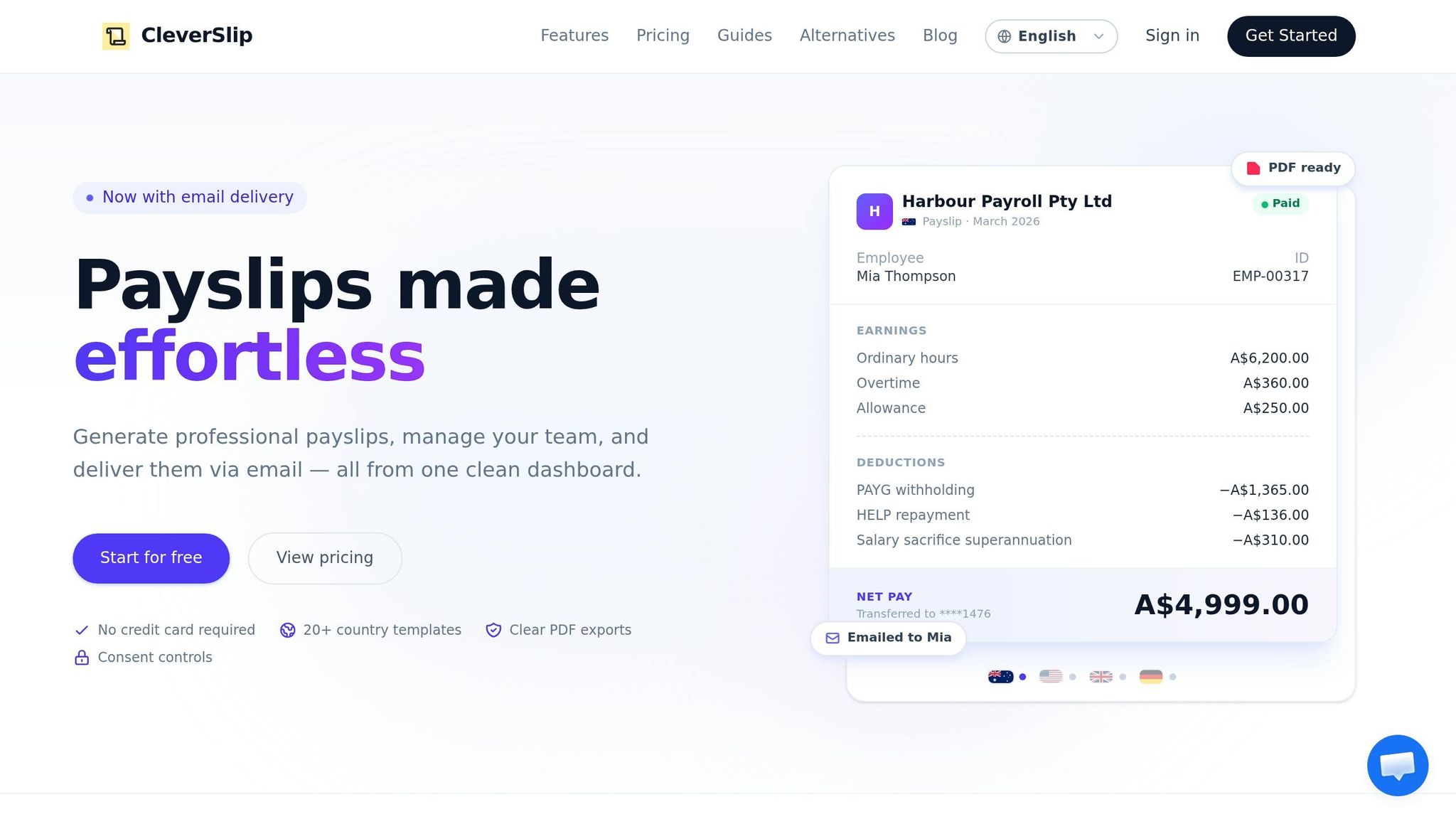
CleverSlip integrates seamlessly with existing payroll systems, simplifying post-payroll tasks and ensuring accurate recordkeeping. Payroll compliance and record management are already challenging enough, and manually generating payslips only adds to the workload - and the risk of common payroll mistakes. CleverSlip acts as a delivery and insights layer, taking over repetitive tasks so HR teams can focus on reviewing and addressing exceptions. Here’s how CleverSlip enhances workflows and accountability.
Automation and Workflow Optimization
Once payroll is finalized in your core system, CleverSlip steps in automatically. A webhook triggers the system to pull employee data and earnings details via API, eliminating the need for manual data exports. It then generates detailed, itemized payslips formatted to U.S. standards, including dollar amounts in $X,XXX.XX format, MM/DD/YYYY date formatting, and clear breakdowns for federal, state, and local taxes.
Payslip distribution is handled in bulk, replacing the need to send them one by one or print and mail paper statements. Payslips are delivered securely via email or through an employee self-service portal. Automated notifications reduce common HR inquiries, while any missing delivery details - like an absent email address - are flagged as exceptions for HR to address before they escalate into larger issues.
The time savings are substantial. Tasks that might take a small HR team 3–4 hours per pay cycle can be reduced to just 30–45 minutes, with most of that time spent reviewing flagged exceptions. According to an EY survey, companies relying heavily on manual payroll processes spend 20%–30% more time per pay cycle compared to those using automated tools like CleverSlip.
Audit Trails and Analytics
CleverSlip keeps a detailed log of every action in the payroll process, from who initiated the payroll run to when payslips were generated, sent, and accessed. These time-stamped records align with best practices recommended by the American Payroll Association, making it easy to resolve disputes or respond to internal audit queries without digging through email chains.
The system also provides an analytics dashboard that adds visibility into the entire payroll process. HR teams can track delivery success rates, identify patterns in errors, and monitor how often payslips need to be resent. If one department regularly causes corrections or a specific pay type frequently generates exceptions, the dashboard pinpoints areas needing improvement. The table below highlights the differences between manual payroll processes and CleverSlip's automated system:
| Dimension | Manual / Email-Based | Automated with CleverSlip |
|---|---|---|
| Data input | Manual export from payroll | Automatic pull via API/webhooks |
| Audit trail | Limited (email logs, file timestamps) | Detailed logs with timestamps, user actions, and dashboards tracking errors and trends |
| Error likelihood | Higher due to manual touchpoints | Lower; system-driven, rules-based generation |
| Time per cycle | 3–4 hours for a small team | ~30–45 minutes (focused on reviewing exceptions) |
| Scalability | Difficult as headcount grows | Scales easily with employee count and pay frequency |
CleverSlip’s Business plan, priced at $79/month, includes full API access, webhooks, and comprehensive audit trails - key tools for maintaining HR compliance and efficiency.
Key Takeaways for HR Professionals
A well-organized payroll checklist acts as a safety net for your operations and compliance efforts. By systematically addressing each stage - from initial setup to post-payroll compliance - you can reduce mistakes and ensure adherence to federal, state, and local regulations. This structured approach not only reduces errors but also promotes consistent best practices across all payroll activities.
As the Oyster Team aptly states:
"A structured approach to payroll management saves time, improves accuracy, and gives you both confidence and peace of mind that everything is running the way it should."
Accuracy and compliance are inseparable. Catching errors before payroll processing can save substantial costs. To keep operations smooth, consider these best practices:
- Conduct internal audits at least every quarter.
- Use a payroll calendar with deadlines set 2–3 working days before disbursement.
- Retain wage and tax records for the required periods to meet compliance standards.
Paying employees on time and without errors builds trust. Even small mistakes can erode morale, so timely and precise payroll is crucial for fostering a positive workplace environment.
Automation offers a game-changing advantage here. For example, small business owners spend nearly 5 hours per pay period managing tax calculations, filing, and remittance tasks. Tools like CleverSlip simplify this process by automating payslip generation, delivery, and audit logging. This frees HR teams to focus on more critical issues, while also speeding up payroll operations. With affordable plans suitable for teams of all sizes, automation tools like CleverSlip highlight the importance of streamlining payroll management.
FAQs
What payroll tasks should be automated first?
Start by automating tasks that are repetitive and prone to errors, such as payroll calculations, tax deductions, and generating payslips. By automating tax updates, you can ensure compliance with ever-changing regulations while minimizing the risk of mistakes. Take it a step further by introducing self-service portals, allowing employees to update their records and enabling bulk processing of payslips. These measures not only save time but also boost accuracy, giving HR teams more bandwidth to focus on higher-level priorities.
How do I avoid worker misclassification mistakes?
To steer clear of worker misclassification issues, it's essential to stay informed about the latest guidelines from the U.S. Department of Labor (DOL) and the IRS. Regularly evaluate how workers are classified, paying close attention to their job responsibilities and factors like the level of control over their work and financial independence.
Conducting internal audits can help catch potential misclassification issues early. Make sure to document important details about work arrangements and, if you're uncertain about a worker's status, consider filing IRS Form SS-8 for clarification. Keeping detailed records and consulting with legal or tax professionals when needed can go a long way in ensuring compliance and avoiding costly penalties.
What payroll records should I keep, and for how long?
Keeping payroll records is essential for both legal compliance and smooth business operations. Key documents to maintain include employee details, hire and termination dates, wage information, hours worked, deductions, net pay, tax forms, and leave records. These should generally be retained for at least 3–4 years.
For employment tax records, it's recommended to keep them for up to 4 years. This timeframe ensures you're prepared for audits and can address any compliance questions that may arise. Maintaining accurate records not only fulfills legal obligations but also helps prevent potential complications down the road.
Payroll, simplified
Create structured payslip PDFs in minutes.
Build country-specific payslip documents, deliver them instantly, and keep a searchable history for audits and employee requests.
Start free