
Employee Self-Service Portals: Benefits and Best Practices
Employee Self-Service (ESS) portals simplify payroll and HR tasks by giving employees direct access to their information, like payslips, tax forms, and leave balances. These platforms save time, cut costs, and improve accuracy by automating routine processes. For businesses, ESS portals reduce HR workload by up to 25 hours weekly and lower transaction costs from $25 to $4.50 per interaction. Employees benefit from 24/7 access to data, improved transparency, and tools like paycheck simulators. Key features to prioritize include secure logins, mobile-friendly design, and easy access to payroll documents. CleverSlip, for example, offers a cost-effective ESS solution starting at $9/month for small teams. Implementing an ESS portal requires clear goals, phased rollouts, and ongoing feedback to ensure long-term success.
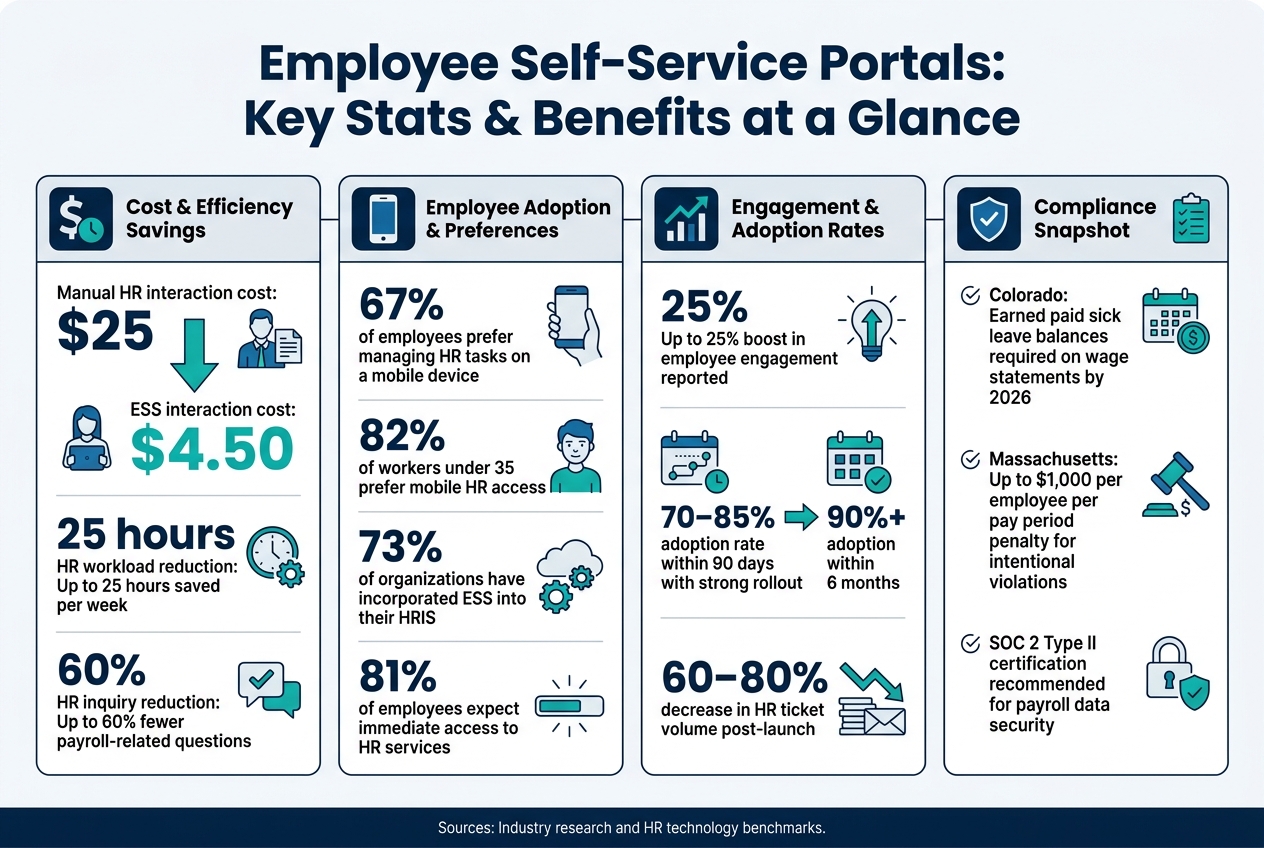
Employee Self-Service Portals: Key Stats & Benefits at a Glance
Core Benefits of Payroll-Focused ESS Portals
Efficiency Gains and Cost Reduction
ESS portals save time - lots of it. Tasks that used to take several minutes can now be done in seconds. For instance, updating an address manually might take 2 minutes when employees handle it themselves, and accessing a pay stub? Less than a minute. These time savings free up HR teams to focus on more strategic work like hiring and training instead of answering routine questions. On top of that, self-service systems slash costs. A manual interaction that could cost $25 or more now drops to about $4.50 per transaction - a big difference that adds up quickly, especially in larger organizations.
Transparency and Compliance
Having real-time access to things like pay history, tax summaries, and leave balances removes the guesswork and waiting time for employees. This level of clarity builds trust because employees can confirm their information whenever they need to. Plus, every action in the system is logged, creating a reliable audit trail for resolving disputes or compliance checks. Payroll regulations in the U.S. are becoming more demanding - like Colorado’s upcoming requirement for earned paid sick leave balances on wage statements by 2026 or Massachusetts’ steep penalties of up to $1,000 per employee per pay period for intentional violations. Automated systems help businesses stay compliant while also fostering employee trust, which naturally leads to better satisfaction.
Employee Satisfaction and Retention
Beyond improving processes, ESS portals empower employees by giving them instant, reliable access to their payroll information. In today’s workplace, convenience is non-negotiable. Research shows 67% of employees prefer managing HR tasks on a mobile device, and that number jumps to 82% for workers under 35. If a portal is clunky or not mobile-friendly, adoption rates plummet - especially among frontline workers. On the other hand, modern, easy-to-use ESS tools allow employees to get the payroll data they need instantly. This convenience drives engagement, with some companies reporting up to a 25% boost in employee engagement thanks to self-service features.
sbb-itb-b1c1928
Key Features to Look for in an ESS Payroll Portal
Not all ESS portals are created equal. The difference between a portal employees rely on and one they avoid often boils down to a few essential features. Here’s what you should prioritize.
Secure Access and Authentication
Payroll data is incredibly sensitive, so robust security measures are non-negotiable. Look for portals that include multi-factor authentication (MFA), 256-bit SSL encryption, and automatic session timeouts to protect user data. For tasks like updating bank account details, requiring MFA adds an extra layer of security. Role-based access control (RBAC) is another must-have, ensuring only authorized users can access specific information.
One critical but often overlooked feature: the portal should automatically revoke access when an employee is offboarded. By linking the ESS system to offboarding workflows, you can prevent former employees from accessing sensitive data after their departure.
"The bigger security risk is actually the pre-ESS process: emailing Social Security numbers, faxing bank account details, or leaving paper forms on desks." - Hyring
Once security is in place, the focus shifts to features that simplify everyday payroll tasks.
Payslip and Tax Document Access
This is the bread and butter of any ESS portal. A well-designed system gives employees real-time access to their current and past pay stubs, along with downloadable PDFs of tax forms like W-2s, 1099s, and 1095-Cs. Offering this level of accessibility can cut HR inquiries by as much as 60%.
The portal should also allow employees to update their direct deposit information, W-4 forms, and contact details without needing HR assistance. Some portals go a step further with tools like a Paycheck Modeler, which lets employees simulate how changes to tax withholdings or benefits elections would impact their take-home pay. This small addition can save payroll teams from fielding countless questions.
Equally important is how the portal functions on mobile devices.
Mobile-Friendly Design and Usability
A secure portal isn’t enough - employees need to be able to use it easily on their phones. With 67% of employees preferring to access HR information via mobile devices, and that number jumping to 82% for workers under 35, a mobile-friendly design is essential. Simply shrinking a desktop site to fit a smaller screen doesn’t cut it.
During product demos, test the portal on a smartphone. Look for touch-friendly buttons, responsive layouts (no horizontal scrolling!), and quick task completion times - like submitting time-off requests in under 30 seconds. Features like push notifications for new pay stubs or tax document deadlines are also a big plus, keeping employees informed without requiring constant manual logins.
To ensure usability, focus on these key factors:
| Usability Factor | Why It Matters |
|---|---|
| Responsive/Native Design | Adapts seamlessly to any screen size or device type |
| Touch-Optimized UI | Designed for finger taps, not mouse clicks |
| Plain Language | Eliminates the need for extra training or guidance |
| No Horizontal Scrolling | Makes payroll breakdowns easy to view on small screens |
| Push Notifications | Keeps employees updated without manual effort |
A mobile-optimized ESS portal doesn’t just improve convenience - it ensures employees use the system regularly and effectively.
Best Practices for Selecting and Deploying an ESS Portal
Choosing the right ESS portal is just the beginning. How you implement and introduce it to your team determines whether it becomes a useful tool or just another forgotten piece of software.
Defining Requirements and Evaluating Options
Start by creating a "friction inventory" - a list of recurring challenges your team faces. For example, are employees constantly emailing HR for pay stub copies? Is updating personal details like home addresses overly complicated? Pinpointing these pain points ensures the ESS portal addresses real issues rather than adding unnecessary complexity.
Involve key stakeholders early, including payroll, HR, and frontline employees. Payroll teams will prioritize seamless integration with current accounting or HRIS systems, while employees will value quick and easy access - like viewing a pay stub on their phone in under a minute. Both perspectives are equally important.
Check the platform’s API documentation upfront. A portal that integrates smoothly with existing systems eliminates duplicate data entry and reduces payroll errors from the get-go.
"ESS isn't 'self-service for its own sake' - it's an approach that reduces dependency on manual handoffs and repeated questions, while improving the accuracy of the record." - PeopleWorX
Once you’ve nailed down the requirements, shift your focus to designing a rollout strategy that prioritizes usability.
User-Centered Design and Training
Don’t treat the ESS portal launch as a one-and-done project. A phased and thoughtful approach works best. Start by training managers - they’re the first point of contact for employees with questions. Once managers are comfortable, test the system with early adopters to iron out usability issues before a full rollout.
Encourage adoption by assigning employees a simple task during the launch, like updating their emergency contact information. This small step can significantly boost engagement early on.
When communicating the rollout, highlight how the portal benefits employees directly. For example, emphasize 24/7 access to pay stubs, the ability to update direct deposit details without paperwork, and bypassing delays from HR. Framing the launch around employee convenience often leads to better adoption rates.
A gradual rollout reduces confusion. Start with essential features like pay stubs and leave requests, then introduce advanced tools once employees are comfortable with the basics.
| Implementation Phase | Timeline | Key Activities |
|---|---|---|
| Foundation | Weeks 1–2 | Platform setup, data migration, admin testing |
| Pilot & Training | Week 3 | Manager training, early adopter testing |
| Launch | Week 4 | Company-wide rollout, first-task assignment |
| Review | Weeks 5–12 | Usage monitoring, support, and full review |
Once the portal is live, ensure its security and compliance measures are airtight.
Security and Compliance Considerations
Involve stakeholders not only to define the portal’s features but also to establish approval rules for sensitive updates. Self-service features like home address changes can be automated, but updates to tax withholdings or bank account details may require additional approval layers.
Take advantage of automatic digital audit trails for compliance and recordkeeping. This feature is crucial for meeting U.S. Department of Labor and FLSA requirements. Platforms like CleverSlip offer built-in audit trails, simplifying compliance reviews and reducing manual tracking.
"Employee self-service isn't designed to replace HR, but rather support HR departments and help employees take care of their more-routine tasks and requests." - Paycor
For businesses handling sensitive payroll data, prioritize platforms certified to SOC 2 Type II standards. This certification ensures the vendor’s security controls have been independently audited, offering more assurance than self-reported compliance.
How to Keep Your ESS Portal Working Well Over Time
Tracking Adoption and Satisfaction Metrics
Launching your ESS portal is just the first step - keeping it relevant and well-used over time is where the real work begins. To ensure your portal remains effective, you’ll need to consistently measure how employees interact with it.
A key metric to monitor is Monthly Active Users (MAU), which tracks the percentage of employees logging in and completing at least one action each month. Companies with strong rollout strategies often see adoption rates of 70–85% within 90 days, climbing to over 90% within six months, particularly during critical periods like tax season or open enrollment.
But don’t stop at logins. Broader metrics like HR ticket deflection, approval cycle time, and data error rate provide deeper insights into how well the portal is working and where it might need improvement:
| Metric | What It Measures | Benchmark |
|---|---|---|
| Monthly Active Users | % of employees logging in and completing actions monthly | >85% within 90 days |
| HR Ticket Deflection | Reduction in manual workflows and HR inquiries | 60–80% decrease |
| Approval Cycle Time | Speed of approvals for leave or data changes | Faster than pre-portal baseline |
| Data Error Rate | Mistakes in payroll or tax data | Consistent decline over time |
"If employees still message HR for time off, onboarding tasks, and basic policies after 30–60 days, adoption isn't a communication problem - it's a workflow problem." - HarmonyHR
If these metrics plateau after 60 days, it’s a sign that the portal’s workflows might need attention. Use these numbers as a guide to pinpoint and address issues, ensuring the portal stays user-friendly and efficient.
Making Improvements Based on Feedback
While metrics can identify problems, employee feedback helps you understand why those problems exist. A simple 1–5 rating scale at the end of each portal task is a quick way to gather insights and catch friction points early, before they lead to disengagement.
Regular reviews of portal activity can also uncover patterns. For example, if a particular feature has low usage, it could mean employees don’t know it exists, find it hard to navigate, or don’t see how it fits into their daily tasks. Pages generating frequent help-desk tickets are another red flag, signaling usability issues that should be prioritized.
To encourage long-term adoption, consider redirecting all routine employee inquiries to the portal for a couple of weeks. This helps reinforce self-service habits and reduces reliance on HR for tasks that the portal is designed to handle.
"Portal launches fail when employees are not given a compelling reason to change their behavior." - Kissflow
Using CleverSlip for Long-Term Portal Success
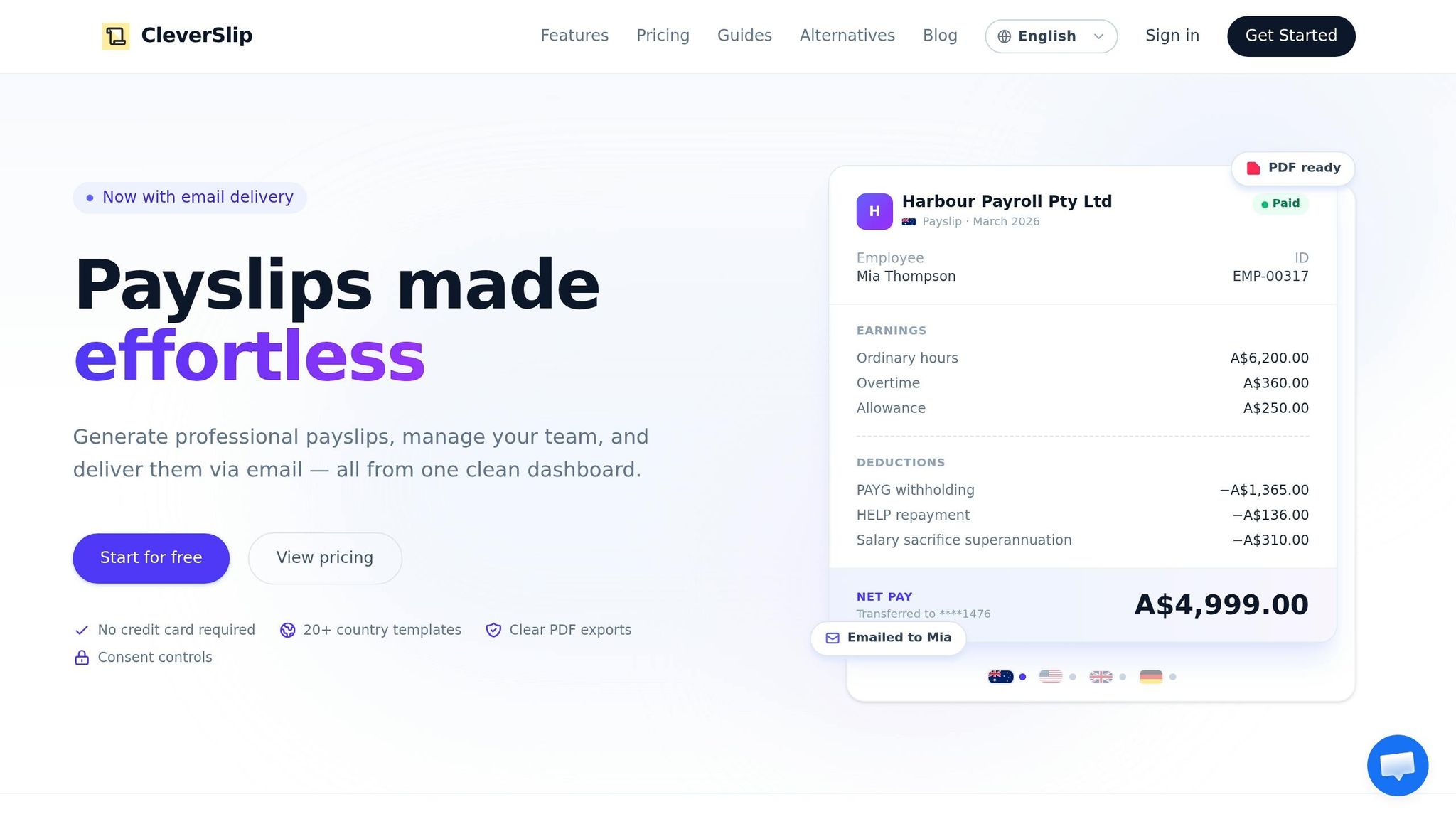
Keeping your ESS portal running smoothly over time not only streamlines operations but also builds trust in payroll and HR processes. CleverSlip simplifies this with its dashboard analytics, offering a clear view of portal activity. You can see which employees are using self-service features, track payslip access, and catch potential issues before they become widespread habits.
The platform’s audit trail feature, included with the Business plan, automatically logs every action - who accessed what, when, and what changes were made. This is invaluable for internal reviews and compliance, eliminating the need for manual recordkeeping. Plus, as your team grows, CleverSlip scales with you: the Pro plan removes employee limits, ensuring the portal can handle increased headcount without becoming a bottleneck.
CleverSlip also integrates seamlessly with existing HRIS or accounting tools through API and webhook connections, keeping data consistent across systems. This reduces errors and reinforces employee confidence in the portal. By combining actionable data insights with intuitive features, CleverSlip helps ensure your portal remains efficient, accurate, and a trusted resource for employees. A reliable portal that delivers up-to-date information is one employees will continue to rely on.
Conclusion
Employee self-service (ESS) portals have shifted from being a luxury to an essential part of modern payroll operations. By reducing manual processes and cutting costs, these tools have become integral to HR systems, with 73% of organizations incorporating ESS into their HRIS and 81% of employees expecting immediate access to HR services - similar to the convenience they experience with online banking.
Launching an ESS portal doesn't have to be complicated. Begin with straightforward, high-impact features like payslip access and PTO requests. Early training for managers and simple tasks, such as verifying emergency contact details within 48 hours, can encourage adoption. From there, track progress, gather feedback, and refine the system as needed. These steps make adopting an ESS portal a logical and efficient move.
"Employees don't dislike HR. They dislike waiting on HR." - ProHRPay
For businesses ready to make this transition, CleverSlip offers a scalable ESS portal designed to simplify payroll management while enhancing employee satisfaction.
An ESS portal isn't just a tool for efficiency - it's a statement that your employees' time and trust are priorities. It’s an investment that delivers benefits in productivity, cost reduction, and employee morale.
FAQs
What’s the fastest way to roll out an ESS portal without confusing employees?
Start with the basics: prioritize key features like automated access to pay stubs and simple self-service updates (think bank account changes or address updates). Ensure the portal is mobile-friendly so employees can access it on the go. Provide clear, step-by-step guides - complete with screenshots or videos - to help users navigate effortlessly.
To make things run smoothly, train managers early on how to handle approvals and processes within the system. Also, integrate the portal with your HR and payroll systems for real-time updates, ensuring everything stays accurate and up-to-date. Finally, position the portal as the go-to hub for pay stubs, tax forms, and similar documents. This can significantly cut down on HR-related emails and streamline communication.
How do we secure payroll data while still letting employees update their info?
Using a secure self-service portal is key to protecting employee data. Make sure the portal includes encrypted, password-protected access along with multi-factor authentication to add an extra layer of security.
To keep things even safer, implement user-based permissions. This ensures employees can only view or update their own information - nothing more. For sensitive changes, maintain an audit trail to track who made updates and when.
When it comes to documents like payslips, always encrypt them before delivery. And don’t forget to verify employee contact details regularly. This simple step helps prevent unauthorized access and reduces the chance of errors.
Which adoption metrics should we track to prove the portal is working?
To gauge success, focus on tracking a few critical metrics. Start with adoption rates - aim for 70-85% within the first 90 days. This means employees should log in at least twice and complete a self-service action. Keep an eye on HR ticket volume, looking for a 40-60% reduction in routine inquiries, which signals that employees are solving issues independently. Additionally, track mobile usage to confirm the platform is accessible on the go. Finally, evaluate which features generate the most engagement to understand what employees find most valuable.
Payroll, simplified
Create structured payslip PDFs in minutes.
Build country-specific payslip documents, deliver them instantly, and keep a searchable history for audits and employee requests.
Start free