
How to Choose Payroll Software for Your Growing Business
Managing payroll manually can cost you time and money. Small businesses spend an average of 17 hours monthly on payroll tasks, and 40% face fines annually for tax mistakes, averaging $850 per incident. In 2023, the IRS issued $8.5 billion in employment tax penalties. The solution? A reliable payroll software that saves time, reduces errors, and ensures compliance.
Here’s a quick guide to choosing the right payroll software:
- Assess Your Needs: Identify your workforce type (W-2 vs. 1099), pay structure, and multi-state requirements.
- Plan for Growth: Choose a scalable system that supports your 3-5 year business goals.
- Key Features to Look For: Multi-state compliance, automation, self-service portals, and integration with accounting/HR tools.
- Understand Pricing: Watch for base fees, per-employee charges, and hidden costs like year-end filings or corrections.
- Prioritize Security: Look for encryption, multi-factor authentication, and audit trails to protect sensitive data.
- Test and Compare: Use trials to evaluate features, accuracy, and customer support.
Payroll software isn’t just about cutting checks - it’s about improving efficiency, avoiding costly errors, and preparing for growth. Whether you’re managing a small team or scaling to hundreds of employees, choosing the right platform is critical for long-term success.
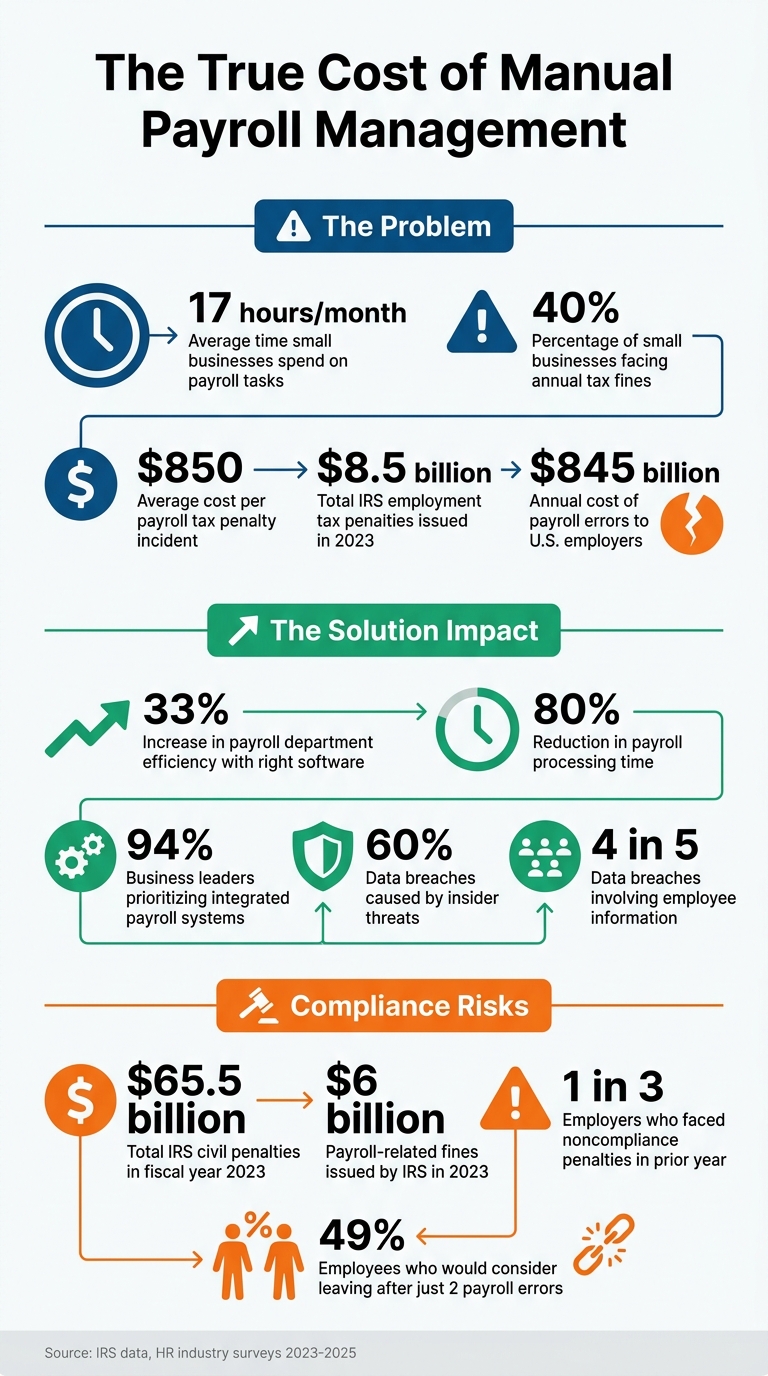
Payroll Software Benefits: Cost Savings and Efficiency Statistics
Assess Your Business's Payroll Needs
Identify Your Core Payroll Requirements
Start by taking a closer look at your workforce. Break down your team into W-2 employees and 1099 contractors, as some payroll platforms handle these groups differently - either through separate modules or varied pricing structures. Keep an accurate count of each category and assess whether you're managing hourly wages (including overtime), salaried roles, or more intricate setups like shift differentials or commission-based pay.
Next, list every state and locality where your employees work. This is crucial because tax rates and filing deadlines can vary significantly depending on location. The payroll software you choose should simplify managing these variations and ensure compliance with local tax laws.
Don’t stop at base pay - consider additional compensation. Do you offer performance bonuses, retirement contribution matching, or expense reimbursements? Make sure the software can handle these without tacking on extra fees. Also, check if the platform supports your preferred pay frequency and allows unlimited payroll runs for corrections or special payments without additional charges.
Once you’ve outlined your current needs, think about how these might change as your business grows.
Plan for Future Growth
Your payroll needs today might look simple, but they’ll likely get more complex as your business expands. Use your three-to-five-year growth plan to guide your decision. A system that works for a small team of 10 could become a bottleneck when managing payroll for 500 employees. Switching providers down the line can be costly and disruptive, so pick a platform that scales with your business from the outset.
As your business grows, payroll becomes more than just processing paychecks - it can turn into a strategic asset. Look for a system that integrates smoothly with your financial and HR tools. You might also need features like workforce analytics or labor cost forecasting as your team expands. Choose a platform that can handle increasing complexity without requiring a complete overhaul.
sbb-itb-b1c1928
How To Choose Payroll Software
Key Features to Look for in Payroll Software
As your business grows, your payroll system needs to keep up with increasing demands and complexity. Choosing the right software can make this transition smoother and more efficient.
Scalability and Flexibility
Payroll software should evolve alongside your business. A modular design is particularly helpful - it lets you start with the basics and add more HR features as needed. This way, you can manage costs upfront while expanding functionality over time.
If you employ remote workers, look for software that supports multi-state payroll processing. This ensures compliance with varying tax and labor laws across jurisdictions. Additionally, features like unlimited payroll runs allow you to handle off-cycle payments - like bonuses or corrections - without extra charges.
Modern platforms often consolidate HR and payroll into a single database. This setup reduces manual entry errors, minimizes discrepancies, and saves time during reconciliations. Plus, robust compliance tools ensure the system meets U.S. regulatory standards.
Compliance with U.S. Regulations
In fiscal year 2023, the IRS imposed over $65.5 billion in civil penalties, with $8.5 billion tied to employment tax issues. To avoid becoming part of these statistics, your payroll software must handle regulatory requirements effectively.
It should automatically calculate federal, state, and local withholdings using real-time tax tables. For remote or traveling employees, the software should track work locations and home addresses to apply the correct tax rules.
As one payroll expert noted, "The IRS doesn't give second chances for payroll tax deposits. Penalties start immediately if you miss a deadline or deposit the wrong amount."
Look for features like live alerts for compliance issues, such as missing tax registrations or unusual pay patterns. Time-stamped audit trails and secure record retention are also critical for meeting legal requirements.
Ease of Use and Employee Self-Service
An intuitive interface can simplify payroll processing and reduce training time for your team. Self-service portals are another must-have - they let employees update personal details, access pay stubs, and manage tax forms on their own. This reduces administrative tasks and helps prevent data entry errors.
Features like live PDF previews allow you to double-check payroll details before finalizing, ensuring accuracy. Integration with your existing business tools further streamlines operations, making the software even more user-friendly.
Integration with Other Tools
Payroll software works best when it integrates seamlessly with your other business tools. By syncing with your accounting system, it ensures financial data stays accurate and up to date. Integration with time-tracking tools is also essential for capturing employee hours correctly.
Be sure the software can connect directly with your accounting, time-tracking, and HR systems. Generic integration options might not be enough - you’ll want a solution that works smoothly with the tools you already use. This eliminates manual data entry and keeps your workflows efficient.
Evaluate Pricing and Plans
Understand Pricing Structures
Payroll software pricing usually includes a base fee combined with a per-employee or contractor charge. These base fees can range from $17 to over $130 per month, while the per-employee cost typically falls between $4 and $22 per month. Naturally, as your team grows, so will your expenses.
The choice between full-service and self-service plans is another important consideration. Full-service plans take care of tax filings and payments automatically, reducing your administrative burden but coming at a higher price. On the other hand, self-service plans require you to handle these tasks yourself, along with any associated risks. For businesses experiencing growth, full-service plans are often the preferred option despite their higher cost.
Be cautious of hidden fees. Additional charges might apply for services like generating year-end W-2s or 1099s, managing multi-state filings, handling benefits administration, or processing garnishments. Some providers also charge per payroll run, which can quickly add up if you frequently process bonuses or corrections. Corrections for payroll errors may also incur extra fees, further increasing your overall costs.
It’s essential to choose a plan that fits your current needs but also has the flexibility to scale as your business expands. With these factors in mind, let’s explore how CleverSlip’s plans cater to businesses with different requirements.
Compare Plans and Features
CleverSlip offers four pricing tiers, each tailored to different business stages and needs:
- Free Plan: This plan supports up to 10 employees and 50 payslips per month. It’s perfect for trying out the platform without any financial commitment.
- Starter Plan ($9/month): Designed for small teams, it allows up to 25 employees with unlimited payslips. This tier also includes email delivery and access to an employee self-service portal.
- Pro Plan ($29/month): Removes employee limits and introduces advanced features like bulk generation, live PDF previews, and company branding.
- Business Plan ($79/month): Offers the most comprehensive functionality, including API access, webhooks, an audit trail, and a dedicated account manager.
When comparing these plans, consider your total cost of ownership by factoring in your current headcount and anticipated growth over the next year. A plan that seems budget-friendly now could become costly as your team grows, especially if multi-state filings or other advanced features require upgrades. Also, confirm whether features like time tracking, HR support, or multi-state compliance are included or require moving to a higher-priced tier.
Ensure Data Security and Compliance
Secure Data Handling
Payroll data is a prime target for cyberattacks because it contains highly sensitive information like Social Security numbers, bank account details, home addresses, and salaries. Alarmingly, 4 in 5 data breaches involve employee information. This makes robust security features a must when selecting payroll software.
Key security measures to prioritize include:
- Data Encryption: Ensure the platform encrypts data both at rest and in transit using protocols like SSL/TLS.
- Multi-Factor Authentication (MFA): Adds an extra layer of protection, preventing access even if passwords are compromised.
- Role-Based Access Control (RBAC): Limits data access to only what each employee needs for their role.
"A breach in payroll data security can have catastrophic consequences. It can lead to identity theft for employees, massive financial penalties for the company, devastating lawsuits, and irreparable damage to the organization's reputation." - HR Certification
Audit trails are another critical tool, especially against insider threats, which account for nearly 60% of all data breaches. These time-stamped logs track every user action, such as accessing, editing, or approving documents, creating a clear record of activity. Additionally, modern platforms that use single database architecture eliminate risks tied to transferring data between separate HR and payroll systems.
When evaluating payroll software, look for vendors with third-party certifications like SOC 2 Type II, ISO 27001, or ISO 27701. These certifications demonstrate adherence to stringent security standards. By implementing these measures, you can protect sensitive payroll data while adapting to the ever-changing landscape of cyber threats and compliance requirements.
Regulatory Compliance Features
Staying compliant with tax regulations is non-negotiable. In 2023 alone, the IRS issued over $6 billion in payroll-related fines, often stemming from late or incorrect payroll tax deposits. A 2025 survey of 1,000 HR and finance professionals revealed that 1 in 3 employers faced penalties for noncompliance in the prior year.
To avoid these costly mistakes, your payroll software should:
- Automatically Update Tax Tables: Reflect changes in federal, state, and local tax rates, including Social Security wage base adjustments, new tax brackets, and labor law updates.
- Integrate Compliance with Security: Automated updates reduce risks linked to outdated tax rates and ease administrative workloads.
Secure employee self-service portals also play a role in compliance. These portals allow employees to verify their personal details and access pay stubs without relying on unsecured communication methods. This not only reduces manual data entry errors but also ensures payroll runs are accurate. Considering that 49% of employees would consider leaving their job after just two payroll errors, maintaining accuracy is essential to retaining talent.
Test Software Scalability and Support
Trial Software Features
Before committing to a payroll software provider, make the most of free trials and demos to see how the system performs in real-world scenarios. Many providers offer 30-day trials, giving you enough time to run actual payroll cycles and spot any potential problems. A good practice is to run at least one parallel payroll cycle alongside your current system to ensure tax calculations and compliance filings align with your existing records.
During the trial, try simulating real payroll operations. Test how the system handles bulk employee additions, generates custom reports, and manages multi-state tax filings and PTO accruals automatically. If you’re planning to expand into new states, ensure the software can handle tax registrations in those areas without requiring manual setup. Also, confirm that payroll data integrates smoothly with your accounting system, eliminating the need for manual data entry.
Accuracy is critical - small tax errors can lead to hefty fines. Use the trial period to validate the precision of tax calculations. These evaluations help ensure the software meets your needs and sets the stage for reliable long-term support.
Evaluate Customer Support
Testing the software’s features is only part of the equation - assessing customer support is equally important. During the trial, reach out to the support team, especially during payroll runs, to check how quickly they respond and whether you have access to a dedicated specialist with clear escalation options.
Support quality can vary widely. Some providers assign specialists who get to know your business, while others rely on tiered models where premium support comes at an extra charge. Pay attention to the onboarding process as well - hands-on assistance during implementation can make the difference between a smooth transition and weeks of headaches. Additionally, look for self-service portals, training materials, and detailed documentation to help your team stay informed about software updates and changes to tax regulations.
Conclusion
Choosing the right payroll software isn't just about simplifying processes - it’s about setting your business up for long-term success. The right tool can make your payroll department up to 33% more efficient and cut processing time by as much as 80%. Considering payroll errors cost U.S. employers a staggering $845 billion annually, the importance of avoiding costly payroll mistakes is hard to overstate.
When evaluating options, look for a solution that grows with your business. Whether you're expanding into new states, juggling full-time employees and contractors, or dealing with complex benefits packages, your payroll system needs to adapt. For example, CleverSlip offers a Pro plan at $29/month, which supports unlimited employees and includes must-have features like streamlined payslip generation and an employee self-service portal. If your needs extend to advanced integrations, their higher-tier plans provide options like API access and webhook capabilities. During your trial, test these features to ensure they align with your business's evolving demands.
"The value of any payroll tool isn't just in the features it offers, but in how well it integrates into your team's daily workflows." - Jason Herring, HR Executive
Before committing, confirm that the software delivers on compliance, integration, and user accessibility. Trial periods are perfect for running real-world payroll scenarios, verifying tax calculations across jurisdictions, and assessing customer support. With 94% of business leaders prioritizing integrated payroll systems, having unified data management is crucial to reducing manual errors and improving efficiency.
FAQs
Do I need payroll software if I use contractors?
If your business only works with contractors and doesn’t employ W-2 workers, you might not need payroll software. Managing 1099 payments can often be done manually or with simple tools. However, if you have both employees and contractors, payroll software becomes a valuable tool. It can handle tax calculations, automate filings, and help ensure compliance - minimizing the chances of expensive mistakes.
What payroll features matter most for multi-state teams?
Managing payroll for teams spread across multiple states comes with its own set of challenges. That's where these essential features come into play:
- Automated compliance: This ensures your business stays on top of state and local tax laws without manual effort.
- Accurate withholding and filings: Properly handles taxes for each jurisdiction, reducing errors and avoiding penalties.
- Work location tracking tools: Helps monitor where employees are working, ensuring compliance with wage and labor regulations.
These tools not only simplify payroll management but also help businesses navigate the complexities of operating across state lines.
What fees should I watch for in payroll pricing?
When evaluating payroll pricing, it’s important to keep an eye out for potential hidden fees. These might include setup charges, transaction fees, or additional costs for services like tax filing or direct deposit. Most providers charge on a per-employee, monthly basis, but the rates can differ significantly. Also, be mindful of tiered pricing structures that may increase as your business expands. To avoid surprises, always double-check what’s covered in the base price and thoroughly review contracts for any unexpected expenses.
Payroll, simplified
Create structured payslip PDFs in minutes.
Build country-specific payslip documents, deliver them instantly, and keep a searchable history for audits and employee requests.
Start free