7 Ways to Automate Payroll and Save Time Every Month
Manual payroll processes waste time, increase errors, and risk compliance issues. Automating payroll can cut processing time by up to 90%, reduce mistakes, and improve efficiency. Here's how you can streamline your payroll with these seven strategies:
- Automated Payslip Generation: Tools like CleverSlip can generate payslips in minutes with 99.9% accuracy, saving hours of manual effort.
- Automatic Email Delivery: Send payslips directly to employees’ inboxes without manual intervention, reducing admin workload and errors.
- Employee Self-Service Portals: Let employees handle updates like bank details or address changes, improving data accuracy and saving HR time.
- Bulk Payslip Generation: Process all payslips in one go and download them as a ZIP file, eliminating repetitive tasks.
- Custom Branding & Live Previews: Add your company logo and preview payslips before finalizing to ensure accuracy and professionalism.
- Automated Payroll History: Keep year-to-date totals and payroll records updated automatically, reducing manual tracking.
- Dashboard Analytics & Audit Trails: Monitor payroll data in real time and maintain detailed logs for compliance and reporting.
Automation not only saves time but also ensures compliance with tax laws, reduces costly errors, and enhances employee trust. Whether you're managing a small team or a large workforce, these methods can transform your payroll process.
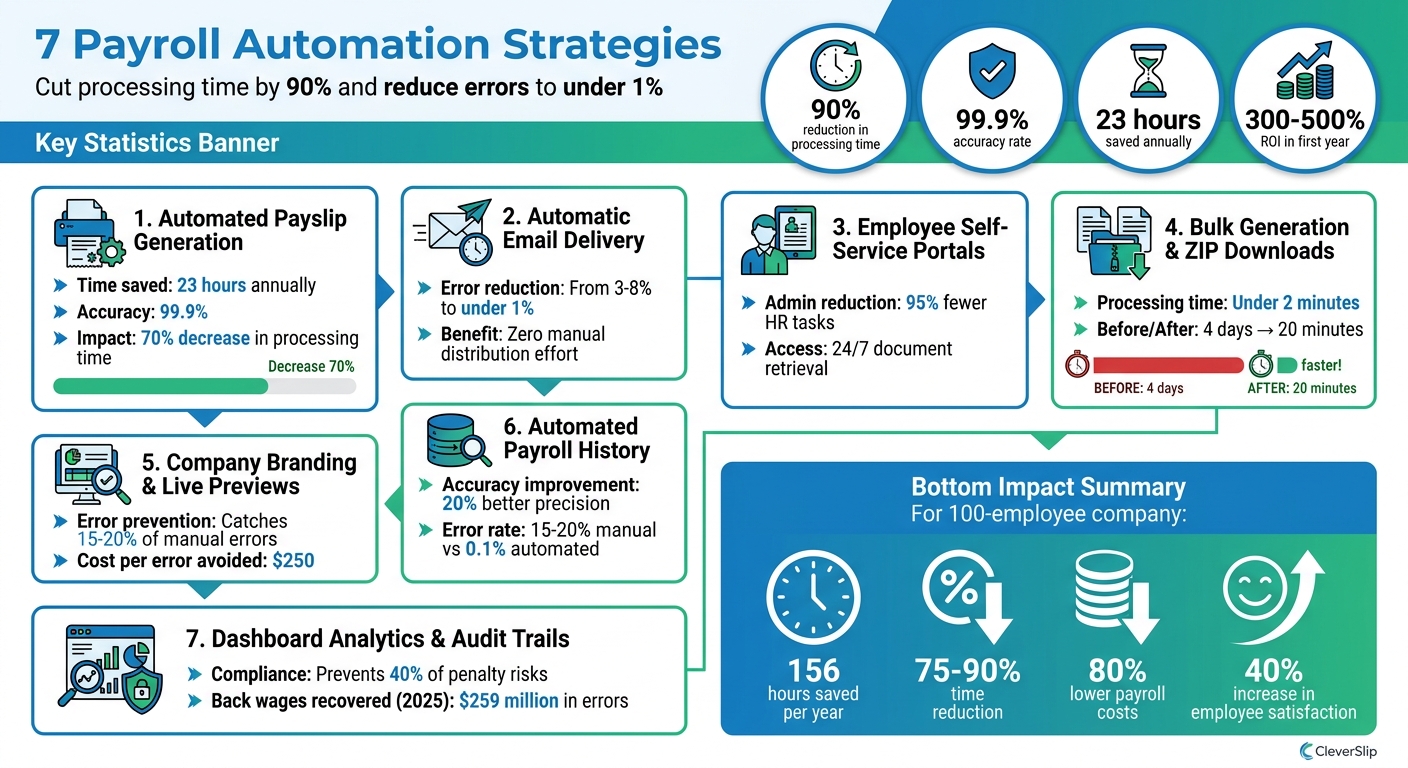
7 Payroll Automation Strategies: Time Savings and ROI Benefits
1. Use Automated Payslip Generation with CleverSlip
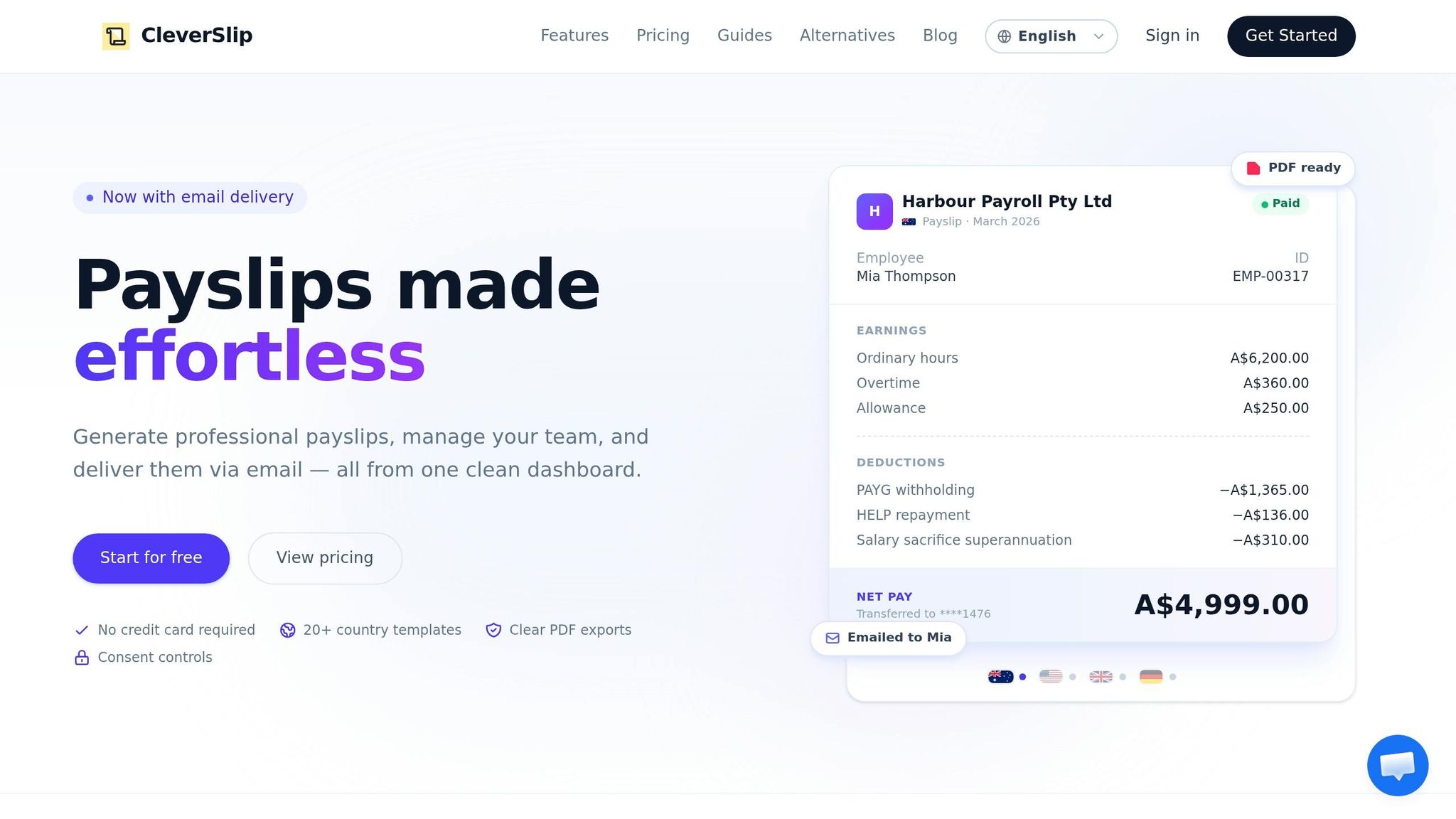
CleverSlip is a game-changer when it comes to streamlining payroll processes. By automating payslip generation, it saves time, reduces errors, and integrates seamlessly with your existing systems.
Time Savings in Payroll Processing
Creating payslips manually can eat up hours every month. CleverSlip cuts that time dramatically - what once took hours can now be done in under 30 minutes. That’s up to 23 hours saved annually, which you can redirect toward more strategic tasks. For instance, a mid-sized US retailer reported a 70% decrease in their monthly payroll processing time after adopting CleverSlip.
With just one click, CleverSlip processes all your payslips, turning a multi-day task into a matter of minutes.
Reduction of Manual Errors
Mistakes in spreadsheets are all too common - formulas break, copy-paste errors creep in, and manual entry issues affect nearly 10% of payslips. CleverSlip virtually eliminates these problems, delivering 99.9% accuracy through automated validation. It handles everything from overtime calculations to federal tax brackets and FICA withholdings, ensuring precise results every time.
Simple Setup and Integration with Existing Systems
Getting started with CleverSlip is quick and painless. Setup takes just 15–30 minutes, whether you use file uploads or APIs, and there’s a 95% success rate on first-time integrations. It works with popular systems like QuickBooks or ADP - no coding required. Just export your payroll data (employee IDs, wages in USD, and deductions), map the fields in CleverSlip, and customize your template with your company logo and MM/DD/YYYY date format. You’ll be ready to generate your first batch of payslips in no time.
To ensure everything runs smoothly, you can compare results from your old system with CleverSlip during the first pay cycle before fully transitioning.
Features that Improve Compliance and Reporting
CleverSlip simplifies compliance by automatically applying US tax rules, including state-specific deductions like California's SDI at 1.1%. It also generates W-2 ready reports and maintains searchable audit trails, making IRS compliance a breeze. HR experts highlight that this can reduce non-compliance fines by 80%, thanks to accurate and consistent documentation for every pay period, such as 04/15/2026.
With automated audit trails and easy access to W-2 reports, CleverSlip not only keeps you compliant but also makes record retrieval simple and stress-free.
sbb-itb-b1c1928
2. Set Up Automatic Email Delivery for Payslips
Manually delivering payslips can be a drain on time and resources. CleverSlip addresses this issue by automating the process, sending payslips directly to employees' inboxes without requiring manual effort. You can either schedule these emails for a specific time or set them to send automatically once payroll is finalized.
Save Time on Payroll Tasks
Automating payslip delivery significantly reduces the administrative burden. Instead of spending hours emailing payslips one by one or handling requests for old documents, your team can focus on more important responsibilities. This automation also minimizes time spent on follow-ups and ensures payslips are distributed efficiently, saving hours each month. Plus, it streamlines the process, making it more dependable and less prone to errors.
Fewer Manual Errors
Manual processes often lead to mistakes, like sending the wrong payslip or accidentally leaving someone out. CleverSlip's automation ensures that every employee gets the correct document on time. As Vanessa Kahkesh, Content Marketing Manager at Rippling, explains:
An automated payroll system largely eliminates the possibility of human error by assigning complicated calculations to machines.
With automated validation, error rates drop from 3–8% to under 1%.
Simple Setup and Seamless Integration
CleverSlip doesn’t just save time and reduce errors - it’s also easy to implement. Once you configure employee contact details, you can set delivery rules for scheduled or instant dispatch. It integrates effortlessly with your current payroll system and even prevents duplicate emails in cloud environments. This simplicity ensures a smooth transition to an automated process.
3. Add Employee Self-Service Portals
Employee self-service portals take routine payroll tasks off your HR team's plate. Instead of handling requests for pay stubs, updating bank information, or fixing timesheet errors, employees can manage these tasks themselves. This shift not only frees up time for your team to focus on bigger priorities but also improves data accuracy and boosts employee satisfaction.
Time Savings in Payroll Processing
These portals eliminate repetitive tasks by letting employees handle their own paperwork - like submitting I-9s, W-4s, and bank details - without HR involvement. Employees can also update their addresses, name changes, and time entries directly.
Take Shipley Do-nuts, for example. In March 2025, the company replaced four separate platforms with a single self-service solution. According to Human Resources Manager Shelley Archer and General Manager Bobby Archer, this change led to a staggering 95% reduction in administrative HR and payroll tasks.
Reduction of Manual Errors
Beyond saving time, self-service portals help reduce common errors in data entry. When employees input their own information, the risk of transcription mistakes drops significantly. Plus, with 24/7 access to pay stubs, W-2s, and payroll records, employees can quickly retrieve documents, ensuring payroll data stays accurate. Bobby Archer explained how empowering employees to correct their own time punches made a big difference:
"One of the features I was most excited about... is the employee's ability to edit their own time punches. If they did forget to clock in, they can submit it. Of course, it still gets reviewed. At the end of the day, it's just one less step."
Ease of Implementation and Integration with Existing Systems
CleverSlip’s employee self-service portal makes it easy to switch from manual to automated payslips. It integrates directly with your payroll system, so when employees update personal or banking information, those changes sync in real time - avoiding payment issues and keeping data current. The portal is mobile-friendly too, letting employees access pay stubs or request time off from anywhere. CleverSlip keeps setup simple and affordable, making it a practical choice for businesses.
4. Use Bulk Generation and ZIP Downloads
Manually processing payslips is a huge time sink. Think about it: generating each payslip one by one can take hours every pay period. But with bulk generation, that same task takes less than 2 minutes. Here’s how it works: upload a CSV file containing all your employee data, double-check the batch for accuracy, and download everything as a single ZIP file. This streamlined approach eliminates repetitive work and keeps your payroll workflow running smoothly.
Time Savings in Payroll Processing
The difference in time is staggering. On average, small business owners spend five hours per pay period on payroll tasks. Automating these processes can slash that time by up to 90%. Josh Franklin, an HR Program Manager, summed it up perfectly:
"Payroll now takes 20 minutes compared to four days."
With CleverSlip’s bulk generation, you only need to import your data once. The system validates it upfront, flags any missing fields or unusual entries, and generates PDFs in seconds. Plus, the ZIP download feature bundles all payslips into one file, so you’re not stuck juggling dozens of individual documents.
Reduction of Manual Errors
Manual payroll processes are prone to errors - mistakes that often come from repetitive data entry. Bulk generation eliminates this problem by pulling data directly from your payroll system. The built-in error review catches issues like missing deductions, incorrect tax calculations, or formatting problems before the PDFs are finalized. Every payslip uses the same template, ensuring consistent formatting and removing the variability that comes with manual creation. When combined with automated email delivery, bulk generation reduces manual steps throughout your payroll cycle.
Features That Enhance Compliance and Reporting
Staying compliant with IRS requirements, such as keeping at least four years of employment tax records, is much easier with an automated system. CleverSlip’s bulk generation feature creates a complete digital record of every pay period, simplifying audits and compliance checks. On top of that, the system automatically adjusts for changes in tax laws or minimum wage regulations at both state and federal levels. This reliable digital trail not only ensures compliance but also lays the groundwork for even more advanced payroll automation strategies. For developers, you can even automate payslip generation with an API to integrate directly with your existing software.
5. Add Company Branding and Live PDF Previews
Payslips are more than just documents - they're a reflection of your company. When employees receive generic payslips with third-party logos or inconsistent formatting, it can feel detached and impersonal. Adding professional branding transforms these documents into official records that reinforce your company's identity. CleverSlip makes this easy with tools to add your company logo, remove vendor branding, and include extra employee details. Once set up, these customizations are automatically applied to every payroll run. This combination of style and functionality not only strengthens your brand but also helps catch potential errors early on.
Reduction of Manual Errors
Branded payslips do more than just look good - they also improve accuracy. CleverSlip's live PDF preview feature ensures that all branding elements and calculations are displayed correctly before finalizing payroll. Did you know that manual payroll errors happen in 15–20% of cases, with each mistake costing about $250 to fix? With live previews, you can double-check calculations, tax withholdings, and deductions visually. The system also flags issues like missing tax IDs or incorrect direct deposit amounts, helping to prevent costly mistakes. As Sarah Chen, HR Director at TechFlow Solutions, shared:
"Since implementing automated payroll, our employee satisfaction scores for HR services increased by 40%. People love having instant access to their pay information and never worry about paycheck accuracy anymore."
Ease of Implementation and Integration with Existing Systems
Once errors are reduced, setting up branded payslips is simple and hassle-free. CleverSlip's platform doesn’t require any coding - just upload your logo, tweak the template, and preview the final design. From then on, your branding is applied automatically to all payslips, ensuring a consistent look without adding extra work each month. Combined with an employee self-service portal, staff can securely access their branded documents whenever they need, creating a seamless and polished experience that feels like a natural extension of your organization.
6. Automate Payroll History and YTD Totals
Time Savings in Payroll Processing
Tracking year-to-date (YTD) totals manually with spreadsheets can eat up hours of valuable time. Automated payroll systems simplify this process by recalculating YTD figures instantly with every payroll cycle. What used to take days can now happen in seconds. For example, CleverSlip not only generates payslips automatically but also includes a full payroll history and YTD totals directly on each PDF payslip. This means employees can easily see their total earnings, deductions, and tax withholdings without needing HR to run custom reports. With 24/7 access to W-2s, pay stubs, and tax documents through an employee portal, administrative requests drop significantly. These real-time updates save time and ensure more accurate record-keeping.
Reduction of Manual Errors
Manual payroll tracking is prone to errors - studies show an error rate of 15–20%, with each mistake costing about $250. In contrast, automation achieves 99.9% accuracy and improves payroll precision by 20%.
Features That Enhance Compliance and Reporting
Automation doesn't just reduce errors; it also strengthens compliance efforts. Digital audit trails automatically log every calculation and adjustment throughout the year, making month-end reconciliations and annual audits much smoother. No more digging through filing cabinets or outdated spreadsheets. CleverSlip, for instance, offers dashboard analytics that provide instant insights into historical trends, along with audit trails that track every change for compliance purposes. Some platforms are even integrating AI-powered natural language queries, allowing administrators to analyze YTD trends without exporting data or creating complex reports. By offering easy access to payroll history, these tools build trust with employees and make HR reporting more straightforward, aligning seamlessly with broader automation strategies discussed in this guide.
7. Track Data with Dashboard Analytics and Audit Trails
CleverSlip's dashboard analytics and audit trails are designed to make payroll management both faster and more precise. They don't just simplify real-time tracking - they also strengthen compliance processes across the board.
Time Savings in Payroll Processing
With dashboard analytics, payroll processing becomes significantly faster. Automated dashboards pull data directly from integrated systems, cutting down a task that used to take days or weeks to just seconds. Managers can now monitor labor costs, overtime trends, and budget variances in real time. This allows for quick financial adjustments when necessary, keeping everything on track.
Reduction of Manual Errors
Audit trails are a game-changer when it comes to catching and addressing errors. By documenting every validation, calculation, and change, they create a clear record of accountability. For example, if misclassified pay codes or incorrect tax withholdings occur, the audit trail helps identify the issue quickly. This is crucial, especially when considering that the U.S. Department of Labor recovered over $259 million in back wages in 2025 due to wage-and-hour mistakes. Additionally, proactive compliance alerts flag potential issues like missing tax IDs or direct deposit errors before they escalate, helping avoid IRS penalties that can range from 2% to 10%. This level of tracking ensures smoother compliance and reporting processes.
Features That Enhance Compliance and Reporting
CleverSlip's dashboard analytics go beyond error prevention by offering tools that simplify compliance and reporting. They provide instant access to historical trends and maintain a secure digital archive, which is incredibly useful during audits by entities like the Department of Labor, IRS, or SOX. Auditors can easily trace exceptions and verify calculations with confidence. Sensitive data is protected through role-based access controls, while documents are indexed by employee ID and pay period. This makes it easy to meet retention requirements - usually between 3 and 7 years - and retrieve records quickly when needed.
Wrapping It All Up
Automating payroll can completely change how your operations run by cutting down on time and minimizing mistakes. With the seven methods discussed, you could slash processing time by 75% to 90%, achieving nearly error-free results. Imagine turning an 8-hour task into a quick 2-hour job - freeing up your HR and finance teams to focus on more strategic priorities.
The financial perks are just as compelling. For instance, a mid-sized company with 100 employees could save around 156 hours each year while reducing payroll costs by up to 80%. That’s a return on investment of 300% to 500% within just the first year.
But it’s not just about time and money. Automation also ensures compliance and strengthens trust within your team. Automated systems stay up-to-date with tax codes and labor laws, helping to avoid penalties that hit over 40% of small businesses. Plus, features like employee self-service portals let staff access payslips and tax documents instantly, cutting down on HR’s administrative workload.
Platforms like CleverSlip combine all these automation methods in one place. From generating and emailing payslips in bulk to offering dashboard analytics and audit trails, CleverSlip scales to fit businesses of any size - whether you’re managing a small team or a large workforce.
If you’re just starting out, focus on one or two methods that solve your biggest challenges, and expand from there. By embracing automation now, you can reclaim valuable hours and channel that energy into growing your business.
FAQs
How do I know payroll automation will fit my current setup?
If you're wondering whether payroll automation suits your business, start by examining your current processes. Are you still handling tasks like data entry, calculating wages, or preparing compliance reports manually? These repetitive and time-consuming tasks are prime candidates for automation.
Payroll automation is most effective when it can integrate with your existing systems - such as employee databases, time-tracking tools, and accounting software. If your current setup allows for this kind of integration, automation can simplify your workflows, minimize errors, and save time by working seamlessly with the tools you already use.
What employee data is required to fully automate payslips?
To automate payslips effectively, you’ll need precise and complete employee data, such as:
- Personal details: Names, addresses, and pay periods.
- Compensation information: Hours worked or salary amounts.
- Deductions: Taxes, benefits, and other withholdings.
- Payment breakdown: Gross pay and net pay figures.
- Tax and benefits specifics: Withholding amounts and benefit contributions.
Having all this information ensures payroll processing is accurate, compliant, and customized for each employee.
How can I prove payroll compliance during an audit?
To demonstrate payroll compliance during an audit, it's essential to have all your records in order and ensure everything aligns with employment laws. Start by reviewing payroll records, including employee data, pay rates, hours worked, deductions, and tax withholdings. Cross-check these details with supporting documents like employment contracts, tax forms, and timesheets.
Keeping accurate and up-to-date records is key. Regular payroll audits can help you identify and fix errors before they become bigger issues. Additionally, using payroll compliance software can simplify the process. These tools automate calculations and verify filings, making it easier to meet legal requirements without the risk of manual mistakes.
Payroll, simplified
Create structured payslip PDFs in minutes.
Build country-specific payslip documents, deliver them instantly, and keep a searchable history for audits and employee requests.
Start free