
Payroll Software vs Manual Payroll: Which Is Right for You?
When deciding how to handle payroll, the choice often comes down to manual payroll vs. payroll software. Here’s the bottom line:
- Manual payroll is best for very small businesses (1–3 employees) with simple pay structures. It’s low-cost but time-consuming and prone to errors.
- Payroll software automates calculations, tax updates, and compliance, saving time and reducing mistakes. It’s ideal for businesses with more employees or complex payroll needs.
Key Stats:
- Payroll software reduces processing time by 65–80% and errors to <1%.
- Manual payroll has an error rate of 8–10% and takes 15–20 hours/month for 50 employees.
- Businesses save an average of $15,000/year using payroll software.
Quick Comparison:
| Factor | Manual Payroll | Payroll Software |
|---|---|---|
| Processing Time | 15–20 hours/month (50 employees) | 2–4 hours/month |
| Error Rate | 8–10% | <1% |
| Compliance | Manual updates required | Automatic updates |
| Scalability | Challenging as team grows | Handles growth easily |
| Cost | No software fees, but labor-intensive | Subscription-based, saves time |
If your business is small and payroll is straightforward, manual methods may work. But as your team grows or payroll becomes more complex, automation delivers efficiency, accuracy, and long-term savings.
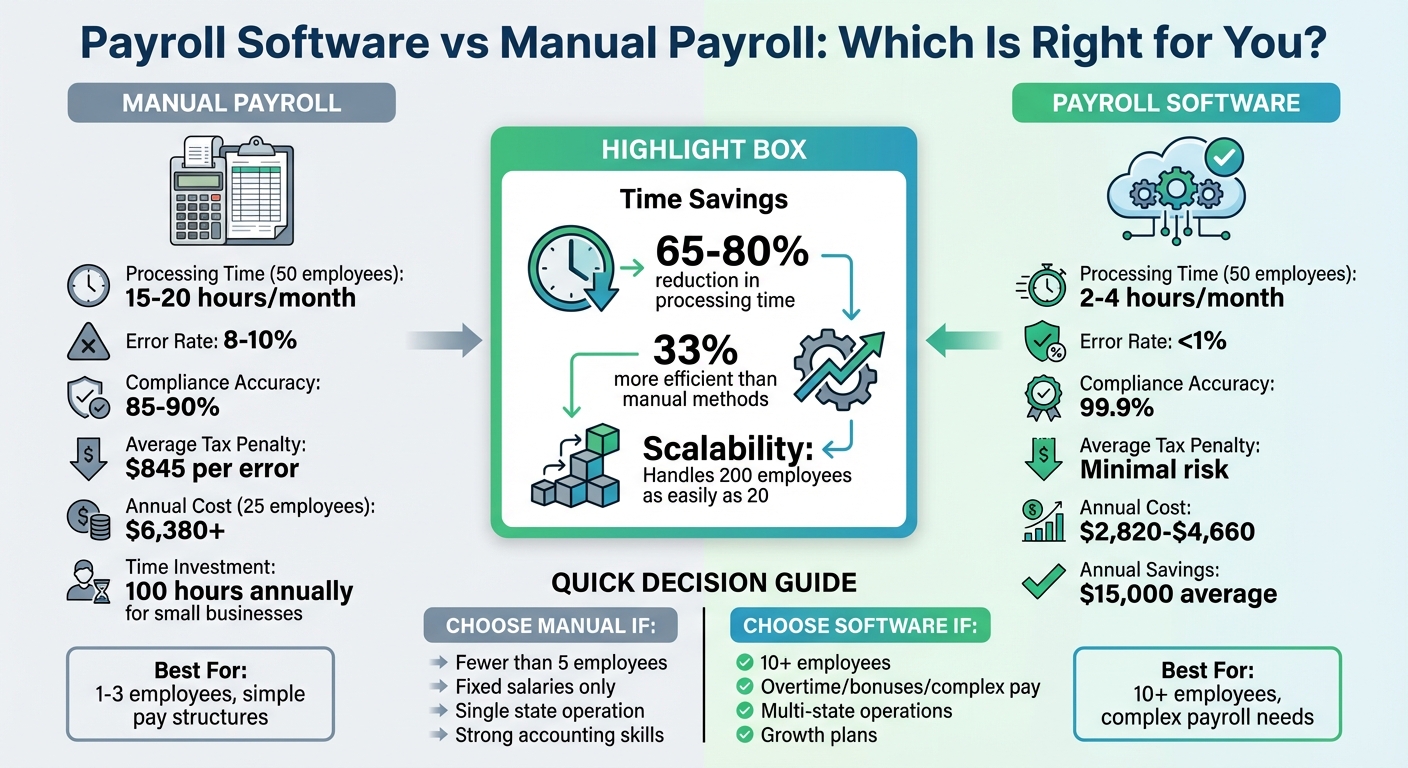
Payroll Software vs Manual Payroll: Time, Cost, and Accuracy Comparison
Manual vs Payroll Software - What's best for your business?
sbb-itb-b1c1928
What Is Manual Payroll?
Manual payroll involves calculating and processing employee wages by hand, without relying on automated software tools. This means you or someone on your team is responsible for every step, from tracking hours worked to calculating taxes and issuing paychecks. Picture spreadsheets, calculators, and paper records instead of software handling the workload.
The process starts with gathering essential employee documents like W-4s, I-9s, and your business's EIN. Then, you track hours - whether regular, overtime, or paid leave - and calculate gross pay by either multiplying hours worked by the hourly rate or dividing annual salaries by the number of pay periods. Next, you subtract pre-tax deductions such as health insurance premiums or 401(k) contributions and calculate statutory taxes like Federal Income Tax, Social Security, Medicare, and applicable state or local taxes. After that, you subtract any post-tax deductions, such as wage garnishments, to determine the employee's net pay. Payments are then issued via check or direct deposit, accompanied by a detailed pay stub.
Once payroll is processed, you must remit withheld taxes through the EFTPS (Electronic Federal Tax Payment System) and file quarterly or annual reports as required. Additionally, federal guidelines mandate that payroll records be kept for at least three years.
Manual payroll works best for micro-businesses with just one to three employees, especially if they have straightforward pay structures and fixed salaries. It’s essentially free - requiring only basic tools like a calculator and spreadsheet software - and provides complete control over every aspect of payroll. Plus, there’s no need to learn new technology or pay for subscription-based services, making it a cost-effective option for very small operations.
However, manual payroll isn’t without its challenges. On average, it takes about 8 hours per month to manage and carries an error rate of 1% to 8%, with penalties for mistakes averaging $845 per incident. In fact, nearly 30% of small businesses face payroll tax penalties annually. As your team grows or pay structures become more complex, the time commitment and risk of errors increase significantly - making manual payroll less feasible for expanding businesses. These difficulties often lead business owners to explore automated payroll solutions.
What Is Payroll Software?
Payroll software simplifies the process of calculating and distributing wages by using cloud-based platforms to handle everything from gross-to-net calculations to tax filings. Instead of manually tracking hours or using spreadsheets, tools like CleverSlip automatically manage base salaries, overtime, bonuses, and deductions - all while staying updated with changing tax laws and labor regulations.
These modern systems integrate seamlessly with time-tracking tools, reducing payroll processing time from days to just minutes. Employees benefit from self-service portals available 24/7, where they can download payslips, access tax documents like W-2s, and update personal details - without needing to rely on HR. For businesses, real-time dashboards offer insights into payroll expenses, overtime trends, and workforce costs, helping with better financial planning.
Security is a key feature of payroll software. Sensitive information like banking details and Social Security numbers is safeguarded with encryption and role-based access controls, eliminating the vulnerabilities of spreadsheets or paper files. Built-in error-checking tools catch issues like negative net pay or missing bank details before payments are finalized. This contributes to compliance accuracy rates of 99.9%, compared to the 85–90% accuracy typical of manual processes.
As of 2024, 62% of organizations have adopted cloud-based payroll systems - a 34% increase since 2019. Businesses using automated payroll report being 33% more efficient than those relying on manual methods. These systems are also highly scalable, capable of handling growth from 10 employees to hundreds with minimal additional effort. For example, processing payroll for 200 employees requires about the same effort as processing payroll for 20.
For companies with more complex payroll needs - such as those operating in multiple locations - the software handles bank transfers, multi-state tax compliance, and provides tamper-proof audit trails. Next, we’ll directly compare these automated solutions with manual payroll methods to help you decide which approach works best for your business.
Payroll Software vs Manual Payroll: Direct Comparison
Comparison Table
The differences between manual payroll and payroll software are striking. For instance, processing payroll for a 50-employee company manually takes around 15–20 hours per month, whereas payroll software can handle the same task in just 2–4 hours. That’s a 65–80% reduction in time. The error rates are equally revealing: manual payroll methods have mistakes in 8–10% of payroll runs, while automated systems keep errors to under 1%.
| Factor | Manual Payroll | Payroll Software |
|---|---|---|
| Processing Time (50 employees) | 15–20 hours/month | 2–4 hours/month |
| Error Rate | 8–10% | <1% |
| Compliance Accuracy | 85–90% | 99.9% |
| Scalability | Additional staff needed as team grows | Handles 200 employees as easily as 20 |
| Tax Updates | Requires manual tracking | Updates automatically |
| Average Tax Penalty | $845 per error | Minimal risk |
Factor-by-Factor Analysis
Time Investment is where payroll software shines. Small businesses using manual payroll spend around 100 hours annually on this task. As staff numbers increase, the workload grows exponentially. For example, managing payroll for 100 employees manually takes 35 hours per month, yet payroll software keeps the time needed steady at 2–4 hours, no matter the team size. This time efficiency has a direct impact on accuracy and compliance.
Accuracy and Compliance are critical for avoiding costly errors. The IRS estimates manual payroll error rates at 1–8%, and payroll mistakes can drive employees away - 49% of U.S. employees would consider leaving after experiencing two payroll errors. Manual systems also require you to monitor and implement tax law changes yourself, which explains why compliance accuracy for manual methods lingers around 85–90%, compared to the 99.9% accuracy achieved by payroll software. This improved precision not only reduces financial risks but also builds employee confidence.
"The real cost of payroll processing hides in places you don't expect. Overtime hours. Penalty notices from tax authorities. Employee trust issues when salaries arrive late or incorrect."
– Praveen Teotia, Director of Compliance and Outsourcing, HROne
Scalability becomes a major hurdle for businesses relying on manual payroll. Once your team surpasses 50–100 employees, additional staff is often required to manage the workload. In contrast, payroll software can process payroll for 200 employees with the same effort as it does for 20. This efficiency explains why companies using payroll software are 33% more efficient than those sticking with manual methods. Additionally, switching to payroll software saves businesses an average of $15,000 annually in administrative costs. These savings and efficiencies make payroll software a clear choice for scaling businesses.
Pros and Cons of Each Method
Building on our direct comparison, let’s explore the benefits and challenges of each approach.
Manual Payroll: Pros and Cons
Manual payroll has the advantage of low upfront costs since there are no recurring software subscriptions or licensing fees. It gives you complete control over every calculation, deduction, and adjustment without relying on external algorithms. Plus, there’s no learning curve, so you won’t need to train employees on complicated software or deal with technical glitches. For businesses with irregular pay schedules, such as seasonal or temporary staff, manual methods offer flexibility without being tied to rigid software cycles.
However, the drawbacks are hard to ignore. Manual payroll is time-intensive, with small business owners spending nearly 100 hours annually on payroll tasks. It’s also prone to errors, and each mistake costs an average of $291 to fix. The compliance responsibility rests entirely on you, requiring constant monitoring of tax laws, contribution limits, and labor regulations. Additionally, storing records in spreadsheets or paper files leaves them vulnerable to breaches, fraud, or physical damage. As your business grows, manual payroll becomes increasingly unmanageable, often requiring dedicated staff.
"Manual payroll might work great when you have two employees, but not so much when you grow to 10, 20, or more. The bigger your team, the more complex payroll becomes."
– Aamina Ahamed, RomeoHR
Payroll Software: Pros and Cons
Payroll software brings a different set of strengths and challenges to the table.
One of its biggest advantages is automation, which significantly reduces human error, bringing error rates below 1%. It also offers real-time compliance updates, automatically adapting to tax law changes to help avoid penalties. The time savings are substantial, with businesses saving an average of $15,000 annually in administrative costs and cutting payroll processing expenses by up to 80%. Features like employee self-service portals allow staff to access payslips and tax forms on their own, reducing HR inquiries. Additionally, payroll software includes built-in data security through encryption, secure cloud storage, and role-based access. It also scales effortlessly, handling 200 employees as efficiently as 20.
That said, there are some downsides. Subscription costs can add up. For example, CleverSlip offers a free plan for up to 10 employees and 50 payslips per month, but charges $9/month for its Starter plan (up to 25 employees), $29/month for Pro (unlimited employees), and $79/month for Business, which includes API access and a dedicated account manager. There’s also an initial learning curve, as staff need time to train and migrate data, which can temporarily slow operations. Software introduces technical dependencies, meaning outages or downtime could disrupt payroll cycles. Additionally, incorrect initial data entry can lead to persistent errors, a classic "garbage in, garbage out" scenario. Finally, businesses with highly specialized pay structures may find the software less adaptable to their unique needs.
These pros and cons highlight how each method suits different business scenarios, setting the stage for a more detailed cost analysis next.
Cost Comparison
Let's dive into how efficiency, accuracy, and scalability directly impact costs when comparing manual payroll with payroll software.
At first glance, manual payroll might seem cheaper because there are no software fees. But the hidden expenses can add up quickly. For a company with 25 employees, manual payroll processing costs over $6,380 annually. This includes staff time ($2,880), accounting support ($2,700), and printing and distribution ($600). On the other hand, payroll software typically costs between $2,820 and $4,620 per year, which covers subscription fees and minimal oversight. While software has upfront costs, the long-term savings and efficiency gains make a compelling case.
Manual payroll also comes with a heavy labor burden. It requires 15–25 hours each month for processing, plus an additional 5–8 hours to fix errors. These extra hours aren't just time-consuming - they also represent missed opportunities for focusing on revenue-generating tasks.
Errors are another costly downside of manual payroll. Each mistake costs around $845, with $291 spent on correcting the issue. Given that manual payroll error rates range from 1% to 8% per cycle, these costs can snowball quickly. In contrast, payroll software boasts an accuracy rate of over 99.9%, helping businesses cut payroll processing expenses by as much as 80%.
"Manual payroll isn't cheaper than software; it's just less visible. But hidden costs don't stay hidden forever. They show up in lost hours, tax penalties, or team frustration."
– PayProNext
For those considering CleverSlip, the pricing is straightforward and scalable:
- Free plan: Covers up to 10 employees and 50 payslips per month.
- Starter plan: $9/month for up to 25 employees.
- Pro plan: $29/month for unlimited employees, with features like bulk generation, live PDF previews, and company branding.
- Business plan: $79/month, offering advanced tools like API access, webhooks, an audit trail, and a dedicated account manager.
These plans make it easier for businesses to find a cost-effective solution that fits their needs while reducing the hidden expenses of manual payroll.
Which Option Should You Choose?
The best payroll approach depends on your team size, payroll complexity, and future growth plans. Let’s explore when manual payroll or automated solutions might be the better fit for your business.
When Manual Payroll Makes Sense
Manual payroll is a practical choice for micro-businesses with fewer than five employees and straightforward pay structures. If you’re a solo entrepreneur with a couple of part-time workers, all working similar hours in one state, a simple spreadsheet might get the job done. The key here is simplicity - no overtime, commissions, or multi-state tax complications.
That said, you’ll need to consider your own accounting skills and the time you can dedicate. If managing payroll eats into hours better spent growing your business or if tax compliance feels overwhelming, manual payroll might become more of a burden than a solution.
When Payroll Software Is the Better Choice
Automation becomes crucial as your team grows or your payroll needs become more complex. For businesses with 10 or more employees or those dealing with overtime, bonuses, or shift differentials, payroll software offers significant advantages. For example, while manually processing payroll for 100 employees could take up to 35 hours each month, software keeps processing time relatively steady, no matter how large your team gets.
Take CleverSlip Pro, for instance. At $29/month, it supports unlimited employees, making it ideal for businesses on the rise. Features like bulk payroll generation, live PDF previews, and custom branding can save time and effort as your company scales. For larger operations, the $79/month Business plan offers advanced tools like API access, webhooks, and audit trails to handle more complex needs efficiently.
"Payroll automation is rapidly becoming essential. While manual payroll might suit a micro-business, it becomes unsustainable as your business grows." – Marquee Solution
Automation also shines for businesses operating across multiple states or dealing with intricate tax requirements. If you’re navigating multi-state taxes, workers’ compensation insurance, or frequent tax law changes, payroll software can simplify compliance with automatic updates. Many businesses find that once they hit five employees, the time savings and reduced errors from automation become too valuable to ignore.
How to Decide for Your Business
Choosing the right payroll method for your business boils down to three key factors: your team size, the complexity of your payroll needs, and your plans for growth. As mentioned earlier, efficiency, cost, and error reduction are essential considerations when making this decision. For very small businesses - think fewer than five employees, all earning fixed salaries within a single state - manual payroll might suffice. However, as soon as you introduce overtime, bonuses, or multi-state tax obligations, the likelihood of mistakes and compliance issues rises significantly.
Start by calculating the cost of your current payroll process. Multiply the hours spent on payroll by your employee’s hourly rate, then factor in any penalties for late filings or errors. Keep in mind that manual payroll can take up to 20 hours a month for a company with 50 employees. If this cost outpaces the price of an automated payroll subscription, it’s time to consider automation.
Watch for signs that manual payroll is no longer cutting it. Frequent errors, compliance headaches, or employee complaints are clear indicators that your current system isn’t sustainable.
You don’t have to dive in headfirst, though. CleverSlip offers a Free plan that allows you to test automated payroll without any upfront costs. This plan supports up to 10 employees and 50 payslips per month, giving you the opportunity to run parallel systems for one or two pay cycles. This side-by-side comparison lets you confirm that the software’s tax calculations, deductions, and compliance features align with your manual results before fully committing.
Automated payroll systems don’t just save time - they make a real difference to your bottom line. Companies using these systems are 33% more efficient, and the average business saves $15,000 annually on administrative costs. Whether you’re ready to automate now or just exploring your options with a free trial, the goal is to choose a payroll solution that supports your business as it grows rather than limiting its potential. A thoughtful evaluation will help you find the right fit for your operations and future plans.
FAQs
When should I switch from manual payroll to payroll software?
When managing payroll becomes a tangled web of calculations, compliance checks, and manual data entry, it’s time to consider payroll software. Struggling with accuracy? Spending too much time on payroll? Dealing with multiple pay structures, taxes, or deductions? These are clear signs that manual methods are no longer cutting it.
As your business grows, so does the complexity of payroll. Automation helps you stay efficient, reduce errors, and handle compliance with ease. Investing in payroll software isn’t just about convenience - it’s about keeping your operations running smoothly and avoiding costly mistakes.
What payroll tasks can software automate besides calculations?
Payroll software does more than just calculate salaries. It takes care of tasks like managing tax filings, ensuring compliance with regulations, processing employee benefits, handling deductions, and creating detailed payroll reports. It also simplifies payment distribution, ensures taxes are paid on time, and keeps accurate records for audits. By automating these processes, it reduces manual work and helps minimize errors, making payroll management smoother and more dependable.
How do I move from spreadsheets to payroll software without mistakes?
To make the switch to payroll software seamless, start by auditing your spreadsheet data for any errors or inconsistencies. This ensures you're starting with clean, accurate information. Next, choose payroll software that aligns with your business requirements and carefully export and import employee data into the new system.
Before going live, run a test payroll to verify that everything is working as expected. Take the time to train your team on how to use the new system effectively. Once implemented, monitor outputs regularly to quickly identify and correct any potential errors. Following these steps can help you transition smoothly and minimize mistakes during the process.
Payroll, simplified
Create structured payslip PDFs in minutes.
Build country-specific payslip documents, deliver them instantly, and keep a searchable history for audits and employee requests.
Start free