
Complete Guide to Payroll Compliance in 2026
Payroll compliance in 2026 is more complex than ever, with stricter federal, state, and local regulations. Key updates include changes to tax forms, higher Social Security wage bases, and new reporting requirements under the One Big Beautiful Bill Act (OBBBA). Mistakes are costly - non-compliance averages $845 per employee annually, and over 50% of companies have faced payroll penalties in recent years. Here's what you need to know:
- Federal Changes: Revamped Form W-4 (now 5 pages), new W-2 codes, and increased Child Tax Credit ($2,200).
- Supplemental Wages: Federal withholding rates remain at 22% (up to $1M) and 37% (over $1M).
- State Rules: Multi-state payroll is challenging, with varying income tax, SUTA rates, and Paid Family and Medical Leave (PFML) requirements.
- Worker Classification: Misclassifications can result in fines exceeding $100,000. The DOL's updated "economic realities" test focuses on control and financial independence.
Automation is now critical for compliance. Tools like CleverSlip simplify payroll by automating tax calculations, updating records, and ensuring accuracy. With penalties rising and regulations becoming stricter, businesses must prioritize precision to avoid fines and retain employee trust.
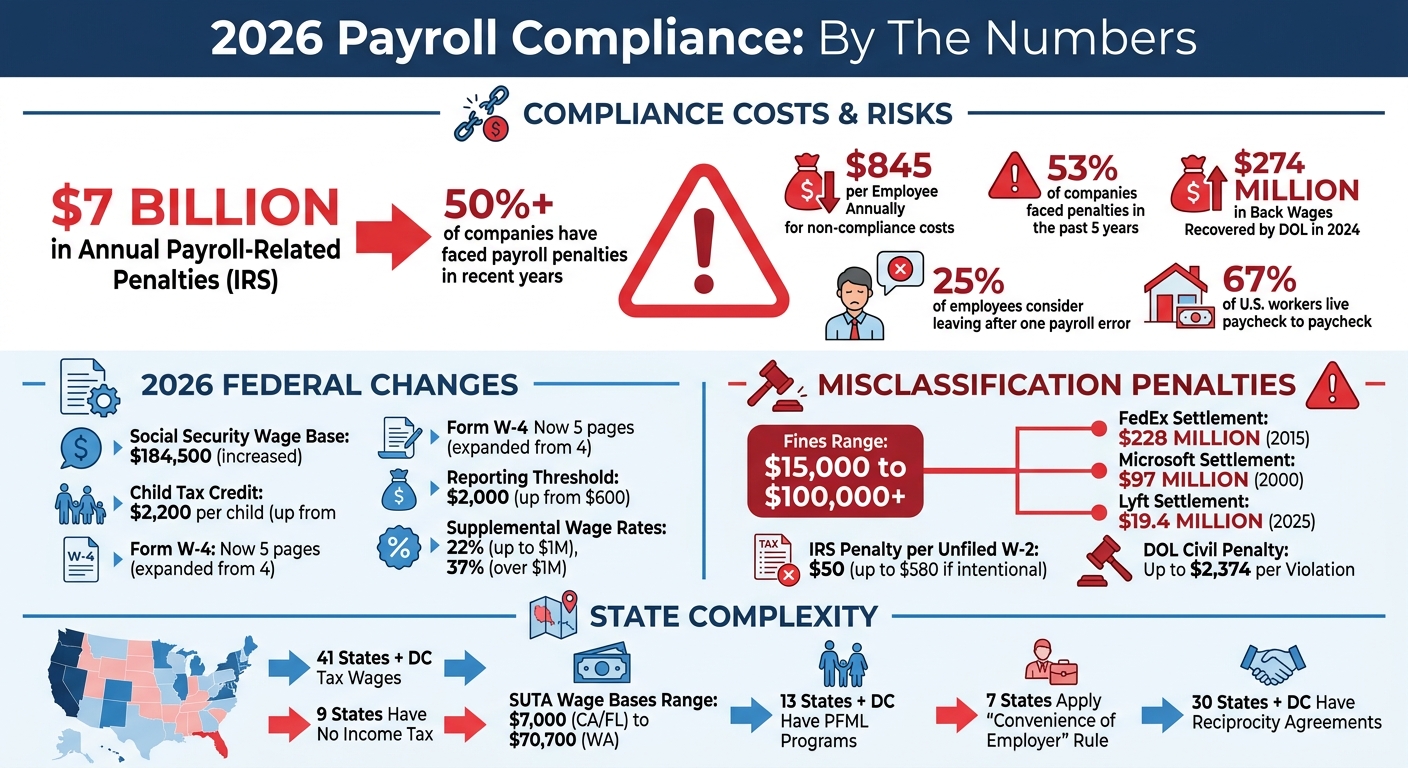
2026 Payroll Compliance Statistics and Key Regulatory Changes
Your 2026 HR Compliance Checkup: Policies, Pay Practices, and Legal Updates
sbb-itb-b1c1928
Federal Payroll Regulations for 2026
Big changes are coming to payroll in 2026, thanks to the One Big Beautiful Bill Act (OBBBA), Public Law 119-21. This legislation has reshaped how employers handle tips, overtime, and tax reporting. For starters, the IRS has revamped Form W-4, expanding it from four to five pages, and introduced updates to Form W-2 reporting codes.
The Social Security wage base has increased to $184,500, meaning higher earners will see larger Social Security withholdings. Additionally, the reporting threshold for wages without tax withholding has jumped from $600 to $2,000, easing the paperwork burden for businesses making smaller payments to contractors or part-time workers.
Another noteworthy update is the increase in the Child Tax Credit (CTC), which rises to $2,200 per qualifying child (up from $2,000). This may lead employees to revisit their W-4s and make mid-year adjustments to their withholding.
"The 2026 Form W-4 represents one of the IRS's most comprehensive updates in years." - Andy Scheu, Time & Pay
The Department of Labor has also clarified that travel time for medical appointments related to serious health conditions now qualifies as FMLA-protected leave. This change affects how employers code time-off requests and maintain compliance records.
Here’s a closer look at the IRS reporting form updates driving these changes.
IRS Form W-2 and W-3 Updates
To align with OBBBA's requirements, Form W-2 now includes three new Box 12 codes for reporting specific income types:
- Code TP: Reports total cash tips.
- Code TT: Captures qualified overtime compensation (only the premium portion).
- Code TA: Tracks employer contributions to Trump Accounts (a new type of individual retirement account for children), effective July 4, 2026.
Additionally, Box 14 has been split into two sections: Box 14a (Other) and Box 14b (Treasury Tipped Occupation Codes), making it easier to track tip-based income.
Form W-4 Withholding Changes
The redesigned 2026 Form W-4 is now five pages long and incorporates structural updates tied to OBBBA. Here are some key changes:
- Step 3 reflects the higher Child Tax Credit.
- Step 4 ("Other Adjustments") is no longer optional, and Step 4(b) now defaults to the standard deduction if left blank.
- The "Exempt" checkbox replaces manual entries under Step 4(c). Employees claiming exemption must renew annually, with a deadline of February 16, 2027.
The updated Deductions Worksheet now spans 15 lines, covering areas like:
- Qualified tips (up to $25,000 for employees earning under $150,000, or $300,000 if filing jointly).
- Qualified overtime (up to $12,500, or $25,000 if filing jointly).
- Passenger vehicle loan interest (up to $10,000 for those earning under $100,000, or $200,000 for joint filers).
These changes are particularly relevant for employees in industries like hospitality, retail, and manufacturing, as they could significantly reduce withholding and boost take-home pay.
"The final 2026 Form W-4 transforms the withholding certificate into a more granular, data-driven tool." - Rudy Mahanta, CPP, Experian
Employers need to update onboarding materials with the new Form W-4 and ensure payroll systems integrate the updated deduction fields and Exempt checkbox functionality.
Supplemental Wages Tax Rates
Supplemental wages - such as bonuses, commissions, overtime, and taxable fringe benefits - remain subject to a flat federal withholding rate of 22% for amounts up to $1 million per employee annually. For amounts exceeding $1 million, the rate rises to 37%.
Employers can choose between two withholding methods:
- Flat Rate Method: Apply a flat 22% (or 37% for amounts over $1 million) directly to supplemental wages when paid separately or listed as a separate line item.
- Aggregate Method: Combine supplemental wages with regular wages, calculate withholding using standard W-4 tables, and subtract the withholding already applied to regular wages.
| Method | Application | Calculation Logic |
|---|---|---|
| Flat Rate | Separate payments or line items | Apply 22% (up to $1M) or 37% (over $1M) |
| Aggregate | Combined with regular wages | Combine wages; calculate withholding using standard tables; adjust the difference |
| Mandatory Flat Rate | High earners (>$1M) | Automatically apply 37% to amounts exceeding $1M, regardless of W-4 instructions |
Payroll systems should be configured to trigger the 37% rate automatically once an employee’s supplemental pay exceeds $1 million for the year. These wages are still reported in Box 1 of Form W-2 and remain subject to Social Security and Medicare taxes.
State and Local Payroll Requirements
Navigating payroll compliance in 2026 requires employers to juggle federal mandates alongside a patchwork of state and local rules. Currently, 41 states, plus the District of Columbia, tax wages, while nine states - Alaska, Florida, Nevada, New Hampshire, South Dakota, Tennessee, Texas, Washington, and Wyoming - have no state income tax at all. Employers must stay on top of varying state withholding rates, unemployment insurance requirements, and local tax regulations for every location where their employees work.
Remote and multi-state work complicates matters further. Even a single day of work in a new state can trigger tax obligations, known as nexus. Unlike sales tax, where minimum revenue thresholds often apply, payroll nexus is immediate and tied to where the employee physically works - not the employer's headquarters.
"A single remote employee in a new state can trigger five or more separate registration and filing obligations for the employer." - Rachel Richardson, Head of Growth & Marketing, Grove HR
Establishing nexus involves registering with three key state agencies: the Department of Revenue for income tax withholding, the Department of Labor for unemployment insurance, and a workers' compensation carrier. Employers should begin this process at least 60 days before the first payroll in a new state. Additionally, many municipalities impose their own local income taxes, requiring employers to pinpoint the exact work address of each employee - not just their mailing address.
State Income Tax and SUTA Variations
State income tax systems in 2026 fall into three categories: no income tax, flat-rate systems (e.g., Arizona at 2.5%), and progressive brackets where rates increase with earnings. These differences impact how much employers withhold from paychecks and remit to state revenue departments.
State Unemployment Tax Act (SUTA) obligations vary even more widely. For example, taxable wage bases range from $7,000 in California and Florida to $70,700 in Washington. New employer rates also differ, from 1.0% in South Carolina to 3.4% in New York. Established employers benefit from experience-rated adjustments, which can significantly lower costs for businesses with a history of low unemployment claims.
Meanwhile, Paid Family and Medical Leave (PFML) programs add another layer of complexity. Thirteen states and D.C. now have PFML programs, with Minnesota and Delaware launching theirs on January 1, 2026, and Maine following on May 1. These programs require payroll deductions, but rates and cost-sharing arrangements differ by state. For instance, Washington's PFML rate increased to 1.13% in 2026, with costs split 71% by employees and 29% by employers.
| State | 2026 SUI Wage Base | New Employer Rate | PFML Rate |
|---|---|---|---|
| California | $7,000 | 3.4% | 1.3% (100% employee) |
| Colorado | $27,200 | 1.7% | 0.88% (50/50 split) |
| Florida | $7,000 | 2.7% | None |
| New York | $12,300 | 3.4% | 0.455% (100% employee) |
| Washington | $70,700 | 1.0% | 1.13% (71% employee / 29% employer) |
Additionally, four states - North Dakota, Ohio, Washington, and Wyoming - require employers to purchase workers' compensation coverage directly from state-run funds instead of private carriers. California remains a FUTA credit reduction state in 2026, adding about $84 per employee in federal unemployment tax liability.
Multistate Payroll Tax Nexus Rules
Beyond state-specific requirements, multistate payroll tax nexus determines where taxes are owed when employees work across state lines. For 2026, the general rule is simple: taxes are owed in the state where the employee physically works, regardless of the employer's location. This "work-state sourcing" principle applies in most states, creating immediate tax obligations for remote workers.
However, seven states - New York, Nebraska, Delaware, Pennsylvania, Arkansas, Connecticut, and Massachusetts - apply the "convenience of the employer" rule. Under this doctrine, wages are taxed in the employer’s state unless the employee works remotely due to employer necessity. This can lead to double taxation, where employees owe taxes to both their work state and the employer's state. While resident states typically offer tax credits, these may not fully offset the difference due to rate disparities.
"The convenience rule can result in double taxation... the credit [from the resident state] may not fully offset the double tax due to rate differences." - Rachel Richardson, Head of Growth & Marketing, Grove HR
To simplify compliance, 30 states and D.C. participate in reciprocity agreements, allowing employees to pay income tax only to their resident state. For instance, a New Jersey resident working in Pennsylvania can file Form REV-419 to stop Pennsylvania withholding. However, reciprocity isn’t automatic - employers must collect exemption certificates to avoid withholding taxes for the work state.
For SUTA, employers rely on a federal four-factor test to determine which state receives unemployment payments when employees work in multiple states. These factors include the localization of work, the base of operations, the place of direction and control, and the employee’s residence.
State agencies are stepping up enforcement. New hire reporting data helps identify out-of-state employers who fail to register. For example, Lyft’s 2025 settlement with New Jersey resulted in a $19.4 million payment over worker classification issues. In New York, penalties for missing workers' compensation coverage can hit $2,000 per 10-day period.
Track employee work locations carefully, using their street address rather than just their residence, to identify overlapping local tax jurisdictions. Regularly review employee locations and state tax rates - especially since 2026 saw numerous changes, including eight state income tax cuts and updates to SUTA wage bases. For multi-state employers, adopting the strictest state standards, such as California’s paystub requirements, can help streamline compliance across all jurisdictions.
2026 Payroll Compliance Checklist
Payroll compliance in 2026 demands careful attention across three main phases: pre-payroll verification, post-payroll actions, and year-end filing. These steps work together to avoid errors and ensure you're ready for audits. Skipping even one can lead to hefty penalties, with payroll mistakes costing U.S. employers around $7 billion annually in fines.
Pre-Payroll Verification Steps
Before processing payroll, confirm every employee’s Social Security Number (SSN), Tax ID, and mailing address. Errors here can result in mismatched records and penalties for late or corrected W-2 filings, which range from $60 to $310 per form. For new hires, complete Form I-9 (Section 1 on their first day and Section 2 within three business days) and store these separately for easier audits.
Make sure to collect updated Form W-4s from new employees or from current ones after major life events to keep federal withholding accurate. Don’t forget any required state or local withholding forms. Regularly check worker classifications by reviewing job duties rather than titles - this is particularly important since the Department of Labor recovered over $274 million in back wages in 2024 alone. Also, audit time records for non-exempt employees to spot missed punches, unauthorized overtime, or other issues.
Handle one-time payments like commissions, bonuses, or reimbursements promptly, and update salary changes as needed. Double-check that benefit deductions and garnishments are set up correctly. Finally, program your payroll system with the 2026 tax rates, including the updated Social Security wage base of $176,100 and new state unemployment insurance limits.
Post-Payroll Actions and Tax Deposits
Once payroll is processed, follow up with these actions to avoid costly mistakes. Deposit federal taxes through the Electronic Federal Tax Payment System (EFTPS), ensuring transfers are initiated at least one business day before the deadline. Your deposit schedule depends on the IRS lookback period (July 1, 2024 – June 30, 2025). If your total tax liability was $50,000 or less, you’ll follow a monthly deposit schedule, with payments due by the 15th of the following month. If it exceeded $50,000, semi-weekly deadlines apply, based on payroll dates.
If your daily tax liability hits $100,000 or more - often due to bonus payouts - you must deposit by the next business day. This could also move you to a semi-weekly deposit schedule. Keep in mind that even a 1–2 day delay can trigger a 2% penalty, with higher penalties for longer delays.
Quarterly, file Form 941 to reconcile wages and withholdings. These deadlines fall on April 30, July 31, October 31, and January 31. Some states have additional rules; for example, Texas requires semi-weekly deposits if withholding exceeds $350 in a single period. Retain payroll records for at least three years and employment tax records for four years to stay prepared for audits.
Year-End Filing and Review Tasks
A smooth year-end filing process starts with timely tax deposits and accurate reconciliations. Begin preparations as early as November to avoid the January crunch. Key tasks include distributing Form W-2 to employees and Form 1099-NEC to contractors (for payments of $600 or more) by January 31. Employers filing 10 or more W-2s must submit them electronically to the Social Security Administration. Additionally, file Form 940 for federal unemployment tax by January 31 - or February 10 if all deposits were made on time.
For Affordable Care Act (ACA) compliance, provide Form 1095-C to employees by March 3 and file Forms 1094-C/1095-C with the IRS by February 28 for paper submissions or March 31 for electronic filings. A new requirement for 2026 under the One Big Beautiful Bill Act (OBBBA) involves using updated W-2 codes to report more detailed information on shift differentials, overtime premiums, and bonuses.
Conduct a thorough year-end review by auditing employee classifications, verifying I-9 forms, and reconciling payroll registers against bank statements. For businesses with remote workers, confirm tax nexus in all applicable states, as this may require additional registrations and adjustments to withholding. Payroll non-compliance can cost employers an average of $845 per employee annually in fines and remediation.
"2026 is shaping up to be the most complex year yet for payroll compliance."
– Stephanie Coward, Managing Director for HCM, IRIS Global
Worker Classification and Common Compliance Mistakes
Getting worker classification right is more than just a payroll formality - it’s a legal and financial necessity. Misclassifying workers can lead to steep financial penalties, ranging from $15,000 to over $100,000 when back taxes, interest, penalties, and legal fees are included.
The Department of Labor (DOL) has made this issue a priority. On February 26, 2026, they proposed a rule reinstating a five-factor economic realities test. This test evaluates two core elements: the degree of control over the work and the worker’s opportunity for profit or loss. If both factors align, the classification is likely correct. The DOL emphasizes:
"the actual practice of the parties involved is more relevant than what may be contractually or theoretically possible"
In other words, what happens in practice carries more weight than what’s written in a contract.
Employee vs. Contractor Classification
Relying on contract labels alone is a risky approach. A "1099 contractor" label doesn’t automatically establish a worker’s status. A glaring example comes from June 2015, when FedEx Ground paid $228 million to settle a case in California. Their delivery drivers, despite being labeled contractors, wore uniforms, adhered to strict schedules, and drove branded vehicles - all signs of employee status.
Under the proposed 2026 rule, the focus shifts to two main factors:
- Control: Do you dictate the worker’s schedule, location, or methods?
- Opportunity for profit or loss: Does the worker invest in their own equipment, make independent business decisions, or risk financial loss?
Simply working more hours to earn more money doesn’t meet the contractor standard. A true contractor demonstrates financial independence.
It’s also important to note that part-time status or job titles don’t determine classification. The IRS and DOL examine actual duties and pay structures. For instance, in December 2000, Microsoft settled for $97 million after misclassifying "permatemps" - contractors who performed the same tasks as employees but didn’t receive benefits.
Preparing for Misclassification Audits
Certain red flags can trigger audits, such as having over 30% of your workforce classified as contractors, worker-filed unemployment claims, or wage disputes. Industries like construction, trucking, delivery, home care, and tech are under heightened scrutiny.
Once a misclassification is found, the ripple effects can be significant. Over 30 states now share audit findings with the IRS and other federal agencies, meaning one audit could lead to multiple reviews. For example, a state unemployment audit might prompt an IRS investigation, which could then involve the DOL or workers’ compensation boards. Most audits cover three to six years of records, though some states allow up to a 10-year review.
To prepare, conduct internal audits regularly. Review contractor relationships using the 2026 core factors, especially focusing on control over schedules and exclusivity requirements. Document cases where contractors use their own tools or hire helpers to show financial independence. Keeping thorough records - like payroll logs, timesheets, and classification documents - for three to seven years is critical. If you’re unsure about a worker’s status, filing IRS Form SS-8 can provide clarity before an audit forces the issue.
The penalties for misclassification are steep. The IRS can fine $50 per unfiled Form W-2 (up to $580 if intentional), 1.5% of wages for not withholding income tax, and 40% of the employee’s share of FICA taxes. The DOL can impose civil penalties of up to $2,374 per violation for willful noncompliance. States like California and Massachusetts may add fines ranging from $5,000 to $25,000 per violation. If you operate in states with stricter "ABC tests" - like California, Massachusetts, or New Jersey - ensure you follow their specific standards. These proactive steps can help you avoid costly mistakes while supporting broader payroll compliance efforts.
How CleverSlip Simplifies Payroll Compliance
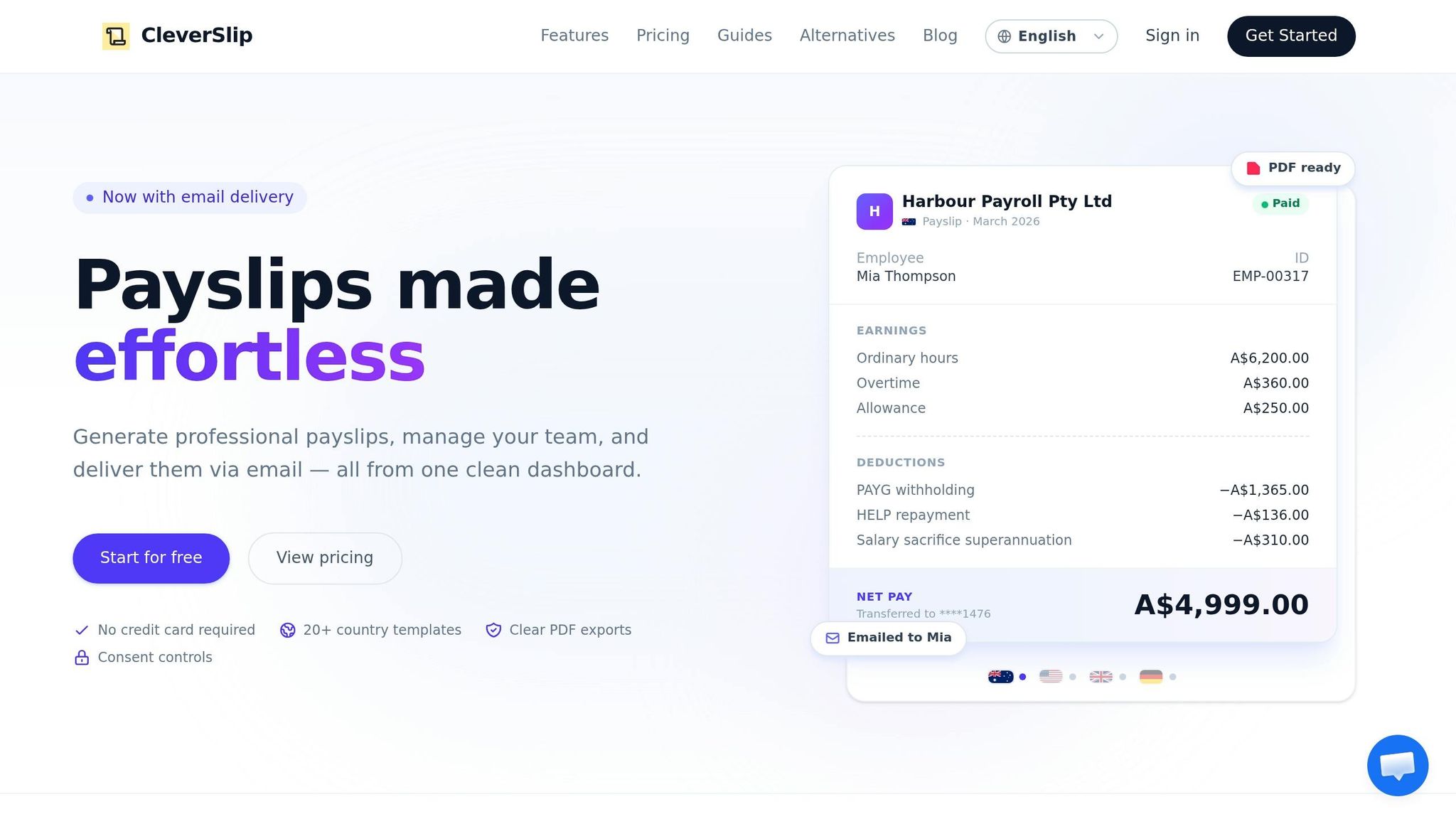
CleverSlip takes the stress out of managing payroll compliance by automating complex tasks and ensuring accuracy at every step. In 2026, staying compliant with constantly shifting federal and state payroll regulations can feel overwhelming, especially as your workforce grows. CleverSlip tackles this head-on by automating error-prone processes and keeping detailed records, making audits less daunting.
Automated Tax Calculation and Updates
CleverSlip’s platform automatically stays up-to-date with the latest regulatory changes for 2026. This means it adjusts withholding calculations to prevent common mistakes, like over-withholding once employees hit their tax caps. Errors like these not only undermine trust but also require time-consuming fixes. CleverSlip continuously updates federal, state, and FICA withholding rates, ensuring compliance is seamless. Considering that around 18% of the U.S. tax gap stems from payroll tax underreporting or nonpayment - and that IRS penalties for late deposits can climb to 15% if ignored for more than 10 days - this automation acts as a safeguard against costly errors.
Payslip Generation with YTD Totals and Audit Trails
Each payslip generated by CleverSlip includes year-to-date (YTD) totals, making W-2 reconciliation easier and helping you spot discrepancies quickly. The platform also keeps a fully searchable payroll history, providing an instant audit trail for both internal checks and external audits. Digital storage ensures access to at least three years of payroll data, meeting the minimum requirement for most audits. With nearly 49% of employees considering quitting after just two payroll mistakes, maintaining accuracy is not just about compliance - it’s also vital for retaining your team.
Country-Specific Templates and Employee Self-Service Portal
CleverSlip offers templates designed specifically for U.S. payroll requirements, ensuring all mandatory federal and state data fields are included. The employee self-service portal further streamlines operations by allowing employees to access their pay information directly. This transparency not only reduces administrative workload but also empowers employees to catch and report potential issues quickly, giving your team more time to focus on strategic tasks.
Bulk Processing and Integration Features
For larger organizations, CleverSlip brings even more efficiency through bulk processing and advanced integrations. The platform enables bulk payslip generation, with downloadable ZIP files for easy distribution. It also integrates with HR and accounting systems, eliminating double-entry errors and syncing employee data automatically. This minimizes mismatches during audits and allows businesses to scale their workforce without adding unnecessary administrative burden. For those on higher-tier plans, API access and webhook integrations make it possible to create custom workflows, further simplifying compliance tracking.
CleverSlip Pricing Plans
| Plan | Monthly Price | Employee Limit | Key Compliance Features |
|---|---|---|---|
| Free | $0 | Up to 10 | PDF download, duplicate payslips, 1 country template, 50 payslips/month |
| Starter | $9 | Up to 25 | Unlimited payslips, all country templates, email delivery, CSV export, self-service portal |
| Pro | $29 | Unlimited | Everything in Starter, bulk generation, YTD totals on PDFs, company branding, priority support |
| Business | $79 | Unlimited | Everything in Pro, API access, webhooks, audit trail, dedicated account manager |
The Business plan stands out for its audit trail feature, offering the detailed documentation needed for multi-year reviews. Additionally, API access ensures smooth integration with existing compliance tools. By automating these essential functions, CleverSlip helps businesses stay compliant while keeping operations efficient and scalable.
Conclusion
Payroll compliance in 2026 has become more demanding than ever, requiring flawless tax calculations and meticulous record-keeping. The stakes are high: the IRS imposes around $7 billion annually in payroll-related penalties, and over half of companies (53%) have faced penalties in the past five years. The regulatory environment has shifted dramatically, with federal and state agencies now leveraging AI-powered audit tools and real-time data matching to identify errors instantly. This means even unintentional mistakes are penalized as harshly as deliberate violations, leaving no room for error.
Beyond federal regulations, state-level changes add further complexity. From rising minimum wages to stricter pay transparency laws, staying compliant is no longer just about avoiding fines - it’s a strategic necessity. Stephanie Coward, Managing Director for HCM at IRIS Global, emphasizes this shift:
"In 2026, automation will no longer be a convenience – it will be a compliance necessity"
The financial risks are staggering. Payroll non-compliance costs an average of $845 per employee annually when accounting for fines, back wages, and corrective measures. Even worse, payroll mistakes significantly impact employee retention - 25% of employees consider leaving after just one error. This is especially concerning when 67% of U.S. workers live paycheck to paycheck.
To meet these challenges, businesses need more than just compliance - they need reliable technology. CleverSlip offers a solution by automating tax calculations, maintaining thorough audit trails, and adapting to ever-changing regulations. Whether it's managing the new OBBBA reporting requirements or navigating multi-state payroll complexities, CleverSlip simplifies compliance, allowing businesses to focus on growth. From small teams using the Free plan to larger organizations on the Business plan, the platform ensures accuracy at every scale.
As enforcement tightens and regulations evolve, the time to act is now. The question isn’t whether to automate - it’s how quickly you can implement the tools you need to stay ahead in 2026’s compliance landscape.
FAQs
What payroll changes under OBBBA should I update for 2026?
Employers need to prepare their payroll systems for the upcoming OBBBA requirements set to take effect in 2026. Here are the key changes to address:
- Maintain detailed tip occupation data: Employers must keep accurate records of employees' tip-related roles.
- Separate overtime pay from regular wages: Overtime earnings must now be distinctly categorized from standard wages.
- Adjust tip tracking methods: New reporting rules call for a revised approach to tracking tips.
These updates are crucial to staying compliant with the revised regulations for tipped employees and overtime pay.
How do I handle payroll taxes for employees working in multiple states?
Managing payroll taxes for employees across multiple states can feel tricky, but breaking it down into clear steps makes it manageable. Start by identifying where each employee works - this is usually the state where they perform their job duties. Once you know that, register your business in those states, ensuring you're set up to withhold the proper state and local taxes. It's also crucial to follow all applicable wage and tax laws in those locations.
For employees who work in more than one state, you'll need to allocate their income based on the number of days they work in each state. Then, file state tax returns as required. To make this process easier and avoid errors, consider using payroll software designed to handle multi-state compliance. It can save time and help ensure accuracy.
How can I reduce worker misclassification risk in 2026?
To reduce the risk of misclassifying workers in 2026, it's crucial to stay updated with the latest guidelines from agencies like the U.S. Department of Labor (DOL). Make sure your worker classifications comply with the most recent standards under the Fair Labor Standards Act (FLSA).
Take advantage of resources provided by the DOL and IRS, keep detailed records of job roles and responsibilities, and routinely review your classifications. If you're uncertain, seek advice from legal or HR professionals to steer clear of penalties and compliance problems.
Payroll, simplified
Create structured payslip PDFs in minutes.
Build country-specific payslip documents, deliver them instantly, and keep a searchable history for audits and employee requests.
Start free