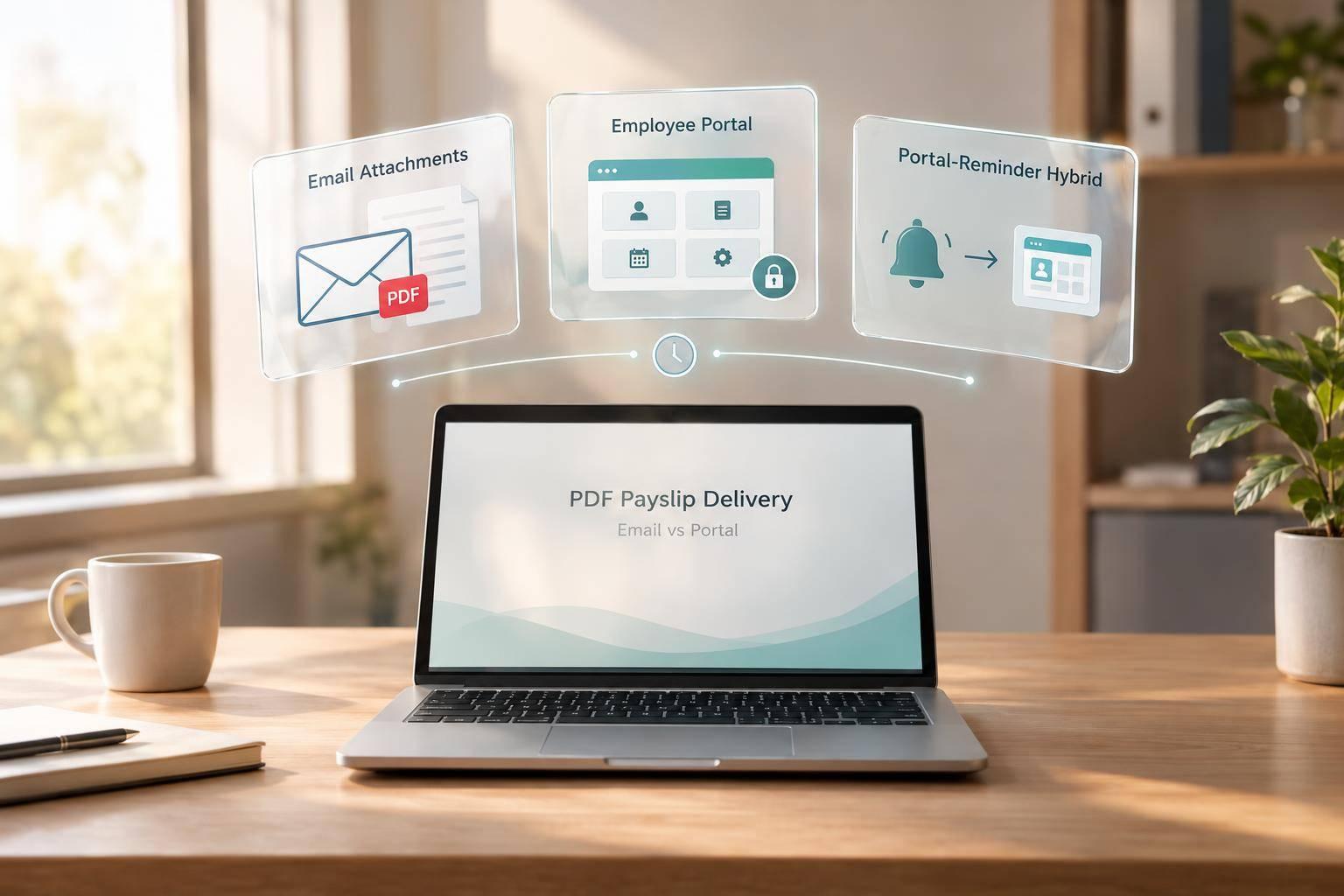
Email suits simple pay stub delivery; a portal suits employees who need a central archive. Before choosing, check employee access, security controls, support time, and state rules for electronic delivery, or compare payroll suites against a payslip-first tool to see which workflow fits your team.
Email attachments require address checks, recipient matching, and failed-send handling. Portals require account setup, login help, and a way for former employees to retrieve statements. A third option - a portal with email reminders - keeps PDFs out of notification emails.
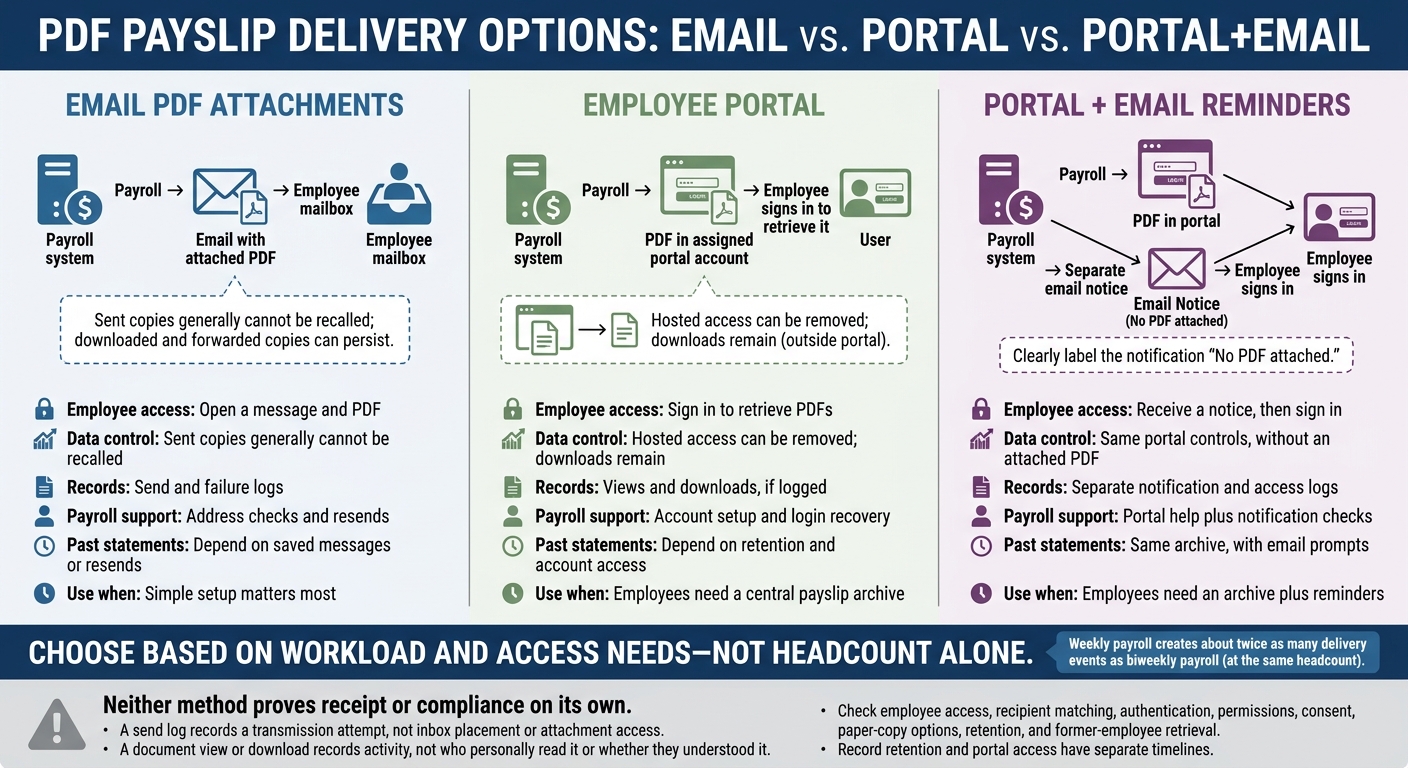
Quick Comparison
| Factor | Email attachments | Employee portal | Portal + email reminders |
|---|---|---|---|
| Employee access | Open a message and PDF | Sign in to retrieve PDFs | Receive a notice, then sign in |
| Data control | Sent copies generally cannot be recalled | Hosted access can be removed; downloads remain | Same portal controls, without an attached PDF |
| Records | Send and failure logs | Views and downloads, if logged | Separate notification and access logs |
| Payroll support | Address checks and resends | Account setup and login recovery | Portal help plus notification checks |
| Past statements | Depend on saved messages or resends | Depend on retention and account access | Same archive, with email prompts |
Workload matters more than headcount alone: weekly payroll creates about twice as many delivery events as biweekly payroll. Neither a sent email nor a logged download proves an employee read the statement - or that delivery meets state requirements. Check consent, paper-copy options, retention, and post-employment access before switching.
Email vs Portal: PDF Payslip Delivery Compared
He Checked His Payslip - Hackers Stole His Work Account! | Cybersecurity Tip #7
How Email and Portal Delivery Work
Security depends on matching each document to the right recipient, setting account permissions, and protecting the file.
| Workflow detail | Email attachment | Employee portal |
|---|---|---|
| Delivery steps | Generate PDF, match recipient, attach, send | Activate account, assign permissions, post PDF, notify |
| Storage | Mailbox copies and any downloads or forwards | Portal-hosted record and any downloads |
| Access requirements | Mailbox access, PDF reader, password if required | Activated account, internet access, credentials, and MFA if required |
Email sends the file out; a portal keeps it inside an account. Email makes distribution simpler, while a portal gives you more control over access.
Email: Sending PDF Attachments
Generate each PDF from approved payroll records, using the employee’s email address in HR or payroll records. Before sending, match the employee ID, name, pay period, and document. Limit who can send documents in bulk, and test formatting with a sample that contains no live payroll data.
TLS protects data in transit; PDF encryption protects the file at rest. A PDF opening password is not end-to-end email encryption. Share that password through a separate, verified channel - never in the email containing the attachment. Encryption won’t correct a recipient mismatch, prevent shared-mailbox access, or stop an authorized recipient from forwarding the file.
| Area | Advantage | Limitation or common failure |
|---|---|---|
| Setup | No separate account activation | Wrong addresses or document matches expose pay data |
| Access | Uses an existing mailbox | Full inboxes, spam filters, or blocked attachments interrupt delivery |
| Security controls | TLS and encrypted PDFs provide separate protections | Compromised mailboxes and forwarded copies remain risks |
| Later retrieval | Employees can search and save messages | Deleted messages or closed work accounts hinder retrieval |
Email records can prove a message was sent, not that it was opened. Changed addresses and shared mailboxes also make delivery less reliable and reduce control over pay data. A portal keeps the same payroll file more contained, but employees need a login to reach it.
Portal: Publishing PDFs to Employee Accounts
Publish each PDF to the correct payroll identity. Set separate administrator rights for publishing, viewing, and making corrections. Check for HTTPS, encryption at rest, MFA availability, session timeouts, and secure account recovery.
Confirm which actions are logged: logins, views, downloads, and admin changes. A portal that logs these actions provides a more detailed access history than email sending records.
| Prerequisite | What to confirm before launch |
|---|---|
| Account activation | Each employee has a separate account mapped to the correct payroll identity |
| Login security | Strong authentication, session controls, and available MFA |
| Password recovery | Identity checks prevent resets by anyone other than the account holder |
| Device access | PDF viewing and downloading, including on desktop-only devices |
| Retention | Defined document availability, backups, and recovery periods |
| Access after separation | Required records remain available through a former-employee retrieval process |
Retention and access logs matter as much as the first delivery. Closing a portal does not erase downloaded copies. Set storage and disposal rules, and test account recovery and former-employee retrieval before launch.
Email vs Portal: Comparing the Trade-Offs
Compare the controls you can use, not just how statements arrive. Email reduces transit risk, while portal security depends on login controls, permissions, and logging.
| Criterion | Email delivery | Portal delivery |
|---|---|---|
| Data control | Copies leave payroll’s control as soon as they’re sent. | The master file stays in one place, but downloaded copies can still spread. |
| Audit trail | Transmission records provide limited proof of access. | Document-level activity records depend on the portal’s logging features. |
| Employee effort | Familiar inbox access means employees must manage saved messages. | Logging in adds a step but can make statements easier to retrieve. |
| Payroll-team effort | Check addresses, monitor delivery failures, and resend statements. | Review permissions, check postings, and help with account recovery. |
| Old-statement access | Depends on saved emails and mailbox retention settings. | Depends on document retention and account access. |
| After separation | Retrieval depends on mailbox retention. | Retrieval requires a process for former employees. |
Next, check what each system records after delivery.
Data Control and Audit Trails
A history entry isn’t proof of access. Check whether records identify the employee account, document, action, and timestamp. Confirm how long logs are kept and whether payroll can export them for an investigation.
| Control | Email delivery | Portal delivery |
|---|---|---|
| Permissions | Mailbox access determines who can reach attachments. | Employee assignments and administrator roles control access to hosted files. |
| Revocation | Delivered attachments generally can’t be recalled reliably. | Access can be removed, but downloaded or printed copies remain. |
| Downloaded copies | Usually outside payroll’s view. | Downloads may be logged, but local copies remain outside portal control. |
Employee Tasks and Payroll Support
Each method puts the work somewhere different. Track resend requests separately from login problems to see which process needs attention.
For employees on shared devices, explain how to sign out, avoid saving credentials, and remove leftover downloads. Offer paper statements or another accessible option when reliable digital access isn’t available.
| Support need | Email delivery | Portal delivery |
|---|---|---|
| Missing statements | Check for blocked attachments, delivery failures, and address errors. | Check for posting errors and account permission issues. |
| Access problems | Help employees open protected attachments. | Help with forgotten passwords, MFA recovery, and locked accounts. |
| Old-statement requests | Resend PDFs employees can’t find. | Help employees use self-service when they can’t access retained statements. |
| Mobile access | Test opening attachments and entering passwords. | Test logging in, viewing PDFs, and downloading files on a phone. |
These support issues also affect how you interpret records later.
What Delivery and Access Records Prove
Keep transmission, availability, and access separate. A send log proves that delivery was attempted. A portal log records activity - not comprehension.
| Event | Available evidence | What it does not establish |
|---|---|---|
| Email sent | The system recorded a transmission attempt. | Inbox placement or attachment access. |
| Mail-server acceptance | The receiving server accepted the message. | Inbox placement or attachment access. |
| Portal posting | A PDF was made available to an account. | Employee awareness or access. |
| Email open or link event | A message was opened or a link was clicked; automated scanners can also trigger the event. | Human review. |
| Portal login | An account signed in, but that doesn’t prove a specific payslip was viewed. | Access to a particular payslip. |
| Document view or download | The system recorded the document action, where supported. | Who personally read it or whether they understood it. |
Neither method alone proves compliance with wage-statement rules. Check consent, notice, retention, and paper-alternative requirements separately.
With the evidence clear, the next question is how team size and support capacity shape the choice.
Which Delivery Method Fits Your Team?
Choose based on workload and access needs - not headcount alone. An emailed PDF delivers the payslip itself. A portal notice tells employees where to sign in.
Your choice depends on payroll frequency, how often employee email addresses change, and how much support your team can handle.
| Team situation | Email PDF attachments | Portal delivery | Portal + reminder email |
|---|---|---|---|
| Small team, low volume, stable addresses | Practical with protected sending and few retrieval requests | Worth setting up when employees need an archive | Adds payday reminders to archive access |
| Large team or frequent payroll | Requires careful recipient matching and exception handling | Supports repeat access and centralized account management | Prompts sign-in while keeping PDFs in the portal |
| Mixed access needs | Requires verified individual addresses and another access route when needed | Requires login recovery and printing access | Adds reminders without exposing the PDF |
| Detailed record requirements | Need transmission logs | Need document-level logs | Keep notification logs separate from access logs |
Small Teams: Setup and Routine Work
Email can work well when volume is low and addresses rarely change. If employees often request old payslips, a portal may reduce that work. Use individual inboxes, not shared ones, and verify recipients before each payroll run.
| Factor | Email attachments | Portal delivery |
|---|---|---|
| Initial setup | Verify addresses, secure sending, and set correction procedures | Configure accounts, permissions, and recovery |
| Recurring administration | Check recipients, handle failures, and resend files | Publish PDFs and resolve account exceptions |
| Historical access | Payroll retrieves and resends retained copies | Employees retrieve retained PDFs themselves |
| Support needs | Missing messages and attachment problems | Activation, passwords, and access permissions |
As volume grows, managing accounts and handling exceptions take more attention than delivery alone.
Large Teams: Distribution and Account Management
Weekly payroll doubles delivery events compared with biweekly payroll at the same headcount. Track onboarding, departures, requests for past payslips, and support time - not just delivery volume.
Centralized publishing can reduce manual attachment handling. But it shifts work to account setup, access support, and exception handling.
| Workflow | Email attachments | Portal archive | Portal + reminder email |
|---|---|---|---|
| Bulk distribution | Match recipients and attachments; monitor failures | Publish to assigned accounts | Publish centrally, then send reminders |
| Error handling | Track wrong recipients and corrected sends | Correct assignments or permissions | Correct the portal record; resend the notice if needed |
| Account support | Address and attachment troubleshooting | Activation, recovery, and identity checks | Portal support plus notification troubleshooting |
| Access records | Check send, bounce, and resend details | Check document-level events | Keep email events distinct from portal activity |
| Offboarding | Arrange delivery outside disabled work email | Define continued access or another retrieval route | Verify the notification address and retrieval route separately |
Before rollout, document rules for consent, printing, paper requests, retention, and former-employee retrieval. Record consent dates and changes, and test access before disabling company credentials. Record retention and portal access have separate timelines. Do not use record-retention rules to set portal access length.
CleverSlip: PDF Payslip Delivery Options
CleverSlip supports email delivery and employee self-service portals. Use the checks below to match those options to your workflow and the delivery method your team can support.
Verify current capabilities before relying on bulk generation or audit trails. Also confirm whether an email contains the PDF or only a portal notice.
| Feature | Workflow connection | What to verify |
|---|---|---|
| PDF generation | Create consistent statements each pay period | Final-file retention and correction history |
| Email delivery | Distribute to verified addresses | PDF versus notice; bounce, retry, and resend records |
| Payslip history | Reduce retrieval requests | Retention periods and search filters |
| Employee self-service portal | Let employees retrieve their own payslips | Login, MFA, recovery, permissions, and printing |
| Delivery and access records | Investigate distribution issues | Logged events, timestamps, document IDs, and exports |
| Post-employment access | Support former employees’ requests | Access after credentials expire and identity checks |
Conclusion: Match Delivery to Your Team’s Needs
Once you’ve compared control, access, proof, and support, choose the method your team can maintain - not just the one you can launch fastest. Email is easier to set up. A portal keeps payslips in one place and reduces repeat requests for older documents.
| Method | Use when | Expect |
|---|---|---|
| Email PDF attachments | Simple setup matters most | Address checks, failed sends, and resends |
| Portal access | Employees need a central payslip archive | Account setup, login support, and access recovery |
| Portal with email reminders | Employees need an archive plus reminders | Separate notification and document-access records |
Neither method proves receipt or compliance on its own. A sent message or logged download records activity. It doesn’t show that an employee read or retained the payslip.
Before choosing, work through this checklist:
- Employee access: Make sure every employee can use the method by payday.
- PDF protection: Check encryption, authentication, permissions, and recipient matching.
- Available records: Verify which send, failure, access, correction, and paper-copy events are logged and can be exported.
- Retention: Set schedules for statements, support records, consent, and logs.
- Offboarding: Keep lawful retrieval available while removing access that’s no longer needed.
- State requirements: Check current consent, printing, and paper-copy rules for each work location.
- Administrative workload: Compare the monthly time spent on resends and corrections with the time needed for account and password support.
FAQs
How do I switch delivery methods without disrupting payday?
Plan a three-week transition. During week one, send payslips through both methods and fix any email address, filter, or access issues. In week two, explain the change with instructions and screenshots. Starting in week three, phase out the old method, but keep a paper opt-out where compliance requires it.
Before the pay run, check employee contact details and confirm that your payroll platform supports consistent, centralized sending and automated audit logs.
What should I do if I send the wrong payslip?
Act fast to protect the data. You can’t revoke access to a file sent through standard email. Ask the recipient to delete it immediately and confirm in writing that they’ve done so.
For future deliveries, use an employee self-service portal whenever possible. Portals let you control access in one place and keep an audit trail, reducing the risks and privacy concerns that come with distributing files manually by email.
How can I compare email and portal costs?
Compare platform fees with potential savings in administrative work. Email delivery is often part of a basic software plan, while a portal may require a higher-tier subscription.
Portals can help cover their cost by giving employees access to their pay history, tax documents, and personal details - saving HR time.
For example, a manual payroll interaction can cost about $25.00, compared with about $4.50 for a self-service portal transaction.
Payroll, simplified
Create structured payslip PDFs in minutes.
Build country-specific payslip documents, deliver them instantly, and keep a searchable history for audits and employee requests.
Start free